- REST API
- Announcements
-
APIS list
- User V1
- User V2
- Team
- Call
- Dialer Campaign
-
Outbound Campaigns
- Overview
- AIVA campaigns
- The Campaign object
- Set up a campaign
- Create a Campaign
- Retrieve a Campaign
- List all Campaigns
- Update a Campaign
- Delete a Campaign
- Duplicate a Campaign
- Add contacts
- List Campaign contacts
- Add Campaign contacts
- Remove a Campaign contact
- Campaign queue items
- List Campaign queue items
- Reorder a Campaign queue item
- Reschedule a Campaign queue item
- Campaign contact import
- Create a Campaign contact import
- Retrieve a Campaign contact import
- List Campaign contact import rows
- Promote a Campaign contact import
- Choose who dials
- Campaign users
- List Campaign users
- Assign users to a Campaign
- Remove a user from a Campaign
- Campaign teams
- List Campaign teams
- Assign teams to a Campaign
- Remove a team from a Campaign
- List Campaign agents
- List Campaign lines
- The Campaign Eligible Number object
- List Campaign eligible numbers
- Run the campaign
- Launch a Campaign
- Pause a Campaign
- Resume a Campaign
- Archive a Campaign
- Retrieve Campaign statistics
- Record the result
- The Campaign Outcome object
- Create a Campaign Outcome
- Update a Campaign Outcome
- Delete a Campaign Outcome
- List all Campaign Outcomes
- Retrieve a Campaign Outcome
- List Campaign call outcomes
- Record a Campaign call outcome
- Number
-
Conversation Intelligence
- Conversation Intelligence overview
- Call Evaluations
- Retrieve a transcription
- Retrieve realtime transcription
- Retrieve sentiments
- Retrieve Predicted CSAT
- Retrieve topics
- Retrieve a summary
- Retrieve a custom summary result
- Retrieve action items
- Retrieve a playbook result
- Retrieve call evaluations
- Trackers
- List all Trackers
- Retrieve a Tracker
- Content
- Message
- High Volume Messages
-
Contact
- Contact overview
- List all Contacts
- Search Contacts
- Retrieve a Contact
- Create a Contact
- Update a Contact
- Delete a Contact
- Add phone number to a Contact
- Update a phone number from a Contact
- Delete a phone number from a Contact
- Add email to a Contact
- Update an email from a Contact
- Delete an email from a Contact
- Tag
- Webhook
- Company
- Integration
- Participant
- IVR Option
- AI Voice Agent
- Call AI Voice Agents
- Analytics
-
Webhooks
- Register an endpoint
- Webhook usage
- Payload
- User events V1
- User events V2
-
Call events
-
call.created -
call.ringing_on_agent -
call.agent_declined -
call.answered -
call.transferred -
call.external_transferred -
call.unsuccessful_transfer -
call.hungup -
call.ended -
call.voicemail_left -
call.commented -
call.tagged -
call.untagged -
call.assigned -
call.archived -
call.hold -
call.unhold -
call.ivr_option_selected -
call.comm_assets_generated
-
- Number events
- Message events
- Contact events
- Integration events
- Conversation Intelligence events
- AI Voice Agent events
- Analytics events
- Outbound Campaign events
- AI Messaging Agent events
- Mobile
- Changelog
- Extras
Just like you, we are enthusiastic builders and we love to automate things. At Aircall, we are building the next-gen business phone system and we know that one of the best ways to do that is to give you the ability to have the hands on Aircall features.

We are maintaining a Public API. This service allows any developers to retrieve and manage Aircall data with HTTP requests.
We are also supporting Webhooks. We can call back any endpoint of your choice, each time an event occurs on an Aircall account (contact added, call created, user switched off... see the Webhooks section for a complete list). Webhooks provide great scalability to your application and only requires setting up a public web server!
Want to see an example of how easy it is to connect with Aircall Public API and Webhooks? Take a look at our tutorials!
Our Engineering team is on Twitter, follow them @aircalltech!
Check the Changelog if you've already implemented something based on previous versions of this documentation.
Not a Developer?
Install one of many integrations built by our partners in our Marketplace!
Subscribe to updates
Please subscribe to stay updated with the latest API and webhook updates.
REST API
Aircall Public API is a classic REST API. It can be used with any programming languages and offers a fast, reliable and secure access to an Aircall account information.
The root endpoint of Aircall Public API is https://api.aircall.io/v1.
Please note that only HTTPS requests are valid as requests will communicate over SSL connection.
Each Public API request must be authenticated and should not exceed the rate limit, please check the Authentication and the rate limiting sections before jumping in our documentation!
RequestGET https://api.aircall.io
Response{
  "resource": "Aircall Documentation",
  "contact": "support@aircall.io"
}
Authentication
Introduction
With Aircall Public API, Authentication can be done through OAuth or Basic Auth.
If you want to build an App for companies using Aircall - this is mainly the case for Technology Partners - please use the OAuth flow. It is a requirement to be listed on the Aircall App Marketplace. You can create a partner-specific account by signing up here!
If you are an Aircall customer, building for your own Aircall account only, the Basic Auth flow will do the trick.
All endpoints behave similarly between the two authentication methods, unless indicated otherwise in the documentation.
OAuth ﹣ Technology Partners
Aircall built a powerful Ecosystem of apps, providing its customers an easy way to enhance their voice experience.
In Aircall, integrations are enabled at the Company level, which means they can only be set by an Admin user. It is possible to configure several instances of an integration on one Aircall account.
Aircall implemented the OAuth 2.0 authentication protocol so you can easily build an app on top of Aircall and deploy it on Aircall's Marketplace.
Beyond the added security and scalability, the Aircall OAuth flow will make your app visible to all customers in the Aircall Dashboard and provide a simple way for customers to install your app from Aircall or from your own website.
Want to know every secret about OAuth? Read the official documentation RFC 6750!
-
Oauth terminology
-
install_uriStringAircall fetches the
install_uriURI when starting the OAuth flow. This step is often used to display a Settings page, instructions on how to use the app or any useful information for the Admin.
It must eventually forward tohttps://dashboard.aircall.io/oauth/authorizewithclient_id,redirect_uri,response_type=codeandscope=public_apiquery params. See Step 3 of the OAuth flow.Must use HTTPS. -
redirect_uriStringAircall sends the Admin's authorization
codeto theredirect_uriURI, once they authorized the app, or the error if any.Must use HTTPS. -
client_idStringUsed in both the
[DASHBOARD] /oauth/authorizeand[API] /v1/oauth/tokenrequest.Provided by Aircall. -
client_secretStringUsed in the request body of
[API] /v1/oauth/token.Provided by Aircall. -
codeStringAn authentication code provided by Aircall valid for 10min.Must be converted in an
access_token(see this endpoint). -
access_tokenStringToken used to send requests to Aircall Public API as a Company.More info on how to use it here.
-
stateStringAn optional string value created by your app to maintain state between the request and callback. This parameter should be used for preventing Cross-site Request Forgery and will be passed back to you, unchanged, in your
redirect_uri.
OAuth credentials
Before starting building the OAuth flow for your app, you will need to get OAuth client_id and client_secret from Aircall. Click the start building button on top of the page and fill in the form. We will get back to you shortly.
When signing up, an
install_uri and a redirect_uri will be asked, make sure you have them ready. Read the OAuth flow first to understand what they are!
OAuth flow
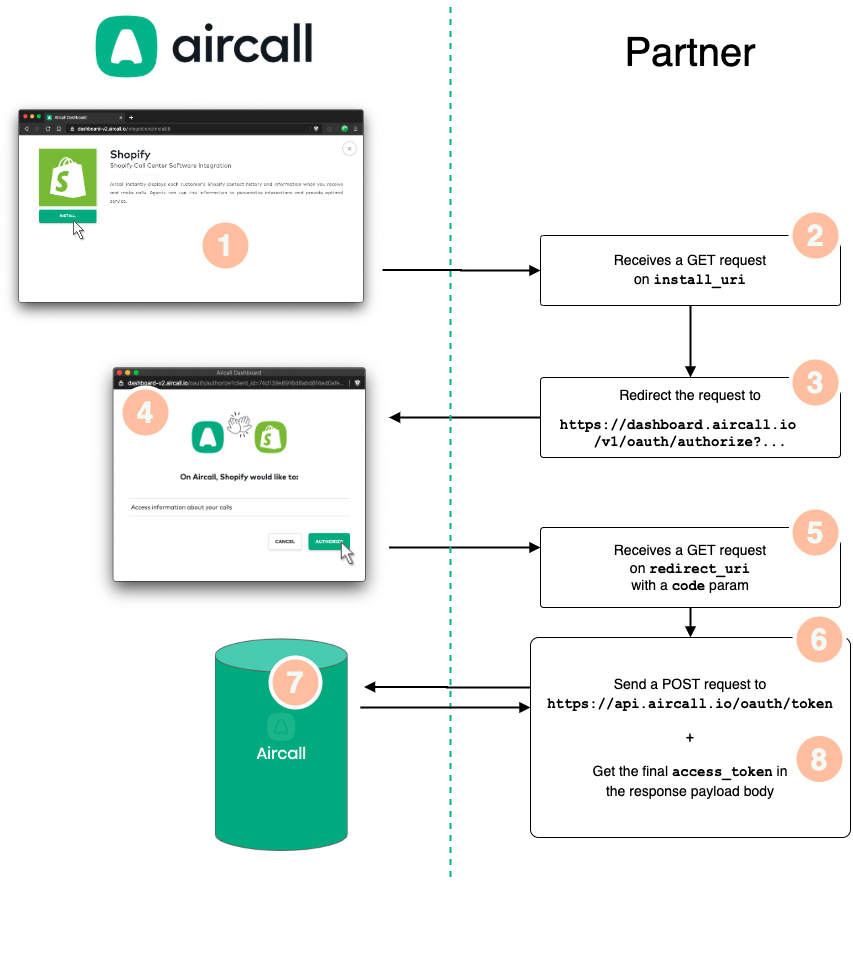
-
Aircall ﹣ When an Admin installs an App, a popup opens up and loads the
install_uriURL. -
Partner ﹣ A Web server receives the
GETrequest on theinstall_uriroute. This step is often used to display a custom Settings page, instructions on how to use the app and/or any useful information for the Admin. -
Partner ﹣ Once Step 2 is done, Web server redirects/forwards the request to the following Aircall URL:
https://dashboard.aircall.io/oauth/authorize?client_id=XX&redirect_uri=YY&response_type=code&scope=public_api&state=ZZ -
Aircall ﹣ Aircall then displays the authorization window. Only users who are Admins will be able to see this window, others will be redirected to the Download page. Once the Admin consented to the permissions the app is requesting (
scope=public_api), Aircall loads theredirect_uriURL with acodeparameter. -
Partner ﹣ Web server receives the
GETrequest on theredirect_uriroute with thecodequery param… -
Partner ﹣ …and sends a
[POST] https://api.aircall.io/v1/oauth/tokenrequest to Aircall's Public API with the proper body params (see here). -
Aircall ﹣ Aircall authenticates the
[POST]request, create anaccess_tokenand sends it back to the Web server. -
Partner ﹣ Web server stores the
access_tokenfor further use!
Start the instructions at Step 3 if you want to trigger the install flow directly from your interface and not from the Aircall Dashboard.
Integrations can only be installed by users who are Admins on Aircall!
Check out our Ruby example app on Github to better understand how to implement the Aircall OAuth flow!
Get an access_token via the Public API
Once you get an OAuth authorization code from the OAuth flow, you need to convert it into a Public API access_token with the following request.
This access_token will then be used as a Bearer token in the Authorization header of each Public API requests you will make and does not expire.
-
Body params
-
client_idStringThe
client_idprovided by Aircall. More information in the Oauth credentials section.Mandatory field. -
client_secretStringThe
client_secretprovided by Aircall. More information in the Oauth credentials section.Mandatory field. -
codeStringThe OAuth authorization code Aircall sent back to your server.Mandatory field.
-
redirect_uriStringYour
redirect_uri.Mandatory field. -
grant_typeStringMust be
authorization_code.Mandatory field.
RequestPOST https://api.aircall.io/v1/oauth/token
{
  "client_id": YOUR_AIRCALL_CLIENT_ID,
  "client_secret": YOUR_AIRCALL_CLIENT_SECRET,
  "code": TMP_AUTHORIZATION_CODE,
  "redirect_uri": YOUR_REDIRECT_URI,
  "grant_type": "authorization_code"
}
ResponseStatus: 200 OK

{
  "access_token": "2d492d492d492d492d492d492d492d",
  "token_type": "Bearer",
  "created_at": 1585868617
}
Test the access_token
A /v1/ping endpoint is available to test the access_token retrieved via the Public API (as described here).
The access_token must be used in the Authorization HTTP header of your request, as a Bearer token.
Requestcurl -X GET https://api.aircall.io/v1/ping \ -H "Authorization: Bearer {YOUR_ACCESS_TOKEN}"
ResponseStatus: 200 OK

{
  "ping": "pong"
}
Basic Auth ﹣ Aircall customers
As an Aircall customer, an api_id and api_token are needed to use Aircall Public API: go to your Company's Settings page. In the API Keys section, click on Add a new API key and get your api_token and api_token.
Do not forget to copy/paste your api_token somewhere safe, we won't be able to retrieve it for you as Aircall does not store it in plain text!
If you are building an App for several companies using Aircall, please refer to the OAuth section.
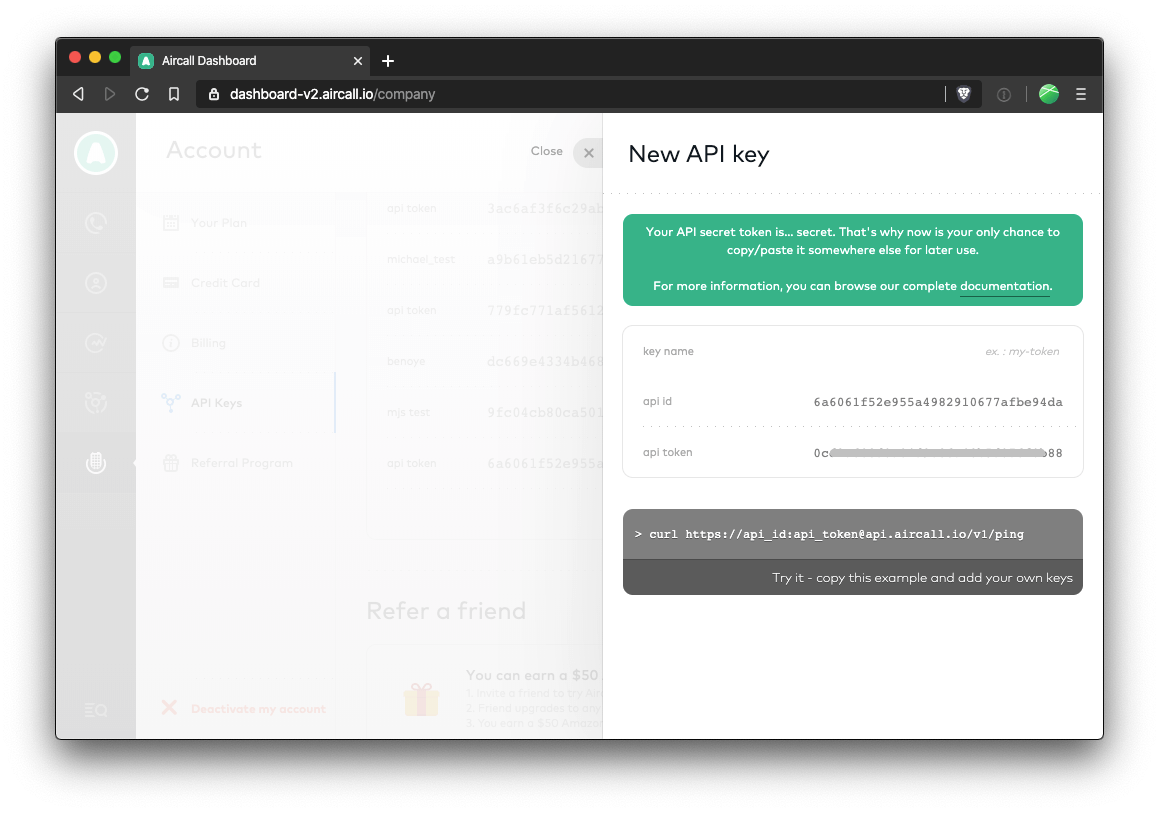
Public API requests must be authenticated using HTTP Basic Authentication. The api_id is the username and the api_token is the password for each Public API requests.
The Authorization HTTP header is constructed as follows:
- The
api_idandapi_tokenare concatenated with a single colon:. - The resulting string is encoded using Base64.
- The authorization header results in
Authorization: Basic YOUR_ENCODED_STRING.
Always prefer Base64 encoding in the
Authorization HTTP header rather than the following: https://api_id:api_token@api.aircall.io.
It is not recommended to authenticate requests passing the api_id and api_token in the URL for security reasons and as some programming languages and platforms do not support it!
Requestcurl -X GET https://api.aircall.io/v1/ping \ -H "Authorization: Basic {YOUR_ENCODED_STRING}"
ResponseStatus: 200 OK

{
  "ping": "pong"
}
Rate limiting
Aircall limits the number of requests to its Public API to 120 requests per minute per company. The following headers are available in API headers' responses when the rate limit has been reached, giving more insight on your API usage:
| header | description |
|---|---|
| X-AircallApi-Limit | Limit of requests for the API key used. |
| X-AircallApi-Remaining | Remaining requests for this API key. |
| X-AircallApi-Reset | Timestamp when the counter will be reset. |
Contact us on support.aircall.io if you need to make more requests per minute, we will add a higher rate limit to your API keys!
Pagination
When retrieving a list of objects with a [GET] request, results are being paginated by Aircall.
Pagination information will be presented in the meta object, available in the payload body and described below.
-
The meta object
-
countIntegerCount of items present in the current page.
-
totalIntegerCount of items in total, according to search params.
-
current_pageIntegerCurrent page number.
-
per_pageIntegerNumber of results retrieved per page.Default is 20. Minimum is 1, maximum is 50.
-
next_page_linkStringURL to follow to go to the next page results.Can be
null. -
previous_page_linkStringURL to follow to go to the previous page results.Can be
null.
The two following attributes can be set in any URL query params to navigate from one page to the other:
-
Query params
-
pageIntegerCurrent page.Default is 1.
-
per_pageIntegerNumber of results retrieved per pageDefault is 20.
Calls and Contacts are limited to 10,000 items, even with pagination on.
To pass over this limit, we encourage you to use the
from param as much as you can!
Response{
  "meta": {
    "count": 20,
    "total": 2234,
    "current_page": 1,
    "per_page": 20,
    "next_page_link": "https://api.aircall.io/v1/calls?page=2&per_page=20",
    "previous_page_link": null
  },
  ...
}
Errors
Aircall uses standard HTTP response codes to indicate the success or failure of an API request:
-
2xxcodes indicate success -
4xxcodes indicate an error that failed given the information provided -
5xxcodes indicate an error with Aircall's servers
Application error responses include an error title and a human-readable troubleshoot description. They also include message, an errors array, and success: false. Requests rejected at the API gateway before they reach an application, such as invalid credentials, can return a shorter gateway error.
For Outbound Campaigns, message is the machine-readable code to use for specific handling. A recognised domain error uses a semantic code such as INVALID_STATUS_TRANSITION or OUTCOME_IN_USE; otherwise it falls back to the HTTP status constant such as BAD_REQUEST or UNPROCESSABLE_ENTITY. errors[].detail always keeps that status-level constant for broad HTTP categorisation. Internal shared-library codes, including numeric codes, are never exposed.
More detailed HTTP response codes are provided in each endpoint's documentation.
Response{
  "error": "Unprocessable Entity",
  "message": "INVALID_STATUS_TRANSITION",
  "errors": [
    {
      "status": 422,
      "title": "Unprocessable Entity",
      "detail": "UNPROCESSABLE_ENTITY"
    }
  ],
  "troubleshoot": "Cannot transition campaign from \"completed\" to \"in_progress\"",
  "success": false
}
| code | description |
|---|---|
| 200 | OK - The request has succeeded. |
| 201 | Created - The request has been fulfilled and has resulted in one or more new resources being created. |
| 204 | No Content - Server has successfully fulfilled the request, no additional content sent in the response payload body. |
| 400 | Bad Request - Server cannot process the request due to something that is perceived to be a client error. |
| 403 | Forbidden - Lack of valid authentication credentials for the target resource. |
| 404 | Not Found - Server did not find the target resource. |
| 405 | Method Not Allowed - The method is known by the server but not supported. |
| 409 | Conflict - The resource changed concurrently or otherwise conflicts with the requested operation. |
| 413 | Payload Too Large - The request exceeds the allowed payload size. |
| 415 | Unsupported Media Type - The request uses an unsupported content type. |
| 422 | Unprocessable Entity - The request is valid, but the resource's current state does not allow the operation. |
| 429 | Too Many Requests - The request exceeded a rate limit. |
| 500 | Internal Server Error - Server encountered an unexpected condition. |
| 503 | Service Unavailable - A required service is temporarily unavailable. |
Versioning
Versioning Strategy
Aircall APIs and Webhooks are versioned to allow for continuous evolution and improvement while maintaining backward compatibility for existing integrations. API versions are indicated in the URL path. The webhook event names are now suffixed with “v2”.
For APIs, Aircall uses URL-based versioning, where the API version is included directly in the endpoint path. For example:
Version 1 endpoints:
/v1/users,/v1/calls, etc.Version 2 endpoints:
/v2/users, etc.
For Webhook events, the version number is suffixed in the event name. For example:
Version 1 webhook event:
user.connectedVersion 2 webhook event:
user.connected.v2
As of now, v2 of user APIs and webhook events is available
Content-Type
Every POST, PUT and DELETE HTTP request sent to Aircall Public API must specify the Content-Type entity header to application/json.
RequestHTTP headers:
{ "Content-Type": "application/json" }
Announcements
Please refer to this section for announcements related to deprecation or changes as well as availability of new APIs and Webhooks.
| Title | Description | Changes effective from | Impacted/New Endpoints | Deprecation/Last Change Date | ||||
|---|---|---|---|---|---|---|---|---|
| New WhatsApp username message webhook events | Three new webhook events describe sent messages, received messages, and delivery status updates for WhatsApp conversations identified by a BSUID. These events are available for subscription. See WhatsApp username message for payload fields and routing behavior. | 13-10-2026 |
whatsapp_username_message.sent whatsapp_username_message.received whatsapp_username_message.status_updated |
N/A | ||||
| New AI Messaging Agent webhook events |
Two new Webhook events for AI Messaging Agent: ai_messaging_agent.escalated and ai_messaging_agent.de_escalated. Subscribe to know when a conversation needs a human teammate's attention and when that escalation has been resolved.
|
30-09-2026 |
ai_messaging_agent.escalated ai_messaging_agent.de_escalated |
N/A | ||||
| New Outbound Campaign Webhook events |
Two new Webhook events for Campaigns: outbound_campaign.outcome_recorded and outbound_campaign.status_changed. Subscribe to react to campaign lifecycle changes and call outcomes without polling.
|
17-09-2026 |
outbound_campaign.outcome_recorded outbound_campaign.status_changed |
N/A | ||||
| New Conversation Intelligence - Trackers Endpoints | Two new endpoints are available to use Conversation Trackers capabilities via API:
|
08-09-2026 |
List all Trackers Retrieve a Tracker |
N/A | ||||
| New Campaigns API |
Outbound Campaigns are now available via the public API: Retrieve a Campaign, List all Campaigns, Retrieve Campaign statistics, and List Campaign call outcomes. An API token has company-wide access to Campaigns. See Outbound Campaigns for details.
|
17-09-2026 |
Retrieve a Campaign List all Campaigns Retrieve Campaign statistics List Campaign call outcomes |
N/A | ||||
| New Campaigns API - lifecycle, assignment and outcome recording | The Campaigns public API now supports creating, editing, deleting and moving a Campaign through its lifecycle (launch/pause/resume/archive), assigning Users and Teams to it, recording call outcomes, and reading its resolved agent ring, caller-id pool, contacts and dial queue. Launch requires a compliance acknowledgment that the caller has the right to dial the Campaign's contacts. Archive is irreversible, and a completed Campaign can only move to archived. See the Outbound Campaigns section for details. | 17-09-2026 |
Create a Campaign Update a Campaign Delete a Campaign Launch a Campaign Pause a Campaign Resume a Campaign Archive a Campaign Record a Campaign call outcome List Campaign users Assign users to a Campaign Remove a user from a Campaign List Campaign teams Assign teams to a Campaign Remove a team from a Campaign List Campaign agents List Campaign lines List Campaign contacts List Campaign queue items |
N/A | ||||
| New Campaign Outcomes API |
A new company-wide catalogue of custom call outcomes for Campaigns is now available via the public API: create, retrieve, list, update and delete a Campaign Outcome. This is the referent behind the outcome.id a custom outcome carries on List Campaign call outcomes.
|
17-09-2026 |
List all Campaign Outcomes Create a Campaign Outcome Retrieve a Campaign Outcome Update a Campaign Outcome Delete a Campaign Outcome |
N/A | ||||
| New Campaign Eligible Numbers API | Discover which of your company's numbers are allowed as a Campaign caller ID via List Campaign eligible numbers - company-wide and Campaign-agnostic, the same access model as Campaign Outcome. Only numbers that pass outbound dialling compliance rules are returned. | 17-09-2026 | List Campaign eligible numbers | N/A | ||||
| New Duplicate Campaign endpoint | Copy a Campaign's settings - name, retry policy, caller-ID strategy, assigned outcome catalogue, caller ID numbers, and User/Team assignment - into a new draft Campaign via Duplicate a Campaign. Contacts are not copied. | 17-09-2026 | Duplicate a Campaign | N/A | ||||
| New Campaign queue management endpoints |
Move a Campaign queue entry to the top/bottom or past a neighbour with Reorder a Campaign queue item, or defer/clear when it's due with Reschedule a Campaign queue item. Both endpoints require the queue entry to belong to the Campaign in the path; a wrong or nonexistent Campaign id returns 404.
|
17-09-2026 |
Reorder a Campaign queue item Reschedule a Campaign queue item |
N/A | ||||
| AI Voice Agent Campaigns and Caller ID pools on the Campaigns API |
The new AIVA campaigns guide connects the creation, contact and launch rules for this Campaign variant. Create a Campaign accepts caller_id_numbers, so a Campaign using caller_id_strategy: "specific_number_pool" can be created with its Caller ID pool and launched in the same flow. Pick the numbers from List Campaign eligible numbers.
The same endpoint also creates AI Voice Agent Campaigns, via agent_type, aiva_agent_id and calling_hours, and the Campaign object now reports all three so you can tell the two kinds apart. Update a Campaign accepts caller_id_numbers and calling_hours.
Each agent type is a separate per-company entitlement. |
17-09-2026 |
AIVA campaigns Create a Campaign Update a Campaign Campaign |
N/A | ||||
| New synchronous Campaign contacts API |
Add 1-100 contacts to a Campaign and queue them for dialling in a single request, without the CSV upload round trip: Add Campaign contacts. Results align positionally with the request and carry a status plus a rejection reason when applicable. A 201 means at least one contact was queued; a 200 can mean every contact was rejected. Neither successful response has a success key. For larger volumes, continue to use the Campaign contact import flow.The matching undo is Remove a Campaign contact, which takes one contact back out of the dial queue. A contact with no recorded attempts is deleted outright; a contact that has already been called leaves the queue, has its remaining retries cancelled, and keeps its latest known outcome when one exists. |
17-09-2026 |
Add Campaign contacts Remove a Campaign contact |
N/A | ||||
| New Campaign contact import API |
Load a CSV file of contacts into a Campaign: create an import and get a presigned upload target, poll its status, inspect per-row validation results, then promote the valid rows into the dial queue. For AIVA Campaigns, ordered field_mapping.variables pairs map CSV columns to every required agent context variable; see the worked example.
|
17-09-2026 |
Create a Campaign contact import Retrieve a Campaign contact import List Campaign contact import rows Promote a Campaign contact import |
N/A | ||||
| New Conversation Intelligence - Predicted CSAT Endpoint |
Retrieve Predicted CSAT - Fetch Predicted CSAT score and drivers for a call via API.
|
06-07-2026 |
Retrieve Predicted CSAT |
N/A | ||||
| New Analytics Webhook Events | Two new webhook events let you be notified when an Analytics report export finishes, removing the need to poll the retrieve endpoint:
|
26-05-2026 |
analytics.report_created analytics.report_failed |
N/A | ||||
| New Analytics Report Export Endpoints | Two new endpoints expose Aircall's analytics report exports via the public API. Reports are generated asynchronously: create an export job, poll for status, then download the CSV from a presigned URL.
|
20-05-2026 |
Create an Analytics Report Export Retrieve an Analytics Report Export |
N/A | ||||
| New WhatsApp Message Endpoints | Four new endpoints are available for WhatsApp messaging via the public API:
|
15-05-2026 |
Send WhatsApp Message in Agent Conversation Send WhatsApp Message Skipping Aircall Inbox List WhatsApp Templates Get WhatsApp Line Status |
N/A | ||||
| Trigger an Outbound Call endpoint | A new endpoint is available to programmatically place outbound calls from an Outbound Voice Agent. External systems can trigger AI Voice Agent outbound calls for appointment reminders, billing follow-ups, surveys, lead qualification and similar workflows. The agent must be configured in the Aircall Dashboard with a phone number and first message before the endpoint can be used. | 14-05-2026 | Trigger an Outbound Call | N/A | ||||
| Mobile URL Schemes | The Aircall mobile apps now support the aircall:// URL scheme, allowing third-party applications to initiate calls directly within the Aircall app by pre-filling the dialpad.
|
27-03-2026 | Call (Android & iOS) | N/A | ||||
| Send Group Message endpoints | Two new endpoints are available for group messages:
|
10-03-2026 |
Send Group Message Send Group Message in agent conversation |
N/A | ||||
| New Group Message Webhook Events | Three new Webhook group message events are now available:
|
04-03-2026 |
group_message.sent group_message.received group_message.status_updated |
N/A | ||||
| Deprecation of User V1 APIs and Events | User V1 APIs for List all Users, Retrieve a User, Create a User and Update a User as well as User V1 events will be deprecated and replaced by User V2 APIs and Events. | 25-02-2026 | 30-09-2026 | |||||
Deprecation of realtime_transcription endpoint |
The realtime_transcription endpoint is in its deprecation phase. As the deadline is approaching, update/migrate to transcription endpoint as soon as possible, to avoid service disruption. | 20-02-2026 | realtime_transcription | 31-03-2026 | ||||
Updated Conversation Intelligence transcription endpoint |
transcription endpoint will support realtime mode to retrieve, at the end of the call, the content of the transcription generated for the agent during the call. |
20-02-2026 | transcription | N/A | ||||
| Deprecation of Aircall Everywhere SDK V1 | The original SDK for the legacy Aircall Phone is in its deprecation phase. As the deadline is approaching, update/migrate to Aircall Everywhere SDK V2 as soon as possible, to avoid service disruption and access new features. | 04-29-2025 | CTI - Aircall Everywhere SDK V2 | May 20th, 2026 | ||||
Deprecation of number.closed and number.open Webhook Events |
With the transition from legacy routing to Smartflows, the availability status-based number state (open/closed) is no longer used. As a result, the number.closed and number.opened webhook events are deprecated and will not be triggered for numbers using Smartflows. | These events have never been available for Smartflows numbers |
number.closed number.opened |
30-05-2025 | ||||
Deprecation of Webhook property id
|
The web hook id property has been replaced by the new property Webhook_id. Its recommended to use the same to retrieve, update and delete Webhooks. The property Webhook_id will be returned on creation of a Webhook |
01-07-2023 |
Retrieve a Webhook Update a Webhook Delete a Webhook |
15-04-2024 | ||||
Deprecation of isAdmin Property during User Creation |
The isAdmin parameter is being deprecated from Create a User API and will no longer be available.
To assign Admin role to a User please use the role_ids parameter in the API
|
01-01-2024 | Create a User | 31-03-2024 | ||||
| New Call Webhook Events | Two new Webhook Call events are available i.e.
|
04-03-2024 | call.ivr_option_selected call.comm_assets_generated | N/A | ||||
| New Number Endpoints | One new Endpoint is available i.e.
|
05-15-2024 | Registration Status | N/A | ||||
| New Message Webhook Events | Three new Webhook message events are available i.e.
|
03-06-2024 | message.sent message.received message.status_updated | N/A | ||||
| New Message Endpoints | Four new Endpoints are available to use SMS/MMS capabilities via API i.e.
|
08-05-2024 | Fetch Number Configuration Create Number Configuration Delete Number Configuration Send message | N/A | ||||
| New Conversation Intelligence Event | New Conversation Intelligence event for Sentiment Analysis is available :
|
08-14-2024 | sentiment.created | N/A | ||||
| New Conversation Intelligence Event | New Conversation Intelligence event for Call Transcription is available:
|
08-26-2024 | transcription.created | N/A | ||||
| New Conversation Intelligence endpoints | Four new Endpoints are available to use Conversation Intelligence capabilities via API i.e.:
|
09-13-2024 | N/A | |||||
| New Conversation Intelligence Event | New Conversation Intelligence events for Call Summary and Key Topics are available:
|
10-24-2024 |
summary.created topics.created |
N/A | ||||
| New Message Endpoint | One new Endpoint is available to use SMS capabilities capabilities via API i.e.:
|
11-25-2024 | N/A | |||||
| New Call Webhook Event | New Webhook Call event is available i.e.:
|
02-18-2025 | N/A | |||||
| New version of CTI - Aircall Everywhere | New version of Aircall Everywhere SDK V2 has been released which is based on Aircall Workspace App. | 04-29-2025 | CTI - Aircall Everywhere SDK V2 | N/A | ||||
| New Conversation Intelligence endpoint and webhook | New endpoint and webhook is available to use Conversation Intelligence capabilities:
|
05-07-2025 | N/A | |||||
| Added whatsapp channel to message webhook events | Added whatsapp channel to message webhook events i.e.
|
06-04-2025 | N/A | |||||
| New Conversation Intelligence endpoint and webhook | New endpoint and webhook is available to use Conversation Intelligence capabilities:
|
07-23-2025 | N/A | |||||
| New participant type in Transcription endpoint and webhook | Voice virtual agent is available to use on Conversation Intelligence capabilities:
|
07-23-2025 | N/A | |||||
| New Conversation Intelligence webhook event | New webhook event is available for Conversation Intelligence:
|
07-24-2025 | ||||||
| New AI Voice Agent webhook events | Three new webhook events are available for AI Voice Agent interactions:
|
08-28-2025 | N/A | |||||
| New Realtime Transcription endpoint | New endpoint is available for Conversation Intelligence capabilities:
|
10-08-2025 | N/A | |||||
| New Real-time Transcription webhook event | New webhook event is available for Real-time Transcription:
|
10-08-2025 | N/A | |||||
| New AI Voice Agent webhook event | New webhook event is available for AI Voice Agent interactions:
|
10-30-2025 | N/A | |||||
| New Custom Summary webhook events | Two new webhook events are available for Custom Summaries:
|
07-11-2025 | N/A | |||||
| New Custom Summary API endpoint | New API endpoint is available to retrieve custom summary results:
|
13-11-2025 | N/A | |||||
| New Call Evaluations API endpoint | New API endpoint is available to retrieve call evaluations:
|
17-12-2025 | N/A | |||||
| New Call Evaluations Webhook Events | Two new webhook events are available for Call Evaluations:
|
17-12-2025 |
New User V2 Webhook Events |
New User V2 webhook events are available. These events provide the same functionality as User events but with an updated payload structure. The User V2 events do not include the |
numbers array in the response. Eight new webhook events are available.
01-20-2026 |
|
N/A |
|
| New User V2 APIs | New User V2 API endpoints are now available. These endpoints provide the same functionality as User APIs V1 but with an updated payload structure. The User V2 endpoints do not include the numbers array in the response.Five new APIs are available.
|
01-20-2026 | N/A |
Contact us on support.aircall.io if you need more info regarding these announcements.
APIS list
In this section, we list all the available Public APIs.
User V1
User overview
Get all users associated to an Aircall account, or retrieve, create and update info about one specific User! You can also start outbound calls from a User's Aircall Workspace.
Users can be either Admins or Agents:
- Admins: can access the Dashboard and Aircall Workspace, and can invite other users.
- Agents: can only access Aircall Workspace and recording files.
Users are assigned to Numbers.
-
Attributes
-
idIntegerUnique identifier for the User.
-
direct_linkStringDirect API URL.
-
nameStringFull name of the User.Results of
first_name last_name. -
emailStringEmail of the User.
-
created_atStringTimestamp when the User was created, in UTC.
-
availableBooleanCurrent availability status of the User, based on their working hours.
-
availability_statusStringCurrent working status of the User.Can be
available,custom(= available according to their Working Hours and Timezone) orunavailable(= Do Not Disturb or other unavailable status). More availablility statuses can be retrieved, see the Availability table below. -
substatusStringCurrent substatus of the User.If user selects availability_status as
availableorcustom(available according to working hours or timezone) then substatus will bealways_open.
If user selects availability_status asunavailableand doesn't select a substatus or unavailability reason in Aircall Workspace then it will bealways_closed.
If user selects availability_status asunavailableand selects a substatus or unavailability reason in Aircall Workspace i.e.Out for lunch,On a break,In training,Back officeorOther. The substatus will contain the exact substauts or unavailability reason selected. -
numbersArrayList of Numbers associated to this User.
-
time_zoneStringThe User's timezone. This can be set either from the Dashboard or Aircall Workspace (check our Knowledge Base).Default is
Etc/UTC. More details on Timezones here. -
languageStringThe User's preferred language. This can be set either from the Dashboard or Aircall Workspace (check our Knowledge Base).The format is IETF language tag. Default is
en-US. -
wrap_up_timeIntegerA pre-set timer triggered after a call has ended, during which the user can’t receive any calls. Learn more..
-
Availability
-
availableStringAgent ready to answer calls. -
offlineStringAgent not online. -
do_not_disturbStringAgent toggled themself as do not disturb. -
in_callStringAgent is currently on a call. -
after_call_workStringAgent is performing their after-call work (tagging a call or wrapping up).
Find a proper definition of each of those availability statuses in our Knowledge Base
and retrieve those granular availability statuses with this endpoint!
EndpointsGET /v1/usersList all Users
GET /v1/users/456Retrieve a User
GET /v1/users/john.doe@aircall.ioRetrieve a User
GET /v1/users/:idRetrieve a User
POST /v1/usersCreate a User
PUT /v1/users/:idUpdate a User
DELETE /v1/users/:idDelete a User
GET /v1/users/availabilitiesRetrieve list of Users availability
GET /v1/users/:id/availabilityCheck availability of a User
POST /v1/users/:id/callsStart an outbound call
POST /v1/users/:id/dialDial a phone number in Aircall Workspace
List all Users
Fetch all Users associated to a Company and their information.
Looking for more granular availability statuses? Check the availability endpoint!
User V1 API will be deprecated soon. Please migrate to User V2 API.
-
Query params
-
fromStringSet a minimal creation date for Users (UNIX timestamp).
-
toStringSet a maximal creation date for Users (UNIX timestamp).
-
orderStringReorder entries by
created_at. Can beascordesc.Default value isasc
Pagination params can be used on this request.
RequestGET /v1/users
ResponseStatus: 200 OK

{
  "meta": {
    "count": 3,
    "total": 3,
    "current_page": 1,
    "per_page": 20,
    "next_page_link": null,
    "previous_page_link": null
  },
  "users": [
    {
      "id": 456,
      "direct_link": "https://api.aircall.io/v1/users/456",
      "name": "John Doe",
      "email": "john.doe@aircall.io",
      "available": true,
      "availability_status": "available",
      "created_at": "2019-12-29T10:03:18.000Z",
      "time_zone": "America/New_York",
      "language": "en-US",
      "substatus": "always_opened",
      "wrap_up_time": 0,
      "extension": "001"
    },
    {
      "id": 457,
      "direct_link": "https://api.aircall.io/v1/users/457",
      "name": "Amy Rudd",
      "email": "amy.rudd@aircall.io",
      "available": true,
      "availability_status": "custom",
      "created_at": "2019-12-30T18:10:21.000Z",
      "time_zone": "Etc/UTC",
      "language": "en-US",
      "substatus": "always_opened",
      "wrap_up_time": 0,
      "extension": "002"
    },
    {
      "id": 458,
      "direct_link": "https://api.aircall.io/v1/users/458",
      "name": "Vera Martin",
      "email": "vera.martin@aircall.io",
      "available": false,
      "availability_status": "unavailable",
      "created_at": "20120-01-02T09:01:58.000Z",
      "time_zone": "Europe/Paris",
      "language": "fr-FR",
      "substatus": "always_opened",
      "wrap_up_time": 0,
      "extension": "003"
    }
  ]
}
Retrieve a User
Retrieve details of a specific User.
Looking for more granular availability statuses for a User? Check this dedicated endpoint.
User V1 API will be deprecated soon. Please migrate to User V2 API.
-
Path params
-
idInteger/StringUnique identifier or email address of the User.
Retrieve by ID:
RequestGET /v1/users/456
Retrieve by email:
RequestGET /v1/users/john.doe@aircall.io
RequestGET /v1/users/:id
ResponseStatus: 200 OK

{
  "user": {
    "id": 456,
    "direct_link": "https://api.aircall.io/v1/users/456",
    "name": "John Doe",
    "email": "john.doe@aircall.io",
    "available": true,
    "availability_status": "available",
    "created_at": "2019-12-29T10:03:18.000Z",
    "time_zone": "America/New_York",
    "language": "en-US",
    "substatus": "always_opened",
    "wrap_up_time": 0,
    "extension": "001",
    "default_number_id": 1234,
    "numbers": [
      {
        "id": 1234,
        "direct_link": "https://api.aircall.io/v1/numbers/1234",
        "name": "French Office",
        "digits": "+33 1 76 11 11 11",
        "created_at": "2020-01-02T11:41:01.000Z",
        "country": "FR",
        "time_zone": "Europe/Paris",
        "open": true,
        "availability_status": "custom",
        "is_ivr": true,
        "live_recording_activated": true,
        "priority": null,
        "messages": {
          "welcome": "https://example.com/welcome.mp3",
          "waiting": "https://example.com/waiting_music.mp3",
          "ivr": "https://example.com/ivr_message.mp3",
          "voicemail": "https://example.com/voicemail.mp3",
          "closed": "https://example.com/closed_message.mp3",
          "callback_later": "https://example.com/callback_later.mp3",
          "unanswered_call": "https://example.com/unanswered_call.mp3",
          "after_hours": "https://example.com/closed_message.mp3",
          "ringing_tone": "https://example.com/waiting_music.mp3"
        }
      }
    ]
  }
}
Create a User
Users can be created one at a time. After creation, a unique user ID will be included in the response's payload. An invitation email will be sent to the User, they will have to confirm their account before being able to use Aircall.
A
user.created Webhook event is sent on User creation. More information in the Webhooks section.
User V1 API will be deprecated soon. Please migrate to User V2 API.
-
Body params
-
emailStringMust be a valid and unique email.Mandatory field.
-
first_nameStringCan't be blank if defined.Mandatory field.
-
last_nameStringCan't be blank if defined.Mandatory field.
-
availability_statusString
available,customorunavailable.Default value isavailable -
role_idsArray<String>
owner,supervisor,adminoragent.Default value isagent -
wrap_up_timeIntegerOptional number of seconds as wrap-up time after a call. It applies only to a user that includes the role
agentDefault value is0seconds -
inviter_user_idIntegerOptional id of the user who invited the user to createThe inviter must be an
admin. If a non-admin user ID is provided, the request will return a 400 error.
| code | description |
|---|---|
| 422 | Mandatory attribute missing, check the troubleshoot field. |
RequestPOST /v1/users

{
  "email": "jeffrey.curtis@aircall.io",
  "first_name": "Jeffrey",
  "last_name": "Curtis"
}
ResponseStatus: 201 Created

{
  "user": {
    "id": 458,
    "direct_link": "https://api.aircall.io/v1/users/458",
    "name": "Jeffrey Curtis",
    "email": "jeffrey.curtis@aircall.io",
    "available": false,
    "availability_status": "available",
    "created_at": "2020-02-18T20:52:22.000Z",
    "time_zone": "Etc/UTC",
    "language": "en-US",
    "numbers": [],
    "wrap_up_time": 0
  }
}
Update a User
Some fields can be updated via the Public API. For instance, a User's availability status could be automatically updated based on information from their calendar or a workforce management tool.
User V1 API will be deprecated soon. Please migrate to User V2 API.
-
Path params
-
idIntegerUnique identifier for the User.
-
Body params
-
first_nameStringCan't be blank if defined.
-
last_nameStringCan't be blank if defined.
-
availability_statusString
available,customorunavailable. -
substatusStringPossible values of substatus when availability_status is
unavailable:out_for_lunch,on_a_break,in_training,doing_back_office,other -
role_idsArray<String>
owner,supervisor,adminoragent. -
wrap_up_timeIntegerNumber of seconds as wrap-up time after a call. It applies only to a user that has the role
agent.
RequestPUT /v1/users/:id

{
  "first_name": "Jeff Updated"
}
ResponseStatus: 200 OK

{
  "user": {
    "id": 458,
    "direct_link": "https://api.aircall.io/v1/users/458",
    "name": "Jeff Updated Curtis",
    "email": "jeffrey.curtis@aircall.io",
    "available": false,
    "availability_status": "available",
    "created_at": "2020-02-18T20:52:22.000Z",
    "time_zone": "America/New_York",
    "language": "en-US",
    "numbers": [],
    "wrap_up_time": 55,
    "extension": "001",
    "substatus": "always_opened"
  }
}
Delete a User
When deleting a User, all data associated to them will also be destroyed and won't be recoverable.
A
user.deleted Webhook event is sent on User deletion. More information in the Webhooks section.
-
Path params
-
idIntegerUnique identifier for the User.
| code | description |
|---|---|
| 204 | User will be deleted in the next minutes, depending on how many calls and data are associated to them. |
| 422 | Server unable to process the request, error will be described in the troubleshoot field. |
RequestDELETE /v1/users/:id
ResponseStatus: 204 No Content
Retrieve list of Users availability
List the detailed availability of all Users, displayed in the Dashboard's Activity Feed.
Please refer to the User object definition to see all the possible values of the availability field.
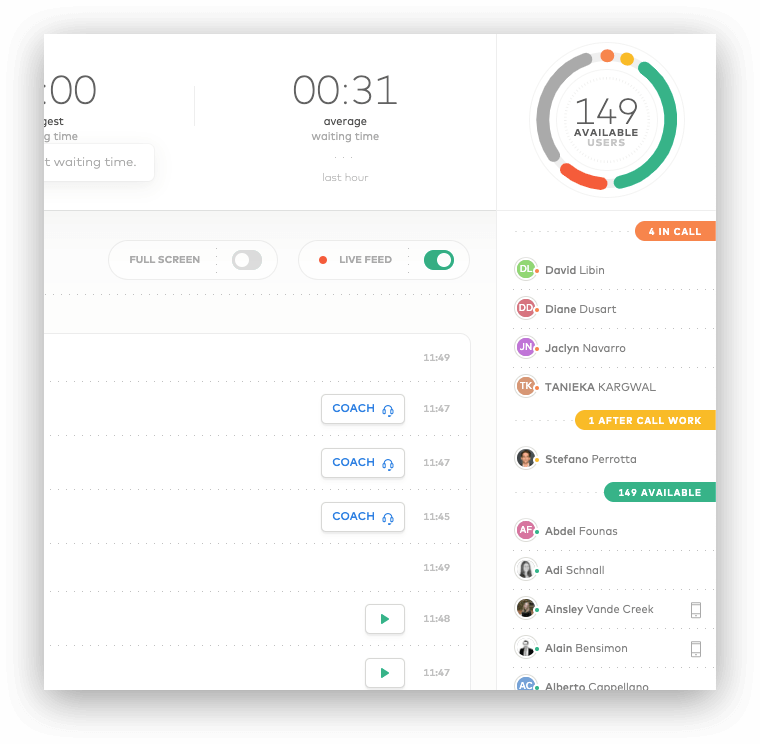
Find a detailed definition of each availability status in our Knowledge Base.
-
Query params
-
fromStringSet a minimal creation date for Users (UNIX timestamp).
-
toStringSet a maximal creation date for Users (UNIX timestamp).
-
orderStringReorder entries by
created_at. Can beascordesc.Default value isasc
RequestGET /v1/users/availabilities
ResponseStatus: 200 OK

{
  "meta": {
    "count": 3,
    "total": 3,
    "current_page": 1,
    "per_page": 20,
    "next_page_link": null,
    "previous_page_link": null
  },
  "users": [
    {
      "id": 456,
      "availability": "available"
    },
    {
      "id": 457,
      "availability": "offline"
    }
    {
      "id": 458,
      "availability": "do_not_disturb"
    }
  ]
}
Check availability of a User
Retrieve the detailed availability of a specific User, displayed in the Dashboard's Activity Feed.
Please refer to the User object definition to see all the possible values of the availability field.
Find a proper definition of each availability status in our Knowledge Base.
-
Path params
-
idIntegerUnique identifier for the User.
RequestGET /v1/users/:id/availability
ResponseStatus: 200 OK

{
  "availability": "after_call_work"
}
Start an outbound call
Outbound calls can be automatically started for a User from their Aircall Workspace. It is often used to build a Click-to-call feature!
A Number ID and a phone number to dial must be provided in the request's body.
The User must be available, not on a call and associated to the Number.
Number must be active (validated), inactive numbers can be seen in the Aircall Dashboard.
This feature is only available on Aircall Workspace on Desktop for now, not yet on iOS and Android.
Please note, the API doesn’t support multiple sessions. It is not recommended to use this API along with Aircall CTI or Web App when multiple tabs are open
-
Path params
-
idIntegerUnique identifier for the User.
-
Body params
-
number_idIntegerUnique identifier of the Number to use for the call.Mandatory field.
-
toStringThe number to dial in E.164 format.Mandatory field.
| code | description |
|---|---|
| 204 | Success. |
| 400 | Number not found or invalid number to dial. |
| 405 | User not available. |
RequestPOST /v1/users/:id/calls

{
  "number_id": 123,
  "to": "+18001231234"
}
ResponseStatus: 204 No Content
Dial a phone number in Aircall Workspace
Sending a request to this endpoint will fill the User's Aircall Workspace with the to params. They will then be able to start the call within Aircall Workspace and will be free to choose from which Number they want to start the call from. It is often used to build a Click-to-dial feature!
User must be available and not on a call.
This feature is also available from the Aircall Everywhere CTI.
This feature is only available on Aircall Workspace on Desktop for now, not yet on iOS and Android.
-
Path params
-
idIntegerUnique identifier for the User.
-
Body params
-
toStringThe phone number to dial in E.164 format.Mandatory field.
| code | description |
|---|---|
| 204 | Success. |
| 400 | Invalid number to dial. |
| 405 | User not available. |
RequestPOST /v1/users/:id/dial

{
  "to": "+18001231234"
}
ResponseStatus: 204 No Content
User V2
User V2 overview
Get all users associated to an Aircall account, or retrieve, create and update info about one specific User V2! You can also start outbound calls from a User V2's Aircall Workspace.
Users can be either Admins or Agents:
- Admins: can access the Dashboard and Aircall Workspace, and can invite other users.
- Agents: can only access Aircall Workspace and recording files.
Please note User v2 object doesn't include a numbers object
-
Attributes
-
idIntegerUnique identifier for the User.
-
direct_linkStringDirect API URL.
-
nameStringFull name of the User.Results of
first_name last_name. -
emailStringEmail of the User.
-
created_atStringTimestamp when the User was created, in UTC.
-
availableBooleanCurrent availability status of the User, based on their working hours.
-
availability_statusStringCurrent working status of the User.Can be
available,custom(= available according to their Working Hours and Timezone) orunavailable(= Do Not Disturb or other unavailable status). More availablility statuses can be retrieved, see the Availability table below. -
substatusStringCurrent substatus of the User.If user selects availability_status as
availableorcustom(available according to working hours or timezone) then substatus will bealways_open.
If user selects availability_status asunavailableand doesn't select a substatus or unavailability reason in Aircall Workspace then it will bealways_closed.
If user selects availability_status asunavailableand selects a substatus or unavailability reason in Aircall Workspace i.e.Out for lunch,On a break,In training,Back officeorOther. The substatus will contain the exact substauts or unavailability reason selected. -
time_zoneStringThe User's timezone. This can be set either from the Dashboard or Aircall Workspace (check our Knowledge Base).Default is
Etc/UTC. More details on Timezones here. -
languageStringThe User's preferred language. This can be set either from the Dashboard or Aircall Workspace (check our Knowledge Base).The format is IETF language tag. Default is
en-US. -
wrap_up_timeIntegerA pre-set timer triggered after a call has ended, during which the user can't receive any calls. Learn more..
-
last_call_idIntegerThe unique identifier of the last call associated with the user's wrap-up time.This attribute is only available in user.wut_start.v2 and user.wut_end.v2 webhook events and not in User APIs.
If mandatory call tagging is enabled in Aircall Workspace and wrap-up time is set to zero or any other duration, or if a call is transferred to an external number and does not connect, thenlast_call_idwon't be available.
-
Availability
-
availableStringAgent ready to answer calls. -
offlineStringAgent not online. -
do_not_disturbStringAgent toggled themself as do not disturb. -
in_callStringAgent is currently on a call. -
after_call_workStringAgent is performing their after-call work (tagging a call or wrapping up).
Find a proper definition of each of those availability statuses in our Knowledge Base
and retrieve those granular availability statuses with this endpoint!
List all Users V2
Fetch all Users V2 associated to a Company and their information.
Looking for more granular availability statuses? Check the availability endpoint!
-
Query params
-
fromStringSet a minimal creation date for Users (UNIX timestamp).
-
toStringSet a maximal creation date for Users (UNIX timestamp).
-
orderStringReorder entries by
created_at. Can beascordesc.Default value isasc
Pagination params can be used on this request.
RequestGET /v2/users
ResponseStatus: 200 OK

{
  "meta": {
    "count": 3,
    "total": 3,
    "current_page": 1,
    "per_page": 20,
    "next_page_link": null,
    "previous_page_link": null
  },
  "users": [
    {
      "id": 456,
      "direct_link": "https://api.aircall.io/v2/users/456",
      "name": "John Doe",
      "email": "john.doe@aircall.io",
      "available": true,
      "availability_status": "available",
      "created_at": "2019-12-29T10:03:18.000Z",
      "time_zone": "America/New_York",
      "language": "en-US",
      "substatus": "always_opened",
      "wrap_up_time": 0,
      "extension": "001"
    },
    {
      "id": 457,
      "direct_link": "https://api.aircall.io/v2/users/457",
      "name": "Amy Rudd",
      "email": "amy.rudd@aircall.io",
      "available": true,
      "availability_status": "custom",
      "created_at": "2019-12-30T18:10:21.000Z",
      "time_zone": "Etc/UTC",
      "language": "en-US",
      "substatus": "always_opened",
      "wrap_up_time": 0,
      "extension": "002"
    },
    {
      "id": 458,
      "direct_link": "https://api.aircall.io/v2/users/458",
      "name": "Vera Martin",
      "email": "vera.martin@aircall.io",
      "available": false,
      "availability_status": "unavailable",
      "created_at": "20120-01-02T09:01:58.000Z",
      "time_zone": "Europe/Paris",
      "language": "fr-FR",
      "substatus": "always_opened",
      "wrap_up_time": 0,
      "extension": "003"
    }
  ]
}
Retrieve a User V2
Retrieve details of a specific User V2.
Looking for more granular availability statuses for a User V2? Check this dedicated endpoint.
-
Path params
-
idInteger/StringUnique identifier or email address of the User.
Retrieve by ID:
RequestGET /v2/users/456
Retrieve by email:
RequestGET /v2/users/john.doe@aircall.io
RequestGET /v2/users/:id
ResponseStatus: 200 OK

{
  "user": {
    "id": 456,
    "direct_link": "https://api.aircall.io/v2/users/456",
    "name": "John Doe",
    "email": "john.doe@aircall.io",
    "available": true,
    "availability_status": "available",
    "created_at": "2019-12-29T10:03:18.000Z",
    "time_zone": "America/New_York",
    "language": "en-US",
    "substatus": "always_opened",
    "wrap_up_time": 0,
    "extension": "001",
    "default_number_id": 1234
  }
}
Create a User V2
Users can be created one at a time. After creation, a unique user ID will be included in the response's payload. An invitation email will be sent to the User V2, they will have to confirm their account before being able to use Aircall.
A
user.created.v2 Webhook event is sent on User creation. More information in the Webhooks section.
-
Body params
-
emailStringMust be a valid and unique email.Mandatory field.
-
first_nameStringCan't be blank if defined.Mandatory field.
-
last_nameStringCan't be blank if defined.Mandatory field.
-
availability_statusString
available,customorunavailable.Default value isavailable -
role_idsArray<String>
owner,supervisor,adminoragent.Default value isagent -
wrap_up_timeIntegerOptional number of seconds as wrap-up time after a call. It applies only to a user that includes the role
agentDefault value is0seconds -
inviter_user_idIntegerOptional id of the user who invited the user to createThe value will be ignored if the inviter is not an admin
| code | description |
|---|---|
| 422 | Mandatory attribute missing, check the troubleshoot field. |
RequestPOST /v2/users

{
  "email": "jeffrey.curtis@aircall.io",
  "first_name": "Jeffrey",
  "last_name": "Curtis"
}
ResponseStatus: 201 Created

{
  "user": {
    "id": 458,
    "direct_link": "https://api.aircall.io/v2/users/458",
    "name": "Jeffrey Curtis",
    "email": "jeffrey.curtis@aircall.io",
    "available": false,
    "availability_status": "available",
    "created_at": "2020-02-18T20:52:22.000Z",
    "time_zone": "Etc/UTC",
    "language": "en-US",
    "wrap_up_time": 0
  }
}
Update a User V2
Some fields can be updated via the Public API. For instance, a User V2's availability status could be automatically updated based on information from their calendar or a workforce management tool.
-
Path params
-
idIntegerUnique identifier for the User.
-
Body params
-
first_nameStringCan't be blank if defined.
-
last_nameStringCan't be blank if defined.
-
availability_statusString
available,customorunavailable. -
substatusStringPossible values of substatus when availability_status is
unavailable:out_for_lunch,on_a_break,in_training,doing_back_office,other -
role_idsArray<String>
owner,supervisor,adminoragent. -
wrap_up_timeIntegerNumber of seconds as wrap-up time after a call. It applies only to a user that has the role
agent.
RequestPUT /v2/users/:id

{
  "first_name": "Jeff Updated"
}
ResponseStatus: 200 OK

{
  "user": {
    "id": 458,
    "direct_link": "https://api.aircall.io/v2/users/458",
    "name": "Jeff Updated Curtis",
    "email": "jeffrey.curtis@aircall.io",
    "available": false,
    "availability_status": "available",
    "created_at": "2020-02-18T20:52:22.000Z",
    "time_zone": "America/New_York",
    "language": "en-US",
    "wrap_up_time": 55,
    "extension": "001",
    "substatus": "always_opened"
  }
}
List all Numbers for a User V2
Fetch all Numbers associated to a specific User V2.
-
Path params
-
idIntegerUnique identifier for the User.
-
Query params
-
orderStringReorder entries by
created_at. Can beascordesc.Default value isasc
Pagination params can be used on this request.
RequestGET /v2/users/:id/numbers
ResponseStatus: 200 OK

{
  "numbers": [
    {
      "id": 673,
      "direct_link": "https://api.aircall.io/v1/numbers/673",
      "name": "Matheus",
      "digits": "+33 1 76 42 03 02",
      "country": "FR",
      "time_zone": "Europe/Paris",
      "open": true,
      "availability_status": "open",
      "is_ivr": false,
      "live_recording_activated": false,
      "priority": 0,
      "messages": {
        "welcome": "https://example.com/welcome.mp3",
        "waiting": "https://example.com/waiting_music.mp3",
        "ivr": "https://example.com/ivr_message.mp3",
        "voicemail": "https://example.com/voicemail.mp3",
        "closed": "https://example.com/closed_message.mp3",
        "callback_later": "https://example.com/callback_later.mp3",
        "unanswered_call": "https://example.com/unanswered_call.mp3",
        "after_hours": "https://example.com/after_hours.mp3",
        "ringing_tone": "https://example.com/ringing_tone.mp3"
      },
      "created_at": "2016-12-28T10:15:05.000Z",
      "flow_editor_enabled": true
    },
    {
      "id": 719,
      "direct_link": "https://api.aircall.io/v1/numbers/719",
      "name": "Pokedex Twilio Staging",
      "digits": "+33 4 20 88 02 82",
      "country": "RO",
      "time_zone": "Europe/Paris",
      "open": true,
      "availability_status": "open",
      "is_ivr": false,
      "live_recording_activated": false,
      "priority": 0,
      "messages": {
        "welcome": "https://example.com/welcome.mp3",
        "waiting": "https://example.com/waiting_music.mp3",
        "ivr": "https://example.com/ivr_message.mp3",
        "voicemail": "https://example.com/voicemail.mp3",
        "closed": "https://example.com/closed_message.mp3",
        "callback_later": "https://example.com/callback_later.mp3",
        "unanswered_call": "https://example.com/unanswered_call.mp3",
        "after_hours": "https://example.com/after_hours.mp3",
        "ringing_tone": "https://example.com/ringing_tone.mp3"
      },
      "created_at": "2017-02-06T11:01:05.000Z",
      "flow_editor_enabled": true
    }
  ],
  "meta": {
    "count": 2,
    "total": 1872,
    "current_page": 2,
    "per_page": 2,
    "next_page_link": "https://api.aircall.io/v2/users/123/numbers?order=asc&page=3&per_page=2",
    "previous_page_link": "https://api.aircall.io/v2/users/123/numbers?order=asc&page=1&per_page=2"
  }
}
Team
Team overview
Users can be grouped in Teams and managed from the Dashboard.
Teams are only used in call distributions of Numbers.
More info on how to use Aircalls' Team feature in our Knowledge Base.
-
Attributes
-
idIntegerUnique identifier for the Team.
-
direct_linkStringDirect API URL.
-
nameStringFull name of the Team.
namemust be unique in a company and the length of the string should be 64 characters maximum. -
created_atStringTimestamp when the Team was created, in UTC.
-
usersArrayList of Users associated to this Team.User attribute
availableis not available in Teams endpoint. User'savailability_statusanddefault_number_idcan be retrieved using List all Teams endpoint.
List all Teams
Fetch all Teams associated to a company and their information.
-
Query params
-
orderStringReorder entries by
created_at. Can beascordesc.Default value isasc
Pagination params can be used on this request.
| code | description |
|---|---|
| 200 | Success. |
| 403 | Forbidden. Invalid API key or Bearer access token |
RequestGET /v1/teams
ResponseStatus: 200 OK

{
  "meta": {
    "count": 1,
    "total": 1,
    "current_page": 1,
    "per_page": 20,
    "next_page_link": null,
    "previous_page_link": null
  },
  "teams": [
    {
      "id": 678,
      "name": "Global Sales",
      "direct_link": "https://api.aircall.io/v1/teams/678",
      "created_at": "2020-03-10T08:31:43.000Z",
      "users": [
        {
          "id": 456,
          "direct_link": "https://api.aircall.io/v1/users/4c56",
          "name": "John Doe",
          "email": "john.doe@aircall.io",
          "availability_status": "available",
          "default_number_id": 1234,
          "created_at": "2019-12-29T10:03:18.000Z",
          "time_zone": "America/New_York"
        },
        {
          "id": 457,
          "direct_link": "https://api.aircall.io/v1/users/457",
          "name": "Amy Rudd",
          "email": "amy.rudd@aircall.io",
          "availability_status": "available",
          "default_number_id": 1234,
          "created_at": "2019-12-30T18:10:21.000Z",
          "time_zone": "Etc/UTC"
        }
      ]
    }
  ]
}
Retrieve a Team
Retrieve details of a specific Team.
-
Path params
-
idIntegerUnique identifier for the Team.
| code | description |
|---|---|
| 200 | Success. |
| 403 | Forbidden. Invalid API key or Bearer access token |
| 404 | Not found. Id does not exist |
RequestGET /v1/teams/:id
ResponseStatus: 200 OK

{
  "team": {
    "id": 678,
    "name": "Global Sales",
    "direct_link": "https://api.aircall.io/v1/teams/678",
    "created_at": "2020-03-10T08:31:43.000Z",
    "users": [
      {
        "id": 456,
        "direct_link": "https://api.aircall.io/v1/users/4c56",
        "name": "John Doe",
        "email": "john.doe@aircall.io",
        "created_at": "2019-12-29T10:03:18.000Z",
        "time_zone": "America/New_York"
      },
      {
        "id": 457,
        "direct_link": "https://api.aircall.io/v1/users/457",
        "name": "Amy Rudd",
        "email": "amy.rudd@aircall.io",
        "created_at": "2019-12-30T18:10:21.000Z",
        "time_zone": "Etc/UTC"
      }
    ]
  }
}
Create a Team
A name must be provided when creating a Team.
Please use the following endpoint to add Users to it.
-
Body params
-
nameStringCan't be blank if defined.Mandatory field.
| code | description |
|---|---|
| 201 | Success. |
| 400 | Company might have reached the maximum number of teams allowed on their plan. Name must be smaller than 64 characters and unique in the company. |
| 403 | Forbidden. Invalid API key or Bearer access token |
RequestPOST /v1/teams

{
  "name": "Support USA"
}
ResponseStatus: 201 Created

{
  "team": {
    "id": 679,
    "name": "Support USA",
    "direct_link": "https://api.aircall.io/v1/teams/679",
    "created_at": "2020-03-10T20:29:52.000Z",
    "users": []
  }
}
Delete a Team
When deleting Teams, they will be removed from the Numbers call distribution.
Users and Calls won't be deleted.
-
Path params
-
idIntegerUnique identifier for the Team.
| code | description |
|---|---|
| 204 | Success. |
| 403 | Forbidden. Invalid API key or Bearer access token |
| 404 | Not found. Id does not exist |
| 422 | Server unable to process the request, error will be described in the troubleshoot field. |
RequestDELETE /v1/teams/:id
ResponseStatus: 200 OK
Add a User to a Team
Users can be added one by one to a Team.
-
Path params
-
team_idIntegerUnique identifier for the Team.
-
user_idIntegerUnique identifier for the User.
| code | description |
|---|---|
| 201 | Success. |
| 403 | Forbidden. Invalid API key or Bearer access token |
| 404 | Not found. Either team_id or user_id does not exist |
| 422 | Server unable to process the request, error will be described in the troubleshoot field. |
RequestPOST /v1/teams/:team_id/users/:user_id
ResponseStatus: 201 Created

{
  "team": {
    "id": 679,
    "name": "Support USA",
    "direct_link": "https://api.aircall.io/v1/teams/679",
    "created_at": "2020-03-10T20:29:52.000Z",
    "users": [
      {
        "id": 456,
        "direct_link": "https://api.aircall.io/v1/users/4c56",
        "name": "John Doe",
        "email": "john.doe@aircall.io",
        "created_at": "2019-12-29T10:03:18.000Z",
        "time_zone": "America/New_York"
      }
    ]
  }
}
Remove a User from a Team
Users can be deleted one by one from a Team.
Calls made and received by this User won't be deleted.
-
Path params
-
team_idIntegerUnique identifier for the Team.
-
useridIntegerUnique identifier for the User.
| code | description |
|---|---|
| 200 | Success. |
| 403 | Forbidden. Invalid API key or Bearer access token |
| 404 | Not found. Either team_id or user_id does not exist |
| 422 | Server unable to process the request, error will be described in the troubleshoot field. |
RequestDELETE /v1/teams/:team_id/users/:user_id
ResponseStatus: 200 OK

{
  "team": {
    "id": 679,
    "name": "Support USA",
    "direct_link": "https://api.aircall.io/v1/teams/679",
    "created_at": "2020-03-10T20:29:52.000Z",
    "users": []
  }
}
Call
Call overview
Calls are an essential part of how Aircall users interact with the product. Our mission is to give real-time insights to make the call experience as delightful as possible!
There are three types of calls:
- Inbound calls: where an external person reaches an Agent.
- Outbound calls: where an Agent starts a call from Aircall Workspace to reach an external person.
- Internal calls: where an Agent calls another Agent.
More information available on each type of Call at the bottom of this section.
Please refer to the User object if you are looking to start an outbound call or to dial a phone number!
-
Attributes
-
idIntegerUnique identifier for the Call.Please note, Call id Data Type is
Int64 -
sidStringCall identifier from call providerPlease note
sidattribute refers tocall_uuidand has same value ascall_uuid.sidis only available in Call APIs -
call_uuidStringCall identifier from call providerPlease note
call_uuidattribute refers tosidand has same value assid.call_uuidis only available in Call Webhook events -
direct_linkStringDirect API URL.
-
started_atIntegerUNIX timestamp when the Call started, in UTC.
-
answered_atIntegerUNIX timestamp when the Call has been answered, in UTC.
-
ended_atIntegerUNIX timestamp when the Call ended, in UTC.
-
durationIntegerDuration of the Call in seconds.This field is computed by
ended_at - started_at. -
statusStringCurrent status of the Call.Can be initial, answered or done.
-
directionStringDirection of the Call.Could be inbound or outbound.
-
raw_digitsStringInternational format of the number of the caller or the callee. For an
anonymouscall, the value isanonymous. -
assetStringIf present, a secured webpage containing the voicemail or live recording for this Call.URL format is
https://assets.aircall.io/[recording,voicemail]/:call_id. -
recordingStringIf present, the direct URL of the live recording (mp3 file) for this Call. This feature can be enabled from the Aircall Dashboard, on each Number - more information in our Knowledge Base.This link is valid for 1 hour only.
-
recording_short_urlStringWhen
recordingis present, a unique short URL redirecting to it.This link is valid for 3 hours only.
URL format ishttps://short-urls.aircall.io/v1/:uuid. -
voicemailStringOnly present if a voicemail was left. Voicemails can only be left by callers on inbound calls. If present, the direct URL of a voicemail (mp3 file) for this Call.This link is valid for 1 hour only.
-
voicemail_short_urlStringWhen
voicemailis present, a unique short URL redirecting to it.This link is valid for 3 hours only.
URL format ishttps://short-urls.aircall.io/v1/:uuid. -
archivedBooleanIndicates whether the Call has been archived.Originally used to flag calls needing follow-up in the legacy Phone app's To-do view; has no functional impact in Aircall Workspace.
-
missed_call_reasonStringRepresenting the reason why the Call was missed.Can be
out_of_opening_hours,short_abandoned,abandoned_in_ivr,abandoned_in_classic,no_available_agentoragents_did_not_answer. -
costStringCost of the Call in U.S. cents.Cost is a legacy field which has been deprecated, we might reintroduce it in the future. For more info please reach out to us on support.aircall.io.
-
numberObjectFull Number object attached to the Call.
-
userObjectFull User object who took or made the Call.
-
contactObjectFull Contact object attached to the Call.
-
assigned_toObjectFull User object assigned to the Call.
-
teamsArrayFull Teams object assigned to the Call.Teams are only assigned to answered inbound calls.
-
transferred_byObjectUser who performed the Call transfer.
-
transferred_toObjectUser to whom the Call was transferred to.If Call is transferred to a Team, this field will represent the first User of the Team. It won't be available in case of external call transfers.
-
external_transferred_toStringExternal number to which the Call was transferred to.Only available via call.external_transferred event
-
external_caller_numberStringCaller Number from whom call was received.Only available via call.external_transferred event
-
automatic_callback_call_idIntegerThe Call ID of the call that requested callback.Only available via call.created, call.answered, call.archived, call.assigned, call.hungup and call.ended Webhook events
-
commentsArrayNotes added to this Call by Users.
-
tagsArrayTags added to this Call by Users.
-
participantsArrayParticipants involved in a conference call.Please note participants attribute is referred as
conference_participantsin Call APIs and asparticipantsin call Webhook events -
ivr_options_selectedArrayIVR options selected in a smartflow enabled number.ivr_options_selected is retrievable via Call APIs using fetch timeline query param
-
ai_voice_agentsArrayCall AI Voice Agents that handled the Call.ai_voice_agents is retrievable via Call APIs using the
fetch_aiva_convquery param
1. Inbound calls
Inbound calls are initiated by an external person, calling an Aircall Number. Once started, calls will follow the Call distribution tree defined in the Aircall Dashboard (see our Knowledge Base).
If an Inbound call is not answered, it is then considered as missed. All missed calls will have the missed_call_reason field defined in their payload, the answered_at field will be null, and the teams field will be empty ([]).
The duration field is computed by the following: ended_at - started_at. As the ringing time is included in it, use the ended_at - answered_at calculation to get the talking time of the call!
More info on Inbound calls lifecycle in the Webhook section.
2. Outbound calls
Outbound calls are initiated by Agents from Aircall Workspace, calling an external person.
If an Outbound call is not answered by the external person, the answered_at field will be null.
The duration field is computed by the following: ended_at - started_at. As the ringing time is included in it, use the ended_at - answered_at calculation to get the talking time of the call. If an outbound call is answered by a voicemail, it will be considered as answered (Aircall does not support Answering Machine Detection yet).
More info on Outbound calls lifecycle in the Webhook section.
Starting an outbound call from Aircall Workspace is feasible
with the Start Outbound Call endpoint, defined on the User object.
3. Internal calls
Internal calls are initiated by an Agent, calling another Agent. Those calls are not rendered in the Public API.
More info on how to use Intercall calls in our Knowledge Base.
Call Comments (also called Notes)
Calls can be commented by Agents or via the Public API endpoint [POST] /v1/calls/:id/comments.
Here is the object description of a comment:
-
Attributes
-
idIntegerUnique identifier for the Comment.
-
contentStringContent of the Comment, written by Agent or via Public API.
-
posted_atStringTimestamp of when the Comment was created.
-
posted_byObjectUser object who created the Comment.Will be
nullif Comment is posted via Public API.
EndpointsGET /v1/callsList all Calls
GET /v1/calls/:idRetrieve a Call
GET /v1/calls/searchSearch Calls
POST /v1/calls/:id/transfersTransfer a Call
POST /v1/calls/:id/commentsComment a Call
POST /v1/calls/:id/tagsTag a Call
PUT /v1/calls/:id/archiveArchive a Call
PUT /v1/calls/:id/unarchiveUnarchive a Call
POST /v1/calls/:id/pause_recordingPause recording on a Call
POST /v1/calls/:id/resume_recordingResume recording on a Call
DELETE /v1/calls/:id/recordingDelete Call recording
DELETE /v1/calls/:id/voicemailDelete Call voicemail
POST /v1/calls/:id/insight_cardsInsight Cards
GET /v1/calls/:call_id/transcriptionRetrieve a transcription
GET /v1/calls/:call_id/realtime_transcriptionRetrieve realtime transcription
GET /v1/calls/:call_id/sentimentsRetrieve sentiments
GET /v1/calls/:call_id/predicted_csatRetrieve Predicted CSAT
GET /v1/calls/:call_id/topicsRetrieve topics
GET /v1/calls/:call_id/summaryRetrieve a summary
GET /v1/calls/:call_id/custom_summary_resultRetrieve a custom summary result
GET /v1/calls/:call_id/action_itemsRetrieve action items
GET /v1/calls/:call_id/playbook_resultRetrieve a playbook result
GET /v1/calls/:call_id/evaluationsRetrieve call evaluations
List all Calls
Fetch all Calls associated to a company and their information.
By default, Calls are ordered by ascending IDs - consider using the order=desc query param if you want to get the last calls made by an account!
Only six months of history is available. Please contact our Support team on support.aircall.io to get a one-time export of calls.
By default contact details are not added in response payload. To add the contact details in response set fetch_contact to
true in query parameters.
-
Query params
-
fromStringSet a minimal creation date for Calls (UNIX timestamp).
-
toStringSet a maximal creation date for Calls (UNIX timestamp).
-
orderStringReorder entries by
created_at. Can beascordesc.Default value isasc -
fetch_contactBooleanWhen set to
true, adds contacts details in response. -
fetch_short_urlsBooleanWhen set to
true, adds short urls in response. -
fetch_call_timelineBooleanWhen set to
true, it will ivr_options_selected at the same level of the call -
fetch_aiva_convBooleanWhen set to
true, it will return ai_voice_agents at the same level of each call
Using the pagination system, you can retrieve up to 10,000 Calls. To pass over this limit, we encourage you to use the
from param as much as you can!
RequestGET /v1/calls
ResponseStatus: 200 OK

{
  "meta": {
    "count": 20,
    "total": 2234,
    "current_page": 1,
    "per_page": 20,
    "next_page_link": "https://api.aircall.io/v1/calls?order=asc&page=2&per_page=20",
    "previous_page_link": null
  },
  "calls": [
    {
      "id": 812,
      "sid": "CA1234567890",
      "direct_link": "https://api.aircall.io/v1/calls/812",
      "direction": "outbound",
      "status": "done",
      "missed_call_reason": null,
      "started_at": 1584998199,
      "answered_at": 1584998205,
      "ended_at": 1584998210,
      "duration": 11,
      "voicemail": null,
      "recording": null,
      "asset": null,
      "raw_digits": "+1 800-123-4567",
      "user": {
        "id": 456,
        "direct_link": "https://api.aircall.io/v1/users/456",
        "name": "John Doe",
        "email": "john.doe@aircall.io",
        "available": true,
        "availability_status": "available",
        "created_at": "2019-12-29T10:03:18.000Z",
        "time_zone": "America/New_York",
        "language": "en-US"
      },
      "contact": null,
      "archived": false,
      "assigned_to": null,
      "transferred_by": null,
      "transferred_to": null,
      "cost": "2.34",
      "number": {
        "id": 1234,
        "direct_link": "https://api.aircall.io/v1/numbers/1234",
        "name": "French Office",
        "digits": "+33 1 76 11 11 11",
        "created_at": "2020-01-02T11:41:01.000Z",
        "country": "FR",
        "time_zone": "Europe/Paris",
        "open": true,
        "availability_status": "custom",
        "is_ivr": true,
        "live_recording_activated": true,
        "priority": null,
        "messages": {
          ...
        }
      },
      "comments": [
        {
          "id": 735,
          "content": "Please call back this customer!",
          "posted_at": 1587994808,
          "posted_by": {
            "id": 456,
            "direct_link": "https://api.aircall.io/v1/users/456",
            "name": "Johnn Doe",
            "email": "john.doe@aircall.io",
            "available": true,
            "availability_status": "available",
            "created_at": "2019-12-29T10:03:18.000Z"
          }
        },
        ...
      ],
      "tags": [
        {
          "id": 678,
          "name": "General Inquiries",
          "created_at": 1587995020,
          "tagged_by": {
            "id": 456,
            "direct_link": "https://api.aircall.io/v1/users/456",
            "name": "Johnn Doe",
            "email": "john.doe@aircall.io",
            "available": true,
            "availability_status": "available",
            "created_at": "2019-12-29T10:03:18.000Z"
          }
        },
        ...
      ],
      "teams": [],
      "ivr_options_selected": [
        {
          "id": "5cb41cde-aed2-4357-a98c-e1b33d68851a",
          "title": "",
          "key": "1",
          "branch": "Default",
          "created_at": "2024-10-01T06:54:45.556Z",
          "transition_started_at": "2024-10-01T06:54:35.332Z",
          "transition_ended_at": "2024-10-01T06:54:45.513Z"
        }
      ]
    },
    {
      "id": 813,
      "direct_link": "https://api.aircall.io/v1/calls/813",
      "direction": "inbound",
      "status": "done",
      "missed_call_reason": "no_available_agent",
      "started_at": 1584998199,
      "answered_at": null,
      "ended_at": 1584998210,
      "duration": 22,
      "voicemail": null,
      "recording": null,
      "asset": null,
      "raw_digits": "+1 800-123-4567",
      "user": null,
      "contact": null,
      "archived": false,
      "assigned_to": null,
      "transferred_by": null,
      "transferred_to": null,
      "cost": "0",
      "number": {
        "id": 1234,
        "direct_link": "https://api.aircall.io/v1/numbers/1234",
        "name": "French Office",
        "digits": "+33 1 76 11 11 11",
        "created_at": "2020-01-02T11:41:01.000Z",
        "country": "FR",
        "time_zone": "Europe/Paris",
        "open": true,
        "availability_status": "custom",
        "is_ivr": true,
        "live_recording_activated": true,
        "priority": null,
        "messages": {
          ...
        }
      },
      "comments": [...],
      "tags": [...],
      "teams": [],
      "ivr_options_selected": [
        {
          "id": "5cb41cde-aed2-4357-a98c-e1b33d68851a",
          "title": "",
          "key": "1",
          "branch": "Default",
          "created_at": "2024-10-01T06:54:45.556Z",
          "transition_started_at": "2024-10-01T06:54:35.332Z",
          "transition_ended_at": "2024-10-01T06:54:45.513Z"
        }
      ],
      "ai_voice_agents": [
        {
          "agent_id": "01KK212KJ2SWPDHZKKB5M3ZWTA",
          "agent_name": "Ava EN - Triage",
          "end_reason": "escalated",
          "started_at": 1778263496,
          "ended_at": 1778263518,
          "escalation_reason": "Caller wants to purchase or create a new number",
          "escalation_target": {
            "type": "branch",
            "destination": "Number Porting & Purchase"
          }
        },
        {
          "agent_id": "01KK23HFG2DMTR9QAD0WZSQVFE",
          "agent_name": "Ava EN - Numbers",
          "end_reason": "escalated",
          "started_at": 1778263518,
          "ended_at": 1778263621,
          "escalation_reason": "Caller explicitly asked to speak with a human representative",
          "escalation_target": {
            "type": "branch",
            "destination": "Caller Request"
          }
        }
      ]
    }
    ...
  ]
}
Retrieve a Call
Use this endpoint to asynchronously retrieve a Call data like duration, direction, status, timestamps, comments or tags…
To get Calls information in real time, we recommend using Calls Webhooks events - for instance to log information automatically in your database after a Call. By default contact details are not added in response payload. To add the contact details in response set fetch_contact to
true in query parameters.
-
Path params
-
idIntegerUnique identifier for the Call.
-
fetch_contactBooleanWhen set to
true, adds contacts details in response. -
fetch_short_urlsBooleanWhen set to
true, adds short urls in response. -
fetch_call_timelineBooleanWhen set to
true, it will return ivr_options_selected at the same level of the call -
fetch_aiva_convBooleanWhen set to
true, it will return ai_voice_agents at the same level of the call
RequestGET /v1/calls/:id
ResponseStatus: 200 OK

{
  "call": {
    "id": 812,
    "sid": "CA1234567890",
    "direct_link": "https://api.aircall.io/v1/calls/812",
    "direction": "outbound",
    "status": "done",
    "missed_call_reason": null,
    "started_at": 1584998199,
    "answered_at": 1584998205,
    "ended_at": 1584998210,
    "duration": 11,
    "voicemail": null,
    "recording": null,
    "asset": null,
    "raw_digits": "+1 800-123-4567",
    "user": {
      "id": 456,
      "direct_link": "https://api.aircall.io/v1/users/456",
      "name": "John Doe",
      "email": "john.doe@aircall.io",
      "available": true,
      "availability_status": "available",
      "created_at": "2019-12-29T10:03:18.000Z",
      "time_zone": "America/New_York",
      "language": "en-US"
    },
    "contact": null,
    "archived": false,
    "assigned_to": null,
    "transferred_by": null,
    "transferred_to": null,
    "cost": "2.34",
    "number": {
      "id": 1234,
      "direct_link": "https://api.aircall.io/v1/numbers/1234",
      "name": "French Office",
      "digits": "+33 1 76 11 11 11",
      "created_at": "2020-01-02T11:41:01.000Z",
      "country": "FR",
      "time_zone": "Europe/Paris",
      "open": true,
      "availability_status": "custom",
      "is_ivr": true,
      "live_recording_activated": true,
      "priority": null,
      "messages": {
        ...
      }
    },
    "comments": [
      {
        "id": 735,
        "content": "Please call back this customer!",
        "posted_at": 1587994808,
        "posted_by": {
          "id": 456,
          "direct_link": "https://api.aircall.io/v1/users/456",
          "name": "Johnn Doe",
          "email": "john.doe@aircall.io",
          "available": true,
          "availability_status": "available",
          "created_at": "2019-12-29T10:03:18.000Z"
        }
      }
    ],
    "tags": [
      {
        "id": 678,
        "name": "General Inquiries",
        "created_at": 1587995020,
        "tagged_by": {
          "id": 456,
          "direct_link": "https://api.aircall.io/v1/users/456",
          "name": "Johnn Doe",
          "email": "john.doe@aircall.io",
          "available": true,
          "availability_status": "available",
          "created_at": "2019-12-29T10:03:18.000Z"
        }
      },
      ...
    ],
    "participants": [
      {
        "name": "John Doe",
        "id": 456,
        "type": "user"
      },
      {
        "name": "Jennifer Smith",
        "phone_number": "+33 7 49 88 29 71",
        "id": 5443,
        "type": "contact"
      },
      {
        "name": "Rafael Lopez",
        "id": 457,
        "type": "user"
      }
    ],
    "teams": [],
    "ivr_options_selected": [
      {
        "id": "5cb41cde-aed2-4357-a98c-e1b33d68851a",
        "title": "",
        "key": "1",
        "branch": "Default",
        "created_at": "2024-10-01T06:54:45.556Z",
        "transition_started_at": "2024-10-01T06:54:35.332Z",
        "transition_ended_at": "2024-10-01T06:54:45.513Z"
      }
    ],
    "ai_voice_agents": [
      {
        "agent_id": "01KK212KJ2SWPDHZKKB5M3ZWTA",
        "agent_name": "Ava EN - Triage",
        "end_reason": "escalated",
        "started_at": 1778263496,
        "ended_at": 1778263518,
        "escalation_reason": "Caller wants to purchase or create a new number",
        "escalation_target": {
          "type": "branch",
          "destination": "Number Porting & Purchase"
        }
      }
    ]
  }
}
Search Calls
Search for specific Calls depending on several Query Params like user_id, phone_number or tags. Given a call transferred between A and B phone numbers, the call will not appear when filtering by A but it will for B.
Only six months of history is available. Please contact our Support team on support.aircall.io to get a one-time export of calls.
By default contact details are not added in response payload. To add the contact details in response set fetch_contact to
true in query parameters.
-
Query params
-
fromStringSet a minimal creation date for Calls (UNIX timestamp).
-
toStringSet a maximal creation date for Calls (UNIX timestamp).
-
orderStringReorder entries by
created_at. Can beascordesc.Default value isasc. -
directionStringDirection of the Calls.If specified, can be
inboundoroutbound. -
user_idIntegerUnique ID of the User who made or received Calls.
-
phone_numberStringThe calling or receiving phone number of Calls.
-
tagsArrayArray of Tags IDs.Implemented as an
ANDcondition: Aircall will search for Calls matching all the tags present in this array. -
fetch_contactBooleanWhen set to
true, adds contacts details in response. -
fetch_short_urlsBooleanWhen set to
true, adds short urls in response. -
fetch_call_timelineBooleanWhen set to
true, it will return ivr_options_selected at the same level of the call -
fetch_aiva_convBooleanWhen set to
true, it will return ai_voice_agents at the same level of each call
Using the pagination system, you can retrieve up to 10,000 Calls. To pass over this limit, we encourage you to use the
from param as much as you can!
RequestGET /v1/calls/search
ResponseStatus: 200 OK

{
  "meta": {
    "count": 3,
    "total": 2,
    "current_page": 1,
    "per_page": 20,
    "next_page_link": null,
    "previous_page_link": null
  },
  "calls": [
    {
      "id": 812,
      "sid": "CA1234567890",
      "direct_link": "https://api.aircall.io/v1/calls/812",
      "direction": "outbound",
      "status": "done",
      "missed_call_reason": null,
      "started_at": 1584998199,
      "answered_at": 1584998205,
      "ended_at": 1584998210,
      "duration": 11,
      "voicemail": null,
      "recording": null,
      "asset": null,
      "raw_digits": "+1 800-123-4567",
      "user": {
        "id": 456,
        "direct_link": "https://api.aircall.io/v1/users/456",
        "name": "John Doe",
        "email": "john.doe@aircall.io",
        "available": true,
        "availability_status": "available",
        "created_at": "2019-12-29T10:03:18.000Z",
        "time_zone": "America/New_York",
        "language": "en-US"
      },
      "contact": null,
      "archived": false,
      "assigned_to": null,
      "transferred_by": null,
      "transferred_to": null,
      "cost": "2.34",
      "number": {
        "id": 1234,
        "direct_link": "https://api.aircall.io/v1/numbers/1234",
        "name": "French Office",
        "digits": "+33 1 76 11 11 11",
        "created_at": "2020-01-02T11:41:01.000Z",
        "country": "FR",
        "time_zone": "Europe/Paris",
        "open": true,
        "availability_status": "custom",
        "is_ivr": true,
        "live_recording_activated": true,
        "priority": null,
        "messages": {
          ...
        }
      },
      "comments": [...],
      "tags": [...],
      "teams": [...],
      "ivr_options_selected": [...],
      "ai_voice_agents": [...],
    },
    {
      "id": 813,
      "direct_link": "https://api.aircall.io/v1/calls/813",
      "direction": "inbound",
      "status": "done",
      "missed_call_reason": "no_available_agent",
      "started_at": 1584998199,
      "answered_at": null,
      "ended_at": 1584998210,
      "duration": 22,
      "voicemail": null,
      "recording": null,
      "asset": null,
      "raw_digits": "+1 800-123-4567",
      "user": null,
      "contact": null,
      "archived": false,
      "assigned_to": null,
      "transferred_by": null,
      "transferred_to": null,
      "cost": "0",
      "number": {
        "id": 1234,
        "direct_link": "https://api.aircall.io/v1/numbers/1234",
        "name": "French Office",
        "digits": "+33 1 76 11 11 11",
        "created_at": "2020-01-02T11:41:01.000Z",
        "country": "FR",
        "time_zone": "Europe/Paris",
        "open": true,
        "availability_status": "custom",
        "is_ivr": true,
        "live_recording_activated": true,
        "priority": null,
        "messages": {
          ...
        }
      },
      "comments": [...],
      "tags": [...],
      "teams": [...],
      "ivr_options_selected": [...],
      "ai_voice_agents": [...],
    },

    ...
  ]
}
Transfer a Call
Calls can be transferred to another User, Team or phone number.
Transfers initiated through the API are only supported for scenarios where a call is transferred directly to a specific agent.
The transfer won’t reroute to other agents if the original transfer target is unavailable.
For more complex scenarios -such as those requiring multiple sequential transfers or fallback routing— we
recommend using the "Ring to via API" widget within Smartflows.
This widget allows for advanced routing logic and provides greater flexibility in managing call flows.
Only cold transfers are available via the Public API. Calls can be transferred to a single User, a single Team or a single external phone number:
- To transfer a Call to another User, provide a user ID in the request's body. A
call.transferredWebhook event will be sent.
If the agent to whom the call was transferred to is not available, call will be directed to the No one answers strategy: the Unanswered call message will be played.
To transfer a Call to a Team, provide a team ID in the request's body. A
call.transferredWebhook event will be sent. When transferring a call to a team, a dispatching strategy can be specified with parameter:dispatching_strategy: The "simultaneous" strategy (default one if argument is not specified) will ring each available member simultaneously. The "random" one will ring each available member one by one. The "longest_idle" one will ring each available member one by one starting with the agent having the longest idle time.To transfer an Incoming Call to an external phone number, provide a phone number in the request body. When transfer is initiated, a message will be played to the caller informing them that their call is being transferred. A
call.transferredWebhook event will be sent without the transferred_to field in the payload.
Transfers to external phone numbers will only work for inbound calls that have not yet been answered.
- If the transfer is not successful, a
call.unsuccessful_transferWebhook event will be sent.
-
Path params
-
idIntegerUnique identifier for the Call.
-
Body params
-
user_idStringUnique identifier of the User the Call will be transferred to.
-
team_idStringUnique identifier of the Team the Call will be transferred to.
-
numberStringExternal phone number the Call will be transferred to.Format must be e164. More information in the dedicated phone numbers format section.
-
dispatching_strategyStringSpecify dispatching strategy on team transfer, only values 'random', 'simultaneous' and 'longest_idle' are accepted. This parameter is optional if not specified 'simultaneous' strategy is implicitly used.
Only one of
user_id, team_id or number parameters are allowed for each request.
| code | description |
|---|---|
| 204 | Success. |
| 400 | Call already ended. |
| 400 | Invalid usage of dispatching strategy with user or external phone number. |
| 400 | Multiple transfer destinies set on request. |
| 404 | User or Call not found. |
RequestPOST /v1/calls/:id/transfers

{
  "user_id": 456
}
ResponseStatus: 204 No Content
Comment a Call
Comments (also called Notes) can be added to Calls and a Call can have a maximum of five of them. After five comments added, those requests will fail with a 400 HTTP code. A comment posted via the Public API does not have an owner.
Once a Comment is posted on a Call, it cannot be updated nor deleted.
A
call.commented Webhook event will be sent every time a call is commented. More info in the Webhooks section.
-
Path params
-
idIntegerUnique identifier for the Call.
-
Body params
-
contentStringContent of the Comment.Emojis are removed from Comments.
| code | description |
|---|---|
| 201 | Success. |
| 400 | Maximum of 5 notes can be added to a Call. |
RequestPOST /v1/calls/:id/comments

{
  "content": "Please call back this customer!"
}
ResponseStatus: 201 Created
Tag a Call
Tags are created in the Dashboard by Admins and calls can be tagged by Agents from Aircall Workspace.
A
call.tagged Webhook event will be sent every time a call is tagged. More info in the Webhooks section.
-
Path params
-
idIntegerUnique identifier for the Call.
-
Body params
-
tagsArrayArray of Tag IDs.
| code | description |
|---|---|
| 201 | Success. |
RequestPOST /v1/calls/:id/tags

{
  "tags": [545]
}
ResponseStatus: 201 Created
Archive a Call
Sets the archived attribute of a Call to false.
A
call.archived Webhook event will be sent every time a call is archived. More info in the Webhooks section.
Note: This endpoint was designed for the legacy Aircall Phone app, where archiving removed a call from the agent's "To-do" follow-up list. With the move to Aircall Workspace — which operates at the conversation level rather than the individual call level — archiving a call no longer has any effect in the app UI. Calling this endpoint only toggles the
archived flag on the call record; it does not close the conversation the call belongs to. The concept of archiving a call is deprecated for Aircall Workspace users.
-
Path params
-
idIntegerUnique identifier for the Call.
RequestPUT /v1/calls/:id/archive
ResponseStatus: 200 OK

{
  "call": {
    "id": 812,
    "sid": "CA1234567890",
    "direct_link": "https://api.aircall.io/v1/calls/812",
    "direction": "outbound",
    "status": "done",
    "missed_call_reason": null,
    "started_at": 1584998199,
    "answered_at": 1584998205,
    "ended_at": 1584998210,
    "duration": 11,
    "voicemail": null,
    "recording": null,
    "asset": null,
    "raw_digits": "+1 800-123-4567",
    "user": {
      "id": 456,
      "direct_link": "https://api.aircall.io/v1/users/456",
      "name": "John Doe",
      "email": "john.doe@aircall.io",
      "available": true,
      "availability_status": "available",
      "created_at": "2019-12-29T10:03:18.000Z",
      "time_zone": "America/New_York",
      "language": "en-US"
    },
    "contact": null,
    "archived": true,
    "assigned_to": null,
    "transferred_by": null,
    "transferred_to": null,
    "cost": "2.34",
    "number": {
      "id": 1234,
      "direct_link": "https://api.aircall.io/v1/numbers/1234",
      "name": "French Office",
      "digits": "+33 1 76 11 11 11",
      "created_at": "2020-01-02T11:41:01.000Z",
      "country": "FR",
      "time_zone": "Europe/Paris",
      "open": true,
      "availability_status": "custom",
      "is_ivr": true,
      "live_recording_activated": true,
      "priority": null,
      "messages": {
        ...
      }
    },
    "comments": [...],
    "tags": [...],
    "teams": [...]
  }
}
Unarchive a Call
Sets the archived attribute of a Call to false.
Note: This endpoint was designed for the legacy Aircall Phone app, where unarchiving returned a call to the agent's "To-do" follow-up list. With the move to Aircall Workspace — which operates at the conversation level rather than the individual call level — unarchiving a call no longer has any effect in the app UI. Calling this endpoint only toggles the
archived flag on the call record; it does not reopen the conversation the call belongs to. The concept of archiving a call is deprecated for Aircall Workspace users.
-
Path params
-
idIntegerUnique identifier for the Call.
RequestPUT /v1/calls/:id/unarchive
ResponseStatus: 200 OK

{
  "call": {
    "id": 812,
    "sid": "CA1234567890",
    "direct_link": "https://api.aircall.io/v1/calls/812",
    "direction": "outbound",
    "status": "done",
    "missed_call_reason": null,
    "started_at": 1584998199,
    "answered_at": 1584998205,
    "ended_at": 1584998210,
    "duration": 11,
    "voicemail": null,
    "recording": null,
    "asset": null,
    "raw_digits": "+1 800-123-4567",
    "user": {
      "id": 456,
      "direct_link": "https://api.aircall.io/v1/users/456",
      "name": "John Doe",
      "email": "john.doe@aircall.io",
      "available": true,
      "availability_status": "available",
      "created_at": "2019-12-29T10:03:18.000Z",
      "time_zone": "America/New_York",
      "language": "en-US",
    },
    "contact": null,
    "archived": false,
    "assigned_to": null,
    "transferred_by": null,
    "transferred_to": null,
    "cost": "2.34",
    "number": {
      "id": 1234,
      "direct_link": "https://api.aircall.io/v1/numbers/1234",
      "name": "French Office",
      "digits": "+33 1 76 11 11 11",
      "created_at": "2020-01-02T11:41:01.000Z",
      "country": "FR",
      "time_zone": "Europe/Paris",
      "open": true,
      "availability_status": "custom",
      "is_ivr": true,
      "live_recording_activated": true,
      "priority": null,
      "messages": {
        ...
      }
    },
    "comments": [...],
    "tags": [...],
    "teams": [...]
  }
}
Pause recording on a Call
When live recording is active on a Call, it can be automatically paused via the Public API.
-
Path params
-
idIntegerUnique identifier for the Call.
| code | description |
|---|---|
| 204 | Success. |
| 400 | Call has already ended. |
| 404 | Call not found. |
| 405 | Recording is disabled on the Call's number. |
RequestPOST /v1/calls/:id/pause_recording
ResponseStatus: 204 No Content
Resume recording on a Call
When live recording is active on a Call and has been paused, it can be automatically resumed via the Public API.
-
Path params
-
idIntegerUnique identifier for the Call.
| code | description |
|---|---|
| 204 | Success. |
| 400 | Call has already ended. |
| 404 | Call not found. |
| 405 | Recording is disabled on the Call's Number. |
RequestPOST /v1/calls/:id/resume_recording
ResponseStatus: 204 No Content
Delete Call recording
Delete the recording of a specific Call. It takes between 10 and 15 minutes to delete a call recording from our servers.
Please note the recording can take up to 24 hours to be received. If it is not present, it will not be deleted. In this case retry the deletion later.
This action cannot be undone.
Important: If your account includes AI Assist or AI Assist Pro, deleting a call recording will also permanently delete the transcription and all AI-generated insights, including summaries, topics, action items, and sentiment analysis.
Check this endpoint to delete the voicemail of a Call.
-
Path params
-
idIntegerUnique identifier for the Call.
RequestDELETE /v1/calls/:id/recording
ResponseStatus: 200 OK
Delete Call voicemail
Delete the voicemail of a specific Call. It can take up to 1 minute to delete a call voicemail from our servers.
Please note the voicemail can take up to 24 hours to be received. If it is not present, it will not be deleted. In this case retry the deletion later.
This action cannot be undone.
Check this endpoint to delete the live recording of a Call.
-
Path params
-
idIntegerUnique identifier for the Call.
RequestDELETE /v1/calls/:id/voicemail
ResponseStatus: 200 OK
Insight Cards
Insight Cards display custom data to Agents in their Aircall Workspace during ongoing Calls.
Insight cards will only be seen on ongoing calls and are not stored after Calls are over.
Three types of content can be sent in an Insight Card:
-
titleis a large text. It should describe the name of a custom app. -
shortTextis a normal line in the Insight Card section. -
useris a user card in the Insight Card section displaying the name and availability of the user.
Please note Insight Card payload size should be less than 10KB.
More info on what Insight Cards are in our Knowledge Base.
-
Path params
-
idIntegerUnique identifier for the Call.
-
Body params
-
contentsArrayRepresents lines displayed on the Insight Card.Please check the following tables to see how to structure this object.
-
Title
-
typeStringType of line. Should be
title.Mandatory field. Possible values aretitle,shortTextoruser(check other tables). -
textStringText displayed in the line of the Insight Card.Mandatory field.
-
linkStringTransform the line in a link.
-
Short text
-
typeStringType of line. Should be
shortText.Mandatory field. Possible values aretitle,shortTextoruser(check other tables). -
textStringText displayed in the title field of the Insight Card.Mandatory field.
-
linkStringTransform the line in a link.
-
labelStringThe
textfield can be preceded by alabelif one is provided.
-
User
-
typeStringType of line. Should be
user.Mandatory field. Possible values aretitle,shortTextoruser(check other tables). -
labelStringThe text that precedes the user card.Mandatory field.
-
user_idIntegerThe id of the user to be displayed.Mandatory field.
| code | description |
|---|---|
| 201 | Success. |
| 400 | Payload malformed or size greater than 10KB. |
| 404 | Call not found. |
RequestPOST /v1/calls/:id/insight_cards

{
  "contents": [
    {
      "type": "title",
      "text": "My Custom CRM",
      "link": "https://my-custom-crm.com"
    },
    {
      "type": "shortText",
      "label": "Account ID",
      "text": "6789",
      "link": "https://my-custom-crm.com/6789"
    },
    {
      "type": "shortText",
      "label": "Company name",
      "text": "Acme Inc."
    },
    {
      "type": "user",
      "label": "Account Owner",
      "user_id": 12345
    }
  ]
}
ResponseStatus: 201 Created
Dialer Campaign
Dialer Campaign overview
Dialer Campaigns refer to the Power Dialer feature. More info on how it works in our Knowledge Base.
Dialer Campaigns are composed of one or several phone numbers.
-
Attributes
-
idIntegerUnique identifier for the Dialer Campaign.
-
number_idStringSet if the Dialer Campaign is associated to a Number.
-
created_atStringDialer campaign's creation date, in UTC.
-
Phone number attributes
-
idIntegerUnique identifier for the phone number.
-
numberStringThe actual phone number.
-
calledBoolean
trueif the number was called by the User. -
created_atStringPhone number's creation date, in UTC.
EndpointsGET /v1/users/:user_id/dialer_campaignRetrieve a Dialer Campaign
POST /v1/users/:user_id/dialer_campaignCreate a Dialer Campaign
DELETE /v1/users/:user_id/dialer_campaignDelete a Dialer Campaign
GET /v1/users/:user_id/dialer_campaign/phone_numbersRetrieve phone numbers
POST /v1/users/:user_id/dialer_campaign/phone_numbersAdd phone numbers
DELETE /v1/users/:user_id/dialer_campaign/phone_numbers/:idDelete a phone number
Retrieve a Dialer Campaign
A User can have only one active Dialer Campaign.
To list all the phone numbers associated to it, please refer to the Retrieve phone numbers endpoint.
-
Path params
-
user_idIntegerUnique identifier for the User.
| code | description |
|---|---|
| 404 | User has no active campaign. |
RequestGET /v1/users/:user_id/dialer_campaign
ResponseStatus: 200 OK

{
  "id": 75555,
  "number_id": null,
  "created_at": "2020-03-21T20:20:04.000Z"
}
Create a Dialer Campaign
Create an active Dialer Campaign for a User.
A User can have only one active Dialer Campaign.
-
Path params
-
user_idIntegerUnique identifier for the User.
-
Body params
-
phone_numbersArrayArray of valid phone numbers.Mandatory field. Must include at least one valid phone number.
| code | description |
|---|---|
| 422 | Must include at least one valid phone number. |
RequestPOST /v1/users/:user_id/dialer_campaign

{
  "phone_numbers": ["+19161112222", "+18001112222"]
}
ResponseStatus: 204 No Content
Delete a Dialer Campaign
Dialer Campaign created by Agents or via the Public API can be deleted.
Phone numbers associated to it will be destroyed as well.
-
Path params
-
user_idIntegerUnique identifier for the User.
| code | description |
|---|---|
| 404 | User has no active campaign. |
RequestDELETE /v1/users/:user_id/dialer_campaign
ResponseStatus: 204 No Content
Retrieve phone numbers
A Dialer Campaign is made of a list of phone numbers. Those lists can be retrieved thanks to the following request.
-
Path params
-
user_idIntegerUnique identifier for the User.
| code | description |
|---|---|
| 404 | User has no active campaign. |
RequestGET /v1/users/:user_id/dialer_campaign/phone_numbers
ResponseStatus: 200 OK

{
  "numbers": [
    {
      "id": 4671488,
      "number": "+18002112223",
      "called": false,
      "created_at": "2020-03-20T20:42:57.000Z"
    },
    {
      "id": 4671489,
      "number": "+18003112224",
      "called": false,
      "created_at": "2020-03-20T20:42:57.000Z"
    },
    {
      "id": 4671490,
      "number": "+18004112225",
      "called": false,
      "created_at": "2020-03-20T20:42:57.000Z"
    }
  ]
}
Add phone numbers
Phone numbers can be added to an Agent's active Dialer Campaign.
Those phone numbers will be automatically appended in Aircall Workspace.
-
Path params
-
user_idIntegerUnique identifier for the User.
-
Body params
-
phone_numbersArrayArray of valid phone numbers.Mandatory field. Must include at least one valid phone number.
| code | description |
|---|---|
| 422 | Must include at least one valid phone number. |
RequestPOST /v1/users/:user_id/dialer_campaign/phone_numbers

{
  "phone_numbers": [
    "+19161112222",
    "+18001112222"
  ]
}
ResponseStatus: 204 No Content
Delete a phone number
Delete one phone number from a Dialer Campaign.
-
Path params
-
user_idIntegerUnique identifier for the User.
-
idIntegerUnique identifier for the phone number.
RequestDELETE /v1/users/:user_id/dialer_campaign/phone_numbers/:id
ResponseStatus: 204 No Content
Outbound Campaigns
Overview
Outbound Campaigns enables automated outbound dialing from a centrally managed contact list. A Campaign defines the list, dialing strategy and outcome labels. Multiple human agents or an AI Voice Agent are assigned to it, and the system handles call distribution automatically. Every attempt and outcome is tracked per contact.
Outbound Campaigns is a distinct resource from Dialer Campaign, which covers the Power Dialer feature. A Dialer Campaign is agent-owned and manages a personal list of numbers dialled one at a time. A Campaign is admin-owned, supports multiple agents or an AI Voice Agent, and follows its own lifecycle (
draft, in_progress, paused, completed, archived). The two resources are independent and do not share data.
API tokens have company-wide access to Campaigns. Since tokens are admin-scoped by nature — and admins already have full visibility in the Dashboard — all campaigns are returned with no per-agent filtering applied.
A Campaign has no overall contact limit. The synchronous Add Campaign contacts endpoint accepts up to 100 contacts per request. A contact import parses at most 10,000 data rows; a file with more rows fails outright, so split it across multiple imports.
Error responses
This section explains the error response shape and how clients should handle its fields; it is not an exhaustive catalogue of every error an endpoint can return. Errors from Outbound Campaigns requests follow a standard envelope format. Requests rejected upstream by the API gateway may return a shorter error response:
{
  "error": "Unprocessable Entity",
  "message": "INVALID_STATUS_TRANSITION",
  "errors": [
    {
      "status": 422,
      "title": "Unprocessable Entity",
      "detail": "UNPROCESSABLE_ENTITY"
    }
  ],
  "troubleshoot": "Cannot transition campaign from \"completed\" to \"in_progress\"",
  "success": false
}
Use message to get the specific reason. Outbound Campaigns exposes stable semantic codes you can handle in your integration: INVALID_STATUS_TRANSITION, CAMPAIGN_NOT_READY, CAMPAIGN_LAUNCH_REQUIRES_CALLER_ID_NUMBERS, CONCURRENT_MODIFICATION, OUTCOME_ALREADY_EXISTS, RESERVED_OUTCOME_NAME, OUTCOME_IN_USE, and BACKEND_API_UNREACHABLE.
Use errors[].detail when you only need the HTTP category, such as BAD_REQUEST, NOT_FOUND, CONFLICT, UNPROCESSABLE_ENTITY, or SERVICE_UNAVAILABLE. Validation errors, opaque 404 responses, and errors without a recognised domain code also use this status-level constant in message. Internal library codes are never exposed, including numeric codes.
AIVA campaigns
Human and AI Voice Agent (AIVA) Campaigns follow the same lifecycle; all sections below apply to both unless noted. Choose the type at creation. agent_type cannot be changed later. AIVA Campaigns have specific rules for creation and contact payloads, described below.
Create an AIVA campaign
Set agent_type to aiva in Create a Campaign. Any field violation returns 400 with the field name:
-
aiva_agent_idis required. The field is rejected whenagent_typeis notaiva. -
caller_id_strategymust bespecific_number_pool, andcaller_id_numbersmust contain at least onenumber_idfrom List Campaign eligible numbers. -
calling_hoursis required and is only valid for an AIVA Campaign. It contains an IANAtimezoneand between 1 and 10slots. Each slot definesfrom_time,to_time(24-hourHH:MM), anddays(MON–SUN).from_timemust be earlier thanto_time. -
agent_typeis fixed at creation. Update a Campaign rejects that field; there is no endpoint for converting a human Campaign to AIVA or an AIVA Campaign to human.
Human and AIVA Campaigns have separate company entitlements. A structurally valid create request can still return
422 when AIVA Campaigns are not enabled for the company.
Add contacts to an AIVA campaign
AIVA Campaign contacts only accept
aiva_variables. Standard fields (first_name, last_name, email, company_name, note) are rejected — sending any returns 422 for the whole batch. Conversely, sending aiva_variables to a human Campaign also fails the whole batch with 422.
On Add Campaign contacts, aiva_variables is a flat string-to-string map and its keys cannot be empty.
Every context variable declared as required by the selected agent must be present and non-blank on every contact. A missing variable rejects that contact with reason: "variable_missing" — the rest of the batch is still queued. The response does not identify which variable is missing.
Retrieve a Campaign returns the agent's context-variable contract, so you can discover it before building contact payloads. aiva_variable_keys lists the context variables the agent requires — the set an import's field_mapping.variables must cover — and aiva_optional_variable_keys lists the variables the agent accepts but never requires, any of which you may map. Both are null on a human Campaign and on an AIVA Campaign created before these fields existed; null means the contract is not recorded, never that the agent declares nothing.
Bulk import AIVA contacts
Use Add Campaign contacts for batches of up to 100 contacts. For larger batches, use the Campaign contact import CSV workflow.
For an AIVA Campaign, field_mapping.variables is required when you create the import. It is an ordered array of { context_key, source_key } pairs and must cover every context variable the selected agent declares as required. If any required mapping is absent, the API returns 422 before creating the import and names the missing context_key values.
The same agent-type separation as the inline endpoint applies to CSV mappings. An AIVA import must not map field_mapping.first_name, field_mapping.last_name, field_mapping.email, field_mapping.company_name or field_mapping.note; a 422 names the offending fields. Conversely, a human Campaign import must not carry field_mapping.variables; that is also a 422. field_mapping.phone_number remains required for both Campaign types because it identifies the number to dial.
The variable mapping follows these rules:
-
context_key: "phone_number"is reserved and silently dropped. Map the dialled number with the requiredfield_mapping.phone_numberfield instead. - Every
context_keymust be unique. - Every
source_keymust be unique and must not reuse the column named byfield_mapping.phone_number.csv_columnis a deprecated alias forsource_key: exactly one of the two is set per entry, and existing integrations sendingcsv_columnkeep working. - Array order is preserved and sets the variable-column order of a later export.
- If the agent's configuration cannot be read, the import is refused rather than created.
Worked example. This CSV maps a phone column and three required agent context variables:
Phone,Customer ID,Plan,Renewal date
+33612345678,cus_1042,Pro,2026-10-01
+33698765432,cus_2084,Starter,2026-11-15
Create the import with matching column names and the variables in the order you want a later export to use:
Upload the CSV to the presigned upload.url from the response, following the form-field rules on Create a Campaign contact import. Then poll the import until it is ready:
RequestGET /v1/campaigns/:id/contact_imports/:import_id
Finally, promote its valid rows into the Campaign queue:
RequestPOST /v1/campaigns/:id/contact_imports/:import_id/promote

{
  "insertion_point": "end"
}
See Retrieve a Campaign contact import for the status loop and Promote a Campaign contact import for promotion behavior.
After contacts are queued, Launch the Campaign. The launch request requires the same compliance acknowledgment as a human Campaign.
RequestPOST /v1/campaigns/:id/contact_imports

{
  "file_name": "aiva-renewals.csv",
  "country_code": "FR",
  "field_mapping": {
    "phone_number": "Phone",
    "variables": [
      { "context_key": "customer_id", "source_key": "Customer ID" },
      { "context_key": "plan", "source_key": "Plan" },
      { "context_key": "renewal_date", "source_key": "Renewal date" }
    ]
  }
}
The Campaign object
The object returned by all Campaign endpoints — create, retrieve, list, update, and lifecycle operations.
-
Attributes
-
idStringUnique identifier for the Campaign (UUID).
-
direct_linkStringDirect API URL.
-
nameStringThe Campaign's name.
-
descriptionStringThe Campaign's description.Can be
null. -
statusStringThe Campaign's current lifecycle status.One of
draft,in_progress,paused,completed,archived.completedcannot return to an active or editable state; its only outgoing transition is toarchived.archivedhas no outgoing transition and cannot be deleted. -
caller_id_strategyStringHow the Caller ID is chosen for outbound calls placed by this Campaign.One of
agent_number_pool,specific_number_pool. -
local_presenceBooleanWhether the Campaign uses local presence dialling (matching the contact's area code where possible).
-
call_attemptsIntegerMaximum number of times a contact is called before being marked unreachable.
-
min_interval_between_attemptsIntegerMinimum time, in seconds, between two attempts to the same contact.
-
external_ringing_timeoutIntegerHow long, in seconds, a call rings before being considered unanswered.
-
campaign_outcome_timeIntegerHow long, in seconds, an agent has to record a call outcome after a call ends.
-
end_dateStringDate the Campaign is set to stop, in UTC.Can be
null. Read-only: nothing in Aircall can currently set this, not even the Dashboard. -
outcome_idsArrayWhich Campaign Outcomes agents can pick from when wrapping up a call on this Campaign.Empty array if none are attached.
-
agent_typeStringWho places the calls: a human agent, or an AI Voice Agent.One of
human,aiva. Fixed when the Campaign is created - no endpoint changes it. -
run_modeStringWhether the Campaign ends on its own.
one_timemoves tocompletedonce every contact is resolved;continuousnever auto-completes and keeps dialling contacts added later until it is paused or archived.One ofone_time,continuous. Fixed when the Campaign is created - no endpoint changes it. -
aiva_agent_idStringThe AI Voice Agent placing the calls.Always
nullwhenagent_typeishuman. -
calling_hoursObjectThe weekly window the Campaign is allowed to dial in, evaluated in its own timezone.Always
nullwhenagent_typeishuman. See the shape below. -
created_byIntegerAircall user id of whoever created the Campaign, using the same ids returned by
GET /v1/users.Can benull. Alwaysnullwhen the Campaign was created through the public API, which has no user behind it. -
created_atStringCampaign's creation date, in UTC.
-
updated_atStringCampaign's last update date, in UTC.
Only an AI Voice Agent Campaign has calling hours, and it cannot be launched without them. Times are wall-clock in timezone, so daylight saving is applied as it changes rather than baked in.
-
Calling hours
-
timezoneStringIANA timezone identifier the window is evaluated in.For example
America/New_York. Never a fixed UTC offset. -
slotsArrayThe windows themselves.Between 1 and 10.
-
slots[].from_timeStringStart of the window, inclusive.
"HH:MM"in 24h form. -
slots[].to_timeStringEnd of the window, exclusive -
18:00permits17:59and blocks18:00."HH:MM"in 24h form, and later thanfrom_time: a window cannot wrap past midnight. -
slots[].daysArrayWhich weekdays the window applies to.Any of
MON,TUE,WED,THU,FRI,SAT,SUN.
{
  "timezone": "America/New_York",
  "slots": [
    { "from_time": "09:00", "to_time": "18:00", "days": ["MON", "TUE", "WED", "THU", "FRI"] },
    { "from_time": "10:00", "to_time": "16:00", "days": ["SAT"] }
  ]
}
EndpointsGET /v1/campaigns/:id/contact_imports/:import_idAIVA campaigns
POST /v1/campaigns/:id/contact_imports/:import_id/promoteAIVA campaigns
POST /v1/campaigns/:id/contact_importsAIVA campaigns
POST /v1/campaignsCreate a Campaign
GET /v1/campaigns/:idRetrieve a Campaign
GET /v1/campaignsList all Campaigns
PUT /v1/campaigns/:idUpdate a Campaign
DELETE /v1/campaigns/:idDelete a Campaign
POST /v1/campaigns/:id/duplicateDuplicate a Campaign
GET /v1/campaigns/:id/contactsList Campaign contacts
POST /v1/campaigns/:id/contactsAdd Campaign contacts
DELETE /v1/campaigns/:id/contacts/:phone_numberRemove a Campaign contact
GET /v1/campaigns/:id/queue_itemsList Campaign queue items
POST /v1/campaigns/:id/queue_items/:queue_item_id/reorderReorder a Campaign queue item
POST /v1/campaigns/:id/queue_items/:queue_item_id/scheduleReschedule a Campaign queue item
GET /v1/campaigns/:id/contact_imports/:import_id/rows?status=invalidList Campaign contact import rows
GET /v1/campaigns/:id/usersList Campaign users
POST /v1/campaigns/:id/usersAssign users to a Campaign
DELETE /v1/campaigns/:id/users/:user_idRemove a user from a Campaign
GET /v1/campaigns/:id/teamsList Campaign teams
POST /v1/campaigns/:id/teamsAssign teams to a Campaign
DELETE /v1/campaigns/:id/teams/:team_idRemove a team from a Campaign
GET /v1/campaigns/:id/agentsList Campaign agents
GET /v1/campaigns/:id/linesList Campaign lines
POST /v1/campaigns/:id/launchLaunch a Campaign
POST /v1/campaigns/:id/pausePause a Campaign
POST /v1/campaigns/:id/resumeResume a Campaign
POST /v1/campaigns/:id/archiveArchive a Campaign
GET /v1/campaigns/:id/statsRetrieve Campaign statistics
GET /v1/campaigns/:id/call_outcomesList Campaign call outcomes
POST /v1/campaigns/:id/call_outcomesRecord a Campaign call outcome
Set up a campaign
Create a Campaign, then retrieve, list, update or delete it while it is still a draft. You can also duplicate an existing Campaign to start from its settings without copying its contacts.
When setting up caller ID, List Campaign eligible numbers shows the numbers the company may use, while List Campaign lines reads the pool configured on a Campaign.
Create a Campaign
Create a Campaign in draft status.
A draft Campaign is not live and has no dialling side effect: nothing is charged and no calls are placed until Launch a Campaign is called, which is what builds the call queue.
Both kinds of Campaign can be created here: human agent (the default) and AI Voice Agent. Each is a separate per-company entitlement, so a body this endpoint accepts can still be refused with a
422 naming the one you are missing.
A Campaign using
caller_id_strategy: "specific_number_pool" must bring at least one entry in caller_id_numbers, or the request is a 400. Without numbers the Campaign could be created but never launched, so it is refused here rather than at launch. Pass the number_id values from List Campaign eligible numbers. Only ids: Aircall resolves the number itself, so an id your company cannot use for campaigns is rejected with a 400 naming it.
This endpoint does not assign Users or Teams - those are separate write operations, each documented on its own page. An AI Voice Agent Campaign needs neither: it is refused if it has any.
An AI Voice Agent Campaign, which must name its agent, dial from a specific number pool, and declare the hours it may call in:
RequestPOST /v1/campaigns

{
  "name": "Q3 outreach (AI Voice Agent)",
  "agent_type": "aiva",
  "aiva_agent_id": "8f1c2c9c-9b6b-4a11-9d9f-3ab01e2e4f1a",
  "caller_id_strategy": "specific_number_pool",
  "caller_id_numbers": [12345],
  "calling_hours": {
    "timezone": "America/New_York",
    "slots": [
      { "from_time": "09:00", "to_time": "18:00", "days": ["MON", "TUE", "WED", "THU", "FRI"] }
    ]
  }
}
-
Body params
-
nameStringThe Campaign's name.Mandatory field. Cannot be blank. Max 255 characters.
-
descriptionStringThe Campaign's description.Optional. Can be
null. Max 1000 characters. -
caller_id_strategyStringHow the Caller ID is chosen for outbound calls placed by this Campaign.Mandatory field. One of
agent_number_pool,specific_number_pool. -
local_presenceBooleanWhether the Campaign uses local presence dialling.Optional. Defaults to
false. -
call_attemptsIntegerMaximum number of times a contact is called before being marked unreachable.Optional. Must be between 1 and 5.
-
min_interval_between_attemptsIntegerMinimum time, in seconds, between two attempts to the same contact.Optional. Maximum 259200 (72 hours). The minimum floor is company-dependent (normally 3600s); a value below the applicable floor is a
400naming the real bound. -
external_ringing_timeoutIntegerHow long, in seconds, a call rings before being considered unanswered.Optional. Must be between 1 and 3600.
-
campaign_outcome_timeIntegerHow long, in seconds, an agent has to record a call outcome after a call ends.Optional. Must be between 1 and 3600.
-
outcome_idsArrayWhich outcome tags (from List all Campaign Outcomes) agents can pick from when wrapping up a call on this Campaign.Optional because a Campaign can be created before any outcomes are attached. Each id must belong to your company's outcome catalogue; if any id does not, the whole request is rejected with a
404. Omit or send an empty array for no outcomes. -
caller_id_numbersArrayThe Aircall numbers this Campaign may dial out from, as
number_idvalues from List Campaign eligible numbers.Mandatory whencaller_id_strategyisspecific_number_pool, and must hold at least one id. Rejected whencaller_id_strategyisagent_number_pool. Ids only - the number itself is resolved from your company's campaign-eligible set, so an id that is not in it (including another company's number) is a400naming the id. List Campaign lines reads the same ids back. -
agent_typeStringWho places the calls.Optional for backward compatibility with Campaign bodies written before AIVA support. One of
human,aiva; defaults tohumanwhen omitted. Cannot be changed afterwards; there is no endpoint that converts a Campaign from one to the other. -
run_modeStringWhether the Campaign ends on its own once its contacts are resolved.
-
aiva_agent_idStringThe AI Voice Agent that will place the calls.Mandatory when
agent_typeisaiva, rejected otherwise. Max 255 characters. There is no endpoint that lists AI Voice Agents, so this id has to come from your AI Voice Agent configuration. -
calling_hoursObjectThe weekly window this Campaign may dial in - see Calling hours on the Campaign object for the full shape.Mandatory when
agent_typeisaiva, rejected otherwise. Required rather than optional because an AI Voice Agent Campaign cannot be launched without one, so creating it without would produce a Campaign that can never run. Between 1 and 10 slots; each slot'sfrom_timemust be earlier than itsto_time, so a window cannot wrap past midnight.
The request body is validated strictly: an unknown key, or a field outside its documented range, is rejected with a
400 naming the offending field rather than being silently ignored. status and end_date are not accepted here - a new Campaign always starts in draft, and end_date cannot be set by any public or dashboard action.
| code | description |
|---|---|
| 400 | A body field is out of range, carries an unknown key, min_interval_between_attempts is below the floor for your company, a specific_number_pool Campaign brought no caller_id_numbers, a caller_id_numbers id is not campaign-eligible for your company, or an AI Voice Agent field was combined with the wrong agent_type. |
| 404 | One or more outcome_ids do not belong to your company's outcome catalogue. |
| 422 | The agent_type you asked for is not enabled for your company. Human agent and AI Voice Agent Campaigns are separate per-company entitlements, so having one does not imply the other. |
| 422 | Your company has too many campaign-eligible numbers for the API to check the submitted caller_id_numbers ids. Set the Campaign's caller ID numbers from the Aircall Dashboard instead. This response does not mean the ids you sent are wrong. |
| 422 | The aiva_agent_id you sent could not be resolved for your company. message is AIVA_AGENT_NOT_FOUND. This error is not retryable; check the id. |
| 503 | The AI Voice Agent's configuration could not be read because its service was unavailable, or your company's campaign-eligible numbers could not be read. The Campaign was not created. Retryable. |
RequestPOST /v1/campaigns

{
  "name": "Q3 outreach",
  "description": "Warm leads from the trade show",
  "caller_id_strategy": "agent_number_pool",
  "local_presence": true,
  "call_attempts": 3,
  "min_interval_between_attempts": 3600,
  "external_ringing_timeout": 30,
  "campaign_outcome_time": 30,
  "outcome_ids": ["9d9f3ab0-1e2e-4f1a-8f1c-2c9c9b6b1a11"]
}
ResponseStatus: 201 Created

{
  "campaign": {
    "id": "019f3614-18e7-7b49-aef3-93159c4ed9e3",
    "direct_link": "https://api.aircall.io/v1/campaigns/019f3614-18e7-7b49-aef3-93159c4ed9e3",
    "name": "Q3 outreach",
    "description": "Warm leads from the trade show",
    "status": "draft",
    "run_mode": "one_time",
    "caller_id_strategy": "agent_number_pool",
    "local_presence": true,
    "call_attempts": 3,
    "min_interval_between_attempts": 3600,
    "external_ringing_timeout": 30,
    "campaign_outcome_time": 30,
    "end_date": null,
    "outcome_ids": ["9d9f3ab0-1e2e-4f1a-8f1c-2c9c9b6b1a11"],
    "agent_type": "human",
    "aiva_agent_id": null,
    "calling_hours": null,
    "created_at": "2026-08-01T09:12:44.000Z",
    "updated_at": "2026-08-01T09:12:44.000Z"
  }
}
Retrieve a Campaign
Fetch a single Campaign by id.
-
Path params
-
idStringUnique identifier for the Campaign (UUID).
| code | description |
|---|---|
| 404 | No Campaign with this id in your company. |
RequestGET /v1/campaigns/:id
ResponseStatus: 200 OK

{
  "campaign": {
    "id": "019f3614-18e7-7b49-aef3-93159c4ed9e3",
    "direct_link": "https://api.aircall.io/v1/campaigns/019f3614-18e7-7b49-aef3-93159c4ed9e3",
    "name": "Q3 outreach",
    "description": "Warm leads from the trade show",
    "status": "in_progress",
    "run_mode": "one_time",
    "caller_id_strategy": "agent_number_pool",
    "local_presence": true,
    "call_attempts": 3,
    "min_interval_between_attempts": 3600,
    "external_ringing_timeout": 30,
    "campaign_outcome_time": 30,
    "end_date": null,
    "outcome_ids": ["9d9f3ab0-1e2e-4f1a-8f1c-2c9c9b6b1a11"],
    "agent_type": "human",
    "aiva_agent_id": null,
    "aiva_variable_keys": null,
    "aiva_optional_variable_keys": null,
    "calling_hours": null,
    "created_at": "2026-08-01T09:12:44.000Z",
    "updated_at": "2026-08-02T10:13:45.000Z"
  }
}
List all Campaigns
Fetch all Campaigns in your company.
This endpoint's pagination is different from the rest of the API - see the note under the response fields table below before using
page or current_page, which do not apply here.
-
Query params
-
statusStringFilter by status. Comma-separated for several values.One or more of
draft,in_progress,paused,completed,archived. An unknown value returns a400, not an empty list. -
nameStringFilter by name (case-insensitive, substring match).
name=Q3matches "Q3 outreach" and "Q3 Retry" alike, not just an exact "Q3". -
created_byStringFilter by the Aircall user id of whoever created the Campaign. Comma-separated for several values.A Campaign whose readable
created_byisnullnever matches any filter value. This includes Campaigns created through the public API, which has no user behind it. -
per_pageIntegerNumber of results per page.Default is 20. Maximum is 50 - a higher value is not rejected, it is silently capped to 50.
-
cursorStringOpaque value from a previous response's
next_cursor, used to fetch the next page.Treat as an opaque token: do not parse it, and do not expect it to still work after being reused out of order. Omit it to get the first page.
-
Meta object
-
countIntegerNumber of Campaigns in this page.
-
totalIntegerTotal number of Campaigns matching the filters, across all pages.
-
per_pageIntegerPage size that was actually used.
-
next_cursorStringCursor to pass as
cursorto fetch the next page.nullon the last page. -
next_page_linkStringFull URL to the next page, filters included.
nullon the last page.
This endpoint pages forward only, using a cursor rather than a page number: there is no
page, current_page or previous_page_link, unlike other list endpoints on this API (see Pagination). A Campaign created while you are paging through results cannot shift already-fetched rows or duplicate one, which a page-number scheme cannot guarantee.
RequestGET /v1/campaigns
ResponseStatus: 200 OK

{
  "campaigns": [
    {
      "id": "019f3614-18e7-7b49-aef3-93159c4ed9e3",
      "direct_link": "https://api.aircall.io/v1/campaigns/019f3614-18e7-7b49-aef3-93159c4ed9e3",
      "name": "Q3 outreach",
      "description": "Warm leads from the trade show",
      "status": "in_progress",
      "run_mode": "one_time",
      "caller_id_strategy": "agent_number_pool",
      "local_presence": true,
      "call_attempts": 3,
      "min_interval_between_attempts": 3600,
      "external_ringing_timeout": 30,
      "campaign_outcome_time": 30,
      "end_date": null,
      "outcome_ids": ["9d9f3ab0-1e2e-4f1a-8f1c-2c9c9b6b1a11"],
      "agent_type": "human",
      "aiva_agent_id": null,
      "calling_hours": null,
      "created_at": "2026-08-01T09:12:44.000Z",
      "updated_at": "2026-08-02T10:13:45.000Z"
    }
  ],
  "meta": {
    "count": 1,
    "total": 1,
    "per_page": 20,
    "next_cursor": null,
    "next_page_link": null
  }
}
Update a Campaign
Update a Campaign's editable configuration.
This is a partial update, despite the
PUT verb. An omitted field is left untouched - it is not cleared or reset to a default. This API has no PATCH method, so PUT is reused for partial semantics rather than true replacement, which is not possible here anyway: status and end_date cannot be written by this or any endpoint.
status is not editable here. Lifecycle changes go through the dedicated actions - Launch a Campaign, Pause a Campaign, Resume a Campaign, Archive a Campaign - each with its own preconditions and side effects.
-
Path params
-
idStringUnique identifier for the Campaign (UUID).
-
Body params
-
nameStringThe Campaign's name.Optional. Cannot be blank if provided. Max 255 characters.
-
descriptionStringThe Campaign's description.Optional. Can be
nullto clear it. -
caller_id_strategyStringHow the Caller ID is chosen for outbound calls placed by this Campaign.Optional. One of
agent_number_pool,specific_number_pool. -
local_presenceBooleanWhether the Campaign uses local presence dialling.Optional.
-
call_attemptsIntegerMaximum number of times a contact is called before being marked unreachable.Optional. Must be between 1 and 5.
-
min_interval_between_attemptsIntegerMinimum time, in seconds, between two attempts to the same contact.Optional. Same floor and 259200s ceiling as on Create a Campaign.
-
external_ringing_timeoutIntegerHow long, in seconds, a call rings before being considered unanswered.Optional. Must be between 1 and 3600.
-
campaign_outcome_timeIntegerHow long, in seconds, an agent has to record a call outcome after a call ends.Optional. Must be between 1 and 3600.
-
outcome_idsArrayWhich outcome tags (from List all Campaign Outcomes) agents can pick from when wrapping up a call on this Campaign.Optional. Each id must belong to your company's outcome catalogue, or the whole request is rejected with a
404. Unlike every other field here,[]and omitting the field mean different things: omitting it leaves the Campaign's outcomes untouched,[]removes every outcome from it. -
caller_id_numbersArrayThe Aircall numbers this Campaign may dial out from, as
number_idvalues from List Campaign eligible numbers.Optional, and replaces the whole pool rather than adding to it: omit the field to leave the pool alone. Ids only - the number itself is resolved from your company's campaign-eligible set, so an ineligible id is a400.caller_id_strategyis required whenever this field is sent - see the notice below. -
calling_hoursObjectThe weekly window this Campaign may dial in - see Calling hours on the Campaign object for the full shape.Optional, and only on an AI Voice Agent Campaign that is still in
draft. Sendnullto clear it. Attempting it on a human agent Campaign, or after the Campaign has leftdraft, is a422.
caller_id_numbers replaces the Campaign's pool: every number currently on it is removed and the ones you send are put in their place. To leave the pool untouched, omit the field.
The two fields travel together in both directions. Sending caller_id_numbers requires caller_id_strategy, so it is always clear which strategy the pool is for - otherwise numbers sent to a Campaign currently on agent_number_pool would store a pool that does nothing until someone later switched the strategy and silently activated it. Setting caller_id_strategy to specific_number_pool does not require you to re-send the pool if the Campaign already has one - but it is refused with a 422 if the result would be a live Campaign on that strategy with no numbers, because it would have nothing to dial from. This applies to a draft too, not only a live Campaign: Create a Campaign refuses specific_number_pool without numbers, so the API would otherwise contradict itself and you would only discover the problem at launch. With agent_number_pool the array must be empty or absent. To change neither, omit both.
On an AI Voice Agent Campaign, sending
caller_id_numbers also triggers a fresh dialling pass over the new pool. That happens whenever the field is present, even if the numbers are identical to the ones already there, so avoid re-sending it from a periodic sync that has nothing to change.
| code | description |
|---|---|
| 400 | A body field is out of range, carries an unknown key, caller_id_numbers was sent without caller_id_strategy, the two disagree (an empty array with specific_number_pool, or a non-empty one with agent_number_pool), or an id is not campaign-eligible for your company. agent_type, aiva_agent_id and run_mode are unknown keys here: each is fixed at creation, so they are rejected rather than silently ignored. |
| 404 | No Campaign with this id in your company, or one or more outcome_ids do not belong to your company's outcome catalogue. |
| 409 | The Campaign was modified concurrently by another request. Re-read the Campaign and retry. message is CONCURRENT_MODIFICATION. |
| 422 | The Campaign's status does not allow editing. Only draft, in_progress and paused are editable; a completed or archived Campaign is refused. Also returned when calling_hours is sent to a human agent Campaign or to an AI Voice Agent Campaign that has already left draft, and when the change would leave the Campaign on specific_number_pool with no caller ID numbers, in any status. |
RequestPUT /v1/campaigns/:id

{
  "name": "Q3 outreach - extended",
  "call_attempts": 4,
  "outcome_ids": ["9d9f3ab0-1e2e-4f1a-8f1c-2c9c9b6b1a11"]
}
ResponseStatus: 200 OK

{
  "campaign": {
    "id": "019f3614-18e7-7b49-aef3-93159c4ed9e3",
    "direct_link": "https://api.aircall.io/v1/campaigns/019f3614-18e7-7b49-aef3-93159c4ed9e3",
    "name": "Q3 outreach - extended",
    "description": "Warm leads from the trade show",
    "status": "in_progress",
    "run_mode": "one_time",
    "caller_id_strategy": "agent_number_pool",
    "local_presence": true,
    "call_attempts": 4,
    "min_interval_between_attempts": 3600,
    "external_ringing_timeout": 30,
    "campaign_outcome_time": 30,
    "end_date": null,
    "outcome_ids": ["9d9f3ab0-1e2e-4f1a-8f1c-2c9c9b6b1a11"],
    "agent_type": "human",
    "aiva_agent_id": null,
    "calling_hours": null,
    "created_at": "2026-08-01T09:12:44.000Z",
    "updated_at": "2026-08-05T14:02:11.000Z"
  }
}
Delete a Campaign
Soft-delete a Campaign. The row is marked deleted and disappears from every read path - the same effect as deleting from the dashboard.
Only a Campaign in
draft status can be deleted. A Campaign that has ever been launched must be moved to archived instead - see Archive a Campaign - which keeps it visible and reportable rather than removing it.
-
Path params
-
idStringUnique identifier for the Campaign (UUID).
| code | description |
|---|---|
| 404 | No Campaign with this id in your company. |
| 409 | The Campaign was modified concurrently by another request. Re-read the Campaign and retry. message is CONCURRENT_MODIFICATION. |
| 422 | The Campaign is not in draft status. |
RequestDELETE /v1/campaigns/:id
ResponseStatus: 204 No Content
Duplicate a Campaign
Copy a Campaign's settings into a new draft Campaign: name, run_mode, retry policy, caller-ID strategy, its assigned outcome catalogue, caller ID numbers, and whatever Users or Teams are assigned. The new Campaign's contacts start empty - this does not copy the dial queue.
For both human and AIVA Campaigns, this public endpoint never copies contacts. It is deliberately narrower than the Dashboard's duplicate flow, which can preview and copy a filtered subset of contacts by outcome. The public endpoint only reuses the Campaign's settings as a template.
-
Path params
-
idStringUnique identifier for the source Campaign (UUID).
-
Body params
-
nameStringName for the new Campaign.Optional. Defaults to the source Campaign's name. Cannot be blank if provided. Max 255 characters.
| code | description |
|---|---|
| 400 |
name is present but blank, or exceeds 255 characters. |
| 404 | No Campaign with this id in your company. |
RequestPOST /v1/campaigns/:id/duplicate

{
  "name": "Q3 outreach (copy)"
}
ResponseStatus: 201 Created

{
  "campaign": {
    "id": "029f3614-18e7-7b49-aef3-93159c4ed9e4",
    "direct_link": "https://api.aircall.io/v1/campaigns/029f3614-18e7-7b49-aef3-93159c4ed9e4",
    "name": "Q3 outreach (copy)",
    "description": "Warm leads from the trade show",
    "status": "draft",
    "run_mode": "one_time",
    "caller_id_strategy": "agent_number_pool",
    "local_presence": true,
    "call_attempts": 3,
    "min_interval_between_attempts": 3600,
    "external_ringing_timeout": 30,
    "campaign_outcome_time": 30,
    "end_date": null,
    "created_at": "2026-08-10T14:02:11.000Z",
    "updated_at": "2026-08-10T14:02:11.000Z"
  }
}
Add contacts
Add the people a Campaign will dial. You can add up to 100 contacts synchronously or use the Campaign contact import flow for a CSV. List Campaign contacts shows who is in the Campaign. Campaign queue items shows their dial order and per-attempt status.
List Campaign contacts
Fetch a Campaign's call queue: the contacts it dials.
?phone_number= narrows the result to a single contact. That is the supported way to fetch one - a contact has no publicly addressable id, and within a Campaign a phone number identifies at most one contact.
Filtered or not, the response is the same paginated collection envelope - at most one element when filtered by
phone_number. A filter that matches nothing returns an empty collection, not a 404: the Campaign exists and was readable, the filter simply selected no rows.
-
Path params
-
idStringUnique identifier for the Campaign (UUID).
-
Query params
-
per_pageIntegerNumber of results per page.Default is 20. Maximum is 50, clamped rather than rejected.
-
cursorStringOpaque value from a previous response's
next_cursor.Same forward-only cursor mechanism as List all Campaigns - not interchangeable with a cursor from another endpoint. -
phone_numberStringNarrow to the one contact with this number.Optional. Malformed values are rejected with
400.
-
Attributes
-
phone_numberStringE.164 digits with no leading
+. The contact's identity within the Campaign - pass it back asphone_numberto fetch this contact. -
first_nameStringThe contact's first name.Can be
null. -
last_nameStringThe contact's last name.Can be
null. -
emailStringThe contact's email address.Can be
null. -
company_nameStringThe contact's company name.Can be
null. -
noteStringFree-text note supplied with the contact, e.g. from a CRM import.Can be
null. -
created_atStringIn UTC.
-
updated_atStringIn UTC.
| code | description |
|---|---|
| 400 | A malformed cursor, or a malformed phone_number. |
| 404 | No Campaign with this id in your company. |
RequestGET /v1/campaigns/:id/contacts
ResponseStatus: 200 OK

{
  "contacts": [
    {
      "phone_number": "33987654321",
      "first_name": "Gary",
      "last_name": "Jennings",
      "email": "gary.jennings@acme.com",
      "company_name": "Acme Corp",
      "note": "Warm lead from the trade show",
      "created_at": "2026-08-01T09:14:00.000Z",
      "updated_at": "2026-08-01T09:14:00.000Z"
    }
  ],
  "meta": {
    "count": 1,
    "total": 1,
    "per_page": 20,
    "next_cursor": null,
    "next_page_link": null
  }
}
Add Campaign contacts
Add up to 100 contacts to a Campaign and queue them for dialling in one request. A Campaign has no overall contact limit.
This is the synchronous path, for feeding contacts in as they arrive. For larger volumes use the Campaign contact import flow instead, which uploads a CSV and processes it in the background.
The
contacts array in the response is positionally aligned to the one you sent: the first result describes your first contact, and so on. There is no index field. Read each result's status and, for a rejected contact, its reason at the same array position as the submitted contact.
A successful response has no
success key. HTTP 201 means at least one contact was queued. HTTP 200 can mean that every contact was rejected, so check queued_count, rejected_count and each positional result instead of treating every 2xx as a queued batch.
Safe to retry. A replayed request queues nothing twice and changes nothing: within a Campaign a phone number identifies at most one contact, so every contact in the replay comes back as
already_in_campaign. No idempotency key is needed.
-
Path params
-
idStringUnique identifier for the Campaign (UUID).
-
Body params
-
country_codeStringISO 3166-1 alpha-2 region used to read numbers written in national format, e.g.
FRturns06 12 34 56 78into33612345678.Required, with no default. A wrong region does not fail loudly - it produces valid-looking numbers for another country, and the first sign of trouble is calls placed to strangers. Numbers already in full international form are unaffected. A well-formed but non-existent region such asZZis rejected with400. -
positionStringWhere the contacts land in the existing queue:
toporbottom.Optional, defaults tobottom.topputs them ahead of everyone already waiting. Note this differs from Promote a Campaign contact import, which spells the same ideainsertion_pointwithstart/end. -
contactsArrayThe contacts to add. Between 1 and 100 elements.Required. More than 100 is rejected with
400; use the Campaign contact import flow for larger lists. -
contacts[].phone_numberStringThe number to dial. National or international format; read against
country_code.Required. -
contacts[].first_nameStringThe contact's first name.Optional. Human agent Campaigns only.
-
contacts[].last_nameStringThe contact's last name.Optional. Human agent Campaigns only.
-
contacts[].emailStringThe contact's email address.Optional. Human agent Campaigns only.
-
contacts[].company_nameStringThe contact's company name.Optional. Human agent Campaigns only.
-
contacts[].noteStringFree-text note to store with the contact.Optional. Human agent Campaigns only.
-
contacts[].aiva_variablesObjectContext passed to the AI Voice Agent for this contact, as string keys to string values, e.g.
{"plan": "Pro"}.AIVA Campaigns only. Every context variable the agent declares as required must be present with a non-blank value. The agent's optional context-variable declarations are not required and are ignored when the Campaign validates a contact. Extra keys are accepted and passed through. Keys must be non-empty.
The accepted fields depend on the Campaign's agent type, and mixing them fails the whole request with
422. An AIVA Campaign accepts aiva_variables only; a human agent Campaign accepts the five descriptive fields only. Both accept phone_number.
On an AIVA Campaign, a contact must carry every context variable the agent declares as required, each with a non-blank value. A contact missing one is reported individually as
variable_missing rather than failing the request, so the rest of the batch can still be queued. The agent's optional context variables are not required and are ignored by Campaign validation. Extra keys are accepted and passed through to the agent.
-
Attributes
-
queued_countIntegerHow many contacts were queued for dialling.Read this to tell a full success from a partial one - the status code only distinguishes "something was queued" from "nothing was".
-
rejected_countIntegerHow many were not queued.The sum of the two always equals the number of contacts you sent.
-
contactsArrayOne result per submitted contact, in the same order as the request.
-
contacts[].statusString
queued,duplicateorinvalid. -
contacts[].queue_item_idStringIdentifier of the created queue item (UUID), for use with Campaign queue items.Present only when
statusisqueued. -
contacts[].phone_numberStringThe normalised number, E.164 digits with no leading
+.Absent whenstatusisinvalid- normalising it is what failed. -
contacts[].reasonStringWhy the contact was not queued. See the table below.Absent when
statusisqueued.
-
Reasons
-
phone_number_unparseableStringThe number could not be read as a real number for the given
country_code.Checkcountry_codebefore the numbers - a wrong region invalidates every row at once. -
phone_number_not_dialableStringThe number is the anonymous-caller placeholder rather than a dialable number.
-
field_too_longStringA descriptive field exceeded its maximum length.
first_nameandlast_name100,email255,company_name200,note500. Values are rejected rather than truncated. -
variable_too_longStringAn
aiva_variablesvalue exceeded 500 characters. -
variable_missingStringA required context variable declared by the Campaign's AIVA agent was absent or had a blank value.The required set is fixed for as long as the Campaign can accept contacts, so this means the contact is incomplete rather than the Campaign having changed.
-
duplicate_in_batchStringThe same number appeared earlier in this request.Compared after normalisation, so
06 12 34 56 78and+33612345678are the same number. The first occurrence is queued. -
already_in_campaignStringThe Campaign already holds this number.Also returned when the number is already in the dial queue. This is the reason a retried request returns for every contact.
| code | description |
|---|---|
| 200 | Nothing was queued. The response body is the same shape and carries a reason for every contact - a replayed request lands here. |
| 201 | At least one contact was queued. |
| 400 | A malformed body: contacts empty or longer than 100, a missing or non-existent country_code, an unknown field, or an empty aiva_variables key. |
| 404 | No Campaign with this id in your company. |
| 422 | The Campaign is completed or archived, or the submitted fields do not match its agent type. |
| 503 | The AI Voice Agent's configuration could not be read, so the Campaign's required variables could not be established. Only reachable for an AIVA Campaign whose variables were never recorded. Retry. |
RequestPOST /v1/campaigns/:id/contacts

{
  "country_code": "FR",
  "position": "bottom",
  "contacts": [
    {
      "phone_number": "06 12 34 56 78",
      "first_name": "Gary",
      "last_name": "Jennings",
      "email": "gary.jennings@acme.com",
      "company_name": "Acme Corp",
      "note": "Warm lead from the trade show"
    },
    {
      "phone_number": "+33698765432"
    }
  ]
}
ResponseStatus: 201 Created

{
  "queued_count": 1,
  "rejected_count": 1,
  "contacts": [
    {
      "status": "queued",
      "queue_item_id": "019f3614-18e7-7b49-aef3-93159c4ed9e3",
      "phone_number": "33612345678"
    },
    {
      "status": "duplicate",
      "reason": "already_in_campaign",
      "phone_number": "33698765432"
    }
  ]
}
Remove a Campaign contact
Remove one contact from a Campaign's queue, so it will not be dialled. This is the undo of Add Campaign contacts.
The contact is addressed by its phone number, which is its identity within a Campaign - a contact has no id of its own. Feed back a phone_number exactly as List Campaign contacts returns it and it matches by construction.
Removing a contact also removes its queue item. The two are one thing from the outside: a contact is only in a Campaign because something is queued to dial it.
Removal has one of two effects.
Delete. A contact with no recorded attempts is deleted with no call history.
Cancel next attempts. If the contact has at least one recorded attempt, any remaining retries are cancelled and the contact leaves the queue. The latest known outcome, when one exists, is kept and made final so it remains available in the Campaign's outcomes. The API does not create a cancellation outcome.
-
Path params
-
idStringUnique identifier for the Campaign (UUID).
-
phone_numberStringThe contact's phone number, as returned by List Campaign contacts. Lenient about formatting:
33612345678,+33612345678and+33 6 12 34 56 78all address the same contact. Percent-encode the+as%2Bin the path. A national number such as0612345678cannot be used - it is only resolvable against a country, and an API token is company-wide with no country attached.
| code | description |
|---|---|
| 204 | The contact was removed. With no recorded attempts, it is deleted with no call history. With at least one attempt, its remaining retries are cancelled and its latest known outcome, if any, is made final. |
| 400 |
phone_number is not an international phone number in digits. A value that is merely absent from the Campaign is a 404, not a 400 - this code means the value could not be a phone number at all. |
| 404 | No Campaign with this id in your company, or no contact with this phone number in it. Deliberately not an idempotent 204: a mistyped number stays distinguishable from a real removal. |
RequestDELETE /v1/campaigns/:id/contacts/:phone_number
ResponseStatus: 204 No Content
Campaign queue items
A Campaign's dial queue, in dial order: list it to see who's next and how the last attempt on each went, reorder an item to change its position, or reschedule one to change when it's next attempted. List Campaign contacts answers who is in the queue; this answers what order and when.
List Campaign queue items
Fetch a Campaign's dial queue, in dial order. List Campaign contacts answers who is in the Campaign and Retrieve Campaign statistics answers the aggregate; this answers what order they will be called in and how the last attempt on each went.
Deliberately narrow. Scheduler internals - retry counters, the next intended attempt time, and the derived live-queue display state - are not published here, to avoid freezing today's retry model into the contract.
Paged by cursor like every other collection on this API, but the cursor encodes queue position rather than creation time, because the queue is ordered by position. This is invisible to a client - the cursor is opaque either way - but a cursor from this endpoint is not interchangeable with one from another.
-
Path params
-
idStringUnique identifier for the Campaign (UUID).
-
Query params
-
per_pageIntegerNumber of results per page.Default is 20. Maximum is 50, clamped rather than rejected.
-
cursorStringOpaque value from a previous response's
next_cursor.See the notice above - not interchangeable with a cursor from another endpoint.
-
Attributes
-
idStringUnique identifier for this queue entry (UUID).
-
phone_numberStringThe number to dial - the identity of the queued row, tied to a contact by Campaign plus phone number rather than by a contact id.
-
positionStringOpaque lexicographic ordering key.Compare it, do not parse it or do arithmetic on it - positions are not consecutive and gaps carry no meaning.
-
last_attempt_atStringWhen the last attempt happened, in UTC.Can be
nullbefore the first attempt. -
last_attempt_idStringThe attempt behind
last_attempt_at, joinable to theidfield of List Campaign call outcomes for the typed outcome.Can benullbefore the first attempt. -
scheduled_atStringWhen this entry is due, if it was queued for a specific time rather than for immediate dialling.Can be
nullotherwise. -
created_atStringIn UTC.
-
updated_atStringIn UTC.
| code | description |
|---|---|
| 400 | A malformed cursor. |
| 404 | No Campaign with this id in your company. |
RequestGET /v1/campaigns/:id/queue_items
ResponseStatus: 200 OK

{
  "queue_items": [
    {
      "id": "aaaaaaaa-aaaa-4aaa-8aaa-aaaaaaaaaaaa",
      "phone_number": "33987654321",
      "position": "n",
      "last_attempt_at": "2026-08-03T11:14:46.000Z",
      "last_attempt_id": "44444444-4444-4444-8444-444444444444",
      "scheduled_at": null,
      "created_at": "2026-08-01T09:14:00.000Z",
      "updated_at": "2026-08-03T11:16:25.000Z"
    }
  ],
  "meta": {
    "count": 1,
    "total": 1,
    "per_page": 20,
    "next_cursor": null,
    "next_page_link": null
  }
}
Reorder a Campaign queue item
Move one entry of a Campaign's dial queue (see List Campaign queue items) to the top or bottom, or past its immediate neighbour in either direction.
Moving an entry already at a boundary -
top when it is already first, bottom when it is already last - is not an error: the entry is returned unchanged.
The queue entry must belong to the Campaign named by
id. A wrong or nonexistent Campaign id returns the same 404 as a missing or cross-company queue entry, and nothing is reordered.
-
Path params
-
idStringUnique identifier for the Campaign (UUID).
-
queue_item_idStringUnique identifier for the queue entry (UUID).
-
Body params
-
directionStringWhere to move the entry.Mandatory field. One of
top,up,down,bottom.
last_attempt_at and last_attempt_id are always null in this response, even for an entry with attempt history: reordering never touches attempt data, so nothing here is re-fetched. Read them from List Campaign queue items instead.
| code | description |
|---|---|
| 400 |
direction is missing or not one of the accepted values. |
| 404 | No queue entry with this id under this Campaign in your company. A wrong or nonexistent Campaign id produces the same response. |
| 409 | The entry was modified concurrently by another request. Re-read and retry. message is CONCURRENT_MODIFICATION. |
RequestPOST /v1/campaigns/:id/queue_items/:queue_item_id/reorder

{
  "direction": "top"
}
ResponseStatus: 200 OK

{
  "queue_item": {
    "id": "aaaaaaaa-aaaa-4aaa-8aaa-aaaaaaaaaaaa",
    "phone_number": "33987654321",
    "position": "m",
    "last_attempt_at": null,
    "last_attempt_id": null,
    "scheduled_at": null,
    "created_at": "2026-08-01T09:14:00.000Z",
    "updated_at": "2026-08-03T11:16:25.000Z"
  }
}
Reschedule a Campaign queue item
Set, change or clear when one Campaign queue entry (see List Campaign queue items) is next due. This per-entry scheduled_at value is not the Campaign's retry interval: min_interval_between_attempts separately controls the minimum gap between attempts to the same contact.
Setting scheduled_at defers the entry to that time instead of immediate dialling; null clears it. This never changes the entry's position in the queue. A scheduled entry keeps its place and is skipped until its due time.
-
Path params
-
idStringUnique identifier for the Campaign (UUID).
-
queue_item_idStringUnique identifier for the queue entry (UUID).
-
Body params
-
scheduled_atStringWhen the entry becomes due, in ISO-8601 with a UTC offset.Mandatory field, but nullable - pass
nullto clear it back to immediate dialling. There is no "leave unchanged" option; every call overwrites it.
last_attempt_at and last_attempt_id are always null in this response - see the equivalent notice under Reorder a Campaign queue item.
The queue entry must belong to the Campaign named by
id. A wrong or nonexistent Campaign id returns the same 404 as a missing or cross-company queue entry, and nothing is rescheduled.
| code | description |
|---|---|
| 400 |
scheduled_at is missing, or present but not a valid ISO-8601 datetime with an offset. |
| 404 | No queue entry with this id under this Campaign in your company. A wrong or nonexistent Campaign id produces the same response. |
| 409 | The entry was modified concurrently by another request. Re-read and retry. message is CONCURRENT_MODIFICATION. |
RequestPOST /v1/campaigns/:id/queue_items/:queue_item_id/schedule

{
  "scheduled_at": "2026-08-04T09:00:00+02:00"
}
ResponseStatus: 200 OK

{
  "queue_item": {
    "id": "aaaaaaaa-aaaa-4aaa-8aaa-aaaaaaaaaaaa",
    "phone_number": "33987654321",
    "position": "n",
    "last_attempt_at": null,
    "last_attempt_id": null,
    "scheduled_at": "2026-08-04T07:00:00.000Z",
    "created_at": "2026-08-01T09:14:00.000Z",
    "updated_at": "2026-08-03T11:20:03.000Z"
  }
}
Campaign contact import
The CSV workflow for loading contacts into a Campaign's dial queue, in three steps: create an import and get a presigned upload target, retrieve it to poll processing status and check rows for anything invalid, then promote it to queue the valid rows for dialling.
For an AIVA Campaign, the create step must map CSV columns to every required agent context variable. See the end-to-end AIVA Campaign bulk-import example.
Creating an import and promoting it are deliberately separate steps. Promotion is what queues real calls to real people, and there is no undo once dialling starts.
Create a Campaign contact import
Step one of three for loading a CSV file of contacts into a Campaign: create the import and get somewhere to upload the file. Promote a Campaign contact import is what actually queues the contacts, once the upload is parsed. A Campaign has no overall contact limit. One import parses at most 10,000 data rows; a file with more rows fails outright, so split it across multiple imports.
The file does not go through this endpoint or through api.aircall.io at all. The response carries a presigned upload target; your integration uploads the CSV directly there as multipart/form-data, with fields sent exactly as returned, in order, and the file part last.
One import in flight per Campaign. Creating a second one while an earlier import is still
pending or processing fails with 422 - imports cannot be pipelined.
Add a separate form field literally named
Content-Type, with the value from upload.content_type (currently always text/csv), before the file part. S3's upload policy checks this field, not the MIME Content-Type: header on the file part itself - omitting it fails the upload with a 403 AccessDenied ("Policy Condition failed") even though the file part's own header is correct.
An AIVA Campaign requires
field_mapping.variables to map CSV columns to every context variable its agent declares as required. A missing required mapping returns 422, names the missing context_key values, and creates no import. See the complete AIVA bulk-import example.
The mapping fields must match the Campaign's agent type. An AIVA import rejects
field_mapping.first_name, field_mapping.last_name, field_mapping.email, field_mapping.company_name and field_mapping.note with 422 naming the offending fields. A human Campaign import rejects field_mapping.variables with 422. field_mapping.phone_number is required for both.
-
Path params
-
idStringUnique identifier for the Campaign (UUID).
-
Body params
-
file_nameStringThe file's name, for your own reference.Mandatory field. Not used to locate the object. Max 255 characters.
-
file_sizeIntegerDeclared size of the CSV file in bytes.Mandatory field. Must be greater than
0and no more than 1,048,576 bytes. The API validates this value before creating the import and returning an upload target. -
country_codeStringISO 3166-1 alpha-2 region used to read national-format numbers in the file, e.g.
FRturns06 12 34 56 78into33612345678.Mandatory field, two uppercase letters -fris rejected with a400. A wrong value does not fail loudly - it produces syntactically valid numbers for the wrong country. Numbers already in full international form are unaffected. -
field_mappingObjectMaps Campaign contact fields and agent context variables to CSV columns.Mandatory field. Every
source_key(or legacycsv_column) value must exactly match a header in the file's first row. -
field_mapping.phone_numberStringThe column holding the phone number.Mandatory for both human and AIVA Campaign imports - a row without one cannot be called.
-
field_mapping.variablesArrayOrdered mappings from CSV columns to the agent's context variables, as
{ context_key, source_key }pairs.Required for an AIVA Campaign and must cover every context variable its agent declares as required. Rejected for a human Campaign. Array order is preserved and sets the variable-column order of a later export. -
field_mapping.variables[].context_keyStringAgent context-variable key.Must be unique and cannot be blank. The reserved key
phone_numberis silently dropped; usefield_mapping.phone_numberfor the dialled number. -
field_mapping.variables[].source_keyStringCSV column mapped to this context variable. Preferred term.Exactly one of
source_keyorcsv_columnper entry. Must be unique across entries, cannot be blank, and cannot reuse the column mapped byfield_mapping.phone_number. -
field_mapping.variables[].csv_columnStringCSV column mapped to this context variable. Deprecated alias for
source_key- still accepted, existing integrations keep working.Exactly one ofsource_keyorcsv_columnper entry; an entry carrying both (or neither) is rejected with a400. Same constraints assource_key. Prefersource_keyfor new integrations. -
field_mapping.first_nameStringThe column holding the first name.Optional - omit the key entirely to skip it. If present, cannot be blank.
-
field_mapping.last_nameStringThe column holding the last name.Optional - omit the key entirely to skip it. If present, cannot be blank.
-
field_mapping.emailStringThe column holding the email address.Optional - omit the key entirely to skip it. If present, cannot be blank.
-
field_mapping.company_nameStringThe column holding the company name.Optional - omit the key entirely to skip it. If present, cannot be blank.
-
field_mapping.noteStringThe column holding a free-text note.Optional - omit the key entirely to skip it. If present, cannot be blank.
The API refuses an AIVA import if it cannot read the selected agent's configuration. It never creates an import whose required context-variable set could not be verified.
-
Attributes
-
contact_import.idStringUnique identifier for the import (UUID).Use it in every following step.
-
contact_import.statusStringAlways
pendinghere - nothing has been parsed yet. -
upload.urlStringUpload the file here, as
multipart/form-data. -
upload.fieldsObjectOpaque signed policy fields.Send all of them as form fields, in this order, before the file part. Do not reconstruct them.
-
upload.expires_atStringAfter this the URL is refused and the import must be created again, in UTC.One hour from creation.
-
upload.max_file_size_bytesIntegerLargest file the API and S3 will accept.Currently 1,048,576 (1 MB). The API validates the declared
file_sizebefore returning an upload target and returns422when it is too large. S3 also enforces the declared size during upload. -
upload.content_typeStringThe only
Content-Typethe upload accepts.Exact match -text/csv; charset=utf-8is rejected. -
upload.max_rowsIntegerLargest number of data rows one import will parse.Currently 10,000. A file with more rows fails the import outright once uploaded - split it instead.
| code | description |
|---|---|
| 400 | A body field is missing, blank, exceeds its length, or country_code is not a two-letter code. For file_size, a missing value returns file_size is required; the value must be a positive integer. |
| 404 | No Campaign with this id in your company. |
| 422 | The declared file_size exceeds the upload cap (file_size must be at most 1048576 bytes); an import is already pending or processing; an AIVA mapping omits required agent context variables; or the mapping fields do not match the Campaign's agent type. Missing variables and agent-type mismatches name the missing or offending fields. |
RequestPOST /v1/campaigns/:id/contact_imports

{
  "file_name": "leads-q3.csv",
  "file_size": 24576,
  "country_code": "FR",
  "field_mapping": {
    "phone_number": "Phone",
    "first_name": "First name",
    "last_name": "Last name",
    "email": "Email",
    "company_name": "Company",
    "note": "Notes"
  }
}
ResponseStatus: 201 Created

{
  "contact_import": {
    "id": "0199c8b0-6e2b-7c4e-9a1e-2f6b3c9d4e5f",
    "status": "pending"
  },
  "upload": {
    "url": "https://aircall-contact-imports.s3.amazonaws.com/",
    "fields": {
      "key": "contacts/12345/019.../csv/.../0199c8b0-6e2b-7c4e-9a1e-2f6b3c9d4e5f",
      "policy": "eyJleHBpcmF0aW9uIjoiMjAyNi0wOC0xMFQxNTowMjoxMVoi...",
      "x-amz-signature": "..."
    },
    "expires_at": "2026-08-10T15:02:11.000Z",
    "max_file_size_bytes": 1048576,
    "content_type": "text/csv",
    "max_rows": 10000
  }
}
Retrieve a Campaign contact import
Poll this while an import's status is pending, processing or promoting; stop at ready, promoted or failed. That loop is guaranteed to terminate - a stuck worker surfaces as failed rather than as processing forever.
Keeps answering after promotion. Promoting an import removes it from the active list internally, but this endpoint still reports it so the loop above has something to land on.
-
Path params
-
idStringUnique identifier for the Campaign (UUID).
-
import_idStringUnique identifier for the import (UUID), from Create a Campaign contact import.
-
Attributes
-
idStringUnique identifier for the import (UUID).
-
statusStringWhere the import is in its lifecycle.One of
pending,processing,ready,promoting,promoted,failed.readymeans parsed and waiting for an explicit promote - promotion is never automatic, because it queues real calls. -
sourceStringHow the import was created.
csvfor an upload through this endpoint. -
file_nameStringAs supplied at creation.
-
country_codeStringAs supplied at creation.
-
total_countIntegerRows read from the file.
0until parsing finishes. -
valid_countIntegerRows that promote will queue.
-
invalid_countIntegerRows that failed validation.Inspect them at List Campaign contact import rows.
-
duplicate_countIntegerRows dropped as duplicates - repeated within the file, or already a contact on this Campaign.
-
created_atStringIn UTC.
-
updated_atStringIn UTC.
| code | description |
|---|---|
| 404 | No import with this id under this Campaign in your company. |
RequestGET /v1/campaigns/:id/contact_imports/:import_id
ResponseStatus: 200 OK

{
  "contact_import": {
    "id": "0199c8b0-6e2b-7c4e-9a1e-2f6b3c9d4e5f",
    "status": "ready",
    "source": "csv",
    "file_name": "leads-q3.csv",
    "country_code": "FR",
    "total_count": 250,
    "valid_count": 231,
    "invalid_count": 12,
    "duplicate_count": 7,
    "created_at": "2026-08-10T14:02:11.000Z",
    "updated_at": "2026-08-10T14:02:19.000Z"
  }
}
List Campaign contact import rows
What happened to each row of a contact import. A ten-thousand-row import with thirty-seven bad numbers is only actionable as ?status=invalid - invalid_count: 37 on its own does not say which thirty-seven.
Read-only. The dashboard lets a person fix a mismapped row before promoting; an integrator fixes its own exporter and creates a new import instead, so there is no way to edit a row here.
-
Path params
-
idStringUnique identifier for the Campaign (UUID).
-
import_idStringUnique identifier for the import (UUID).
-
Query params
-
per_pageIntegerNumber of results per page.Default is 20. Maximum is 50, clamped rather than rejected.
-
cursorStringOpaque value from a previous response's
next_cursor.Encodes row position, not creation time - not interchangeable with a cursor from another endpoint. -
statusStringNarrow to rows in this state.Optional. One of
valid,invalid,duplicate. An unrecognised value is rejected with400rather than silently returning every row.
-
Attributes
-
idStringUnique identifier for this row (UUID).
-
row_indexIntegerZero-based position in the file, excluding the header.The link back to a line in your own CSV.
-
statusStringWhat happened to this row.
validrows are queued by promote;invalidandduplicaterows are discarded.duplicatemeans the number repeats within the file or is already a contact on this Campaign. -
phone_numberStringThe parsed number.E.164-normalised when it could be parsed, the raw file value otherwise - which is exactly the case you are inspecting on an
invalidrow. Can benullif the source column was blank. -
first_nameStringAs read from the file.Can be
null. -
last_nameStringAs read from the file.Can be
null. -
emailStringAs read from the file.Can be
null. -
company_nameStringAs read from the file.Can be
null. -
noteStringAs read from the file.Can be
null. -
issuesArrayWhy the row failed, empty for a
validrow.A row can fail on more than one field.codeis stable and machine-readable;messageis prose and may be reworded - branch oncode. -
issues[].codeStringStable identifier for the kind of problem, e.g.
invalid_phone_number. -
issues[].fieldStringThe field this issue is about, matching the row keys above.
-
issues[].messageStringHuman-readable explanation.Not stable - do not parse it.
| code | description |
|---|---|
| 400 | A malformed cursor, or status is not one of valid, invalid, duplicate. |
| 404 | No import with this id under this Campaign in your company. |
RequestGET /v1/campaigns/:id/contact_imports/:import_id/rows?status=invalid
ResponseStatus: 200 OK

{
  "rows": [
    {
      "id": "0199c8b0-77e1-7c4e-9a1e-2f6b3c9d5a11",
      "row_index": 14,
      "status": "invalid",
      "phone_number": "not-a-number",
      "first_name": "Gary",
      "last_name": "Jennings",
      "email": "gary.jennings@acme.com",
      "company_name": "Acme Corp",
      "note": null,
      "issues": [
        {
          "code": "invalid_phone_number",
          "field": "phone_number",
          "message": "\"not-a-number\" could not be parsed as a phone number for country FR."
        }
      ]
    }
  ],
  "meta": {
    "count": 1,
    "total": 12,
    "per_page": 20,
    "next_cursor": "eyJyb3dfaW5kZXgiOjE0LCJpZCI6IjAxOTljOGIwLTc3ZTEtN2M0ZS05YTFlLTJmNmIzYzlkNWExMSJ9",
    "next_page_link": "https://api.aircall.io/v1/campaigns/019f3614-18e7-7b49-aef3-93159c4ed9e3/contact_imports/0199c8b0-6e2b-7c4e-9a1e-2f6b3c9d4e5f/rows?status=invalid&cursor=eyJyb3dfaW5kZXgiOjE0LCJpZCI6IjAxOTljOGIwLTc3ZTEtN2M0ZS05YTFlLTJmNmIzYzlkNWExMSJ9"
  }
}
Promote a Campaign contact import
Move a contact import's valid rows into the Campaign's dial queue. Invalid and duplicate rows are discarded; valid_count on Retrieve a Campaign contact import is how many this queues.
Separate from creating the import, on purpose. This is the step that queues real calls to real people, and there is no undo once dialling starts. Review GET .../rows?status=invalid first if you want to catch problems before committing.
Asynchronous - this enqueues the work and returns immediately. Poll Retrieve a Campaign contact import until
status reports promoted or failed.
Idempotent for the same import: calling this again while promotion is already in flight, or after it has already completed, returns the same
202 state rather than queueing the contacts twice.
-
Path params
-
idStringUnique identifier for the Campaign (UUID).
-
import_idStringUnique identifier for the import (UUID).
-
Body params
-
insertion_pointStringWhere the imported contacts land in the existing queue.Optional. One of
start,end. Defaults toend.startjumps them ahead of everyone already waiting.
| code | description |
|---|---|
| 400 |
insertion_point is present but not start or end. |
| 404 | No import with this id under this Campaign in your company. |
| 422 | The import is not ready (still processing, or has no valid rows), or the Campaign is not draft, in_progress or paused. message is CAMPAIGN_NOT_READY. |
RequestPOST /v1/campaigns/:id/contact_imports/:import_id/promote

{
  "insertion_point": "end"
}
ResponseStatus: 202 Accepted

{
  "contact_import": {
    "id": "0199c8b0-6e2b-7c4e-9a1e-2f6b3c9d4e5f",
    "status": "promoting",
    "source": "csv",
    "file_name": "leads-q3.csv",
    "country_code": "FR",
    "total_count": 250,
    "valid_count": 231,
    "invalid_count": 12,
    "duplicate_count": 7,
    "created_at": "2026-08-10T14:02:11.000Z",
    "updated_at": "2026-08-10T14:05:00.000Z"
  }
}
Choose who dials
Choose the Users and Teams assigned to a Campaign. List Campaign agents resolves those settings into the people who will dial.
Campaign users
The Users directly assigned to a Campaign: list them, assign more, or remove one. This is the assignment setting, not the resolved set of agents who will actually be called - see List Campaign agents for that.
List Campaign users
Fetch the Users directly assigned to a Campaign - the assignment setting, not the resolved set of agents who will actually be called.
This is a setting, and its
POST/DELETE counterparts round-trip against it: assigning a User makes them appear here, removing them makes them disappear (unless a Team assignment also places them - see the note on Remove a user from a Campaign). If you want everyone who will actually be called, including agents held only through a Team, use List Campaign agents instead.
Returns the Aircall user_id only - name, email and availability belong to User and are not duplicated here.
-
Path params
-
idStringUnique identifier for the Campaign (UUID).
-
Query params
-
per_pageIntegerNumber of results per page.Default is 20. Maximum is 50, clamped rather than rejected.
-
cursorStringOpaque value from a previous response's
next_cursor.Same forward-only cursor mechanism as List all Campaigns - not interchangeable with a cursor from another endpoint.
-
Attributes
-
idStringUnique identifier for this assignment (UUID). Identifies the assignment, not the User.
-
user_idIntegerAircall user id - see User.
-
created_atStringWhen this assignment was created, in UTC.
-
updated_atStringWhen this assignment was last updated, in UTC.
| code | description |
|---|---|
| 400 | A malformed cursor. |
| 404 | No Campaign with this id in your company. |
RequestGET /v1/campaigns/:id/users
ResponseStatus: 200 OK

{
  "users": [
    {
      "id": "77777777-7777-4777-8777-777777777777",
      "user_id": 456,
      "created_at": "2026-08-01T09:15:00.000Z",
      "updated_at": "2026-08-01T09:15:00.000Z"
    }
  ],
  "meta": {
    "count": 1,
    "total": 1,
    "per_page": 20,
    "next_cursor": null,
    "next_page_link": null
  }
}
Assign users to a Campaign
Assign one or more Users to a Campaign.
Additive and idempotent: Users already on the Campaign stay on it, and re-posting an already-assigned
user_id is a no-op. The whole request succeeds or none of it does - a single unresolvable id rejects the request before anything is written.
A caller who wants the resulting membership re-reads List Campaign users.
-
Path params
-
idStringUnique identifier for the Campaign (UUID).
-
Body params
-
user_idsArray<Integer>Aircall user ids, as returned by
GET /v1/usersor List Campaign users.Mandatory field. At least 1, at most 100 ids per request - submit larger assignments in batches. Duplicates are tolerated.
| code | description |
|---|---|
| 400 | A malformed body (unknown key, non-integer, 0, negative, string id, or more than 100 ids); a user_id that does not exist in your company (indistinguishable from a user_id belonging to another company); or the Campaign is an AI Voice Agent (AIVA) Campaign, which cannot take human agent assignments. |
| 404 | No Campaign with this id in your company. |
| 422 | The Campaign is completed or archived - assignment is only editable in draft, in_progress and paused. |
| 503 | Company membership could not be checked because an internal dependency was unreachable. Safe to retry. message is BACKEND_API_UNREACHABLE. |
RequestPOST /v1/campaigns/:id/users

{
  "user_ids": [1, 2, 3]
}
ResponseStatus: 204 No Content
Remove a user from a Campaign
Remove one User's individual assignment from a Campaign. user_id is the value returned by List Campaign users, not that endpoint's own id.
A User who is on the Campaign only through an assigned Team answers
204 here while staying on the Campaign: this endpoint only rewrites the directly-assigned set, which never held them in the first place. Their Team membership is what keeps them there - removing that is a change to the Team, via Remove a team from a Campaign. Check assigned_directly and team_ids on List Campaign agents beforehand to know which case you are in.
-
Path params
-
idStringUnique identifier for the Campaign (UUID).
-
user_idIntegerAircall user id, as returned by List Campaign users.
| code | description |
|---|---|
| 404 | No Campaign with this id in your company; or this User is not on the Campaign at all, whether directly or through a Team - see the notice above for the case where they are on it only through a Team, which is not a 404. |
| 422 | The Campaign is completed or archived - assignment is only editable in draft, in_progress and paused. |
RequestDELETE /v1/campaigns/:id/users/:user_id
ResponseStatus: 204 No Content
Campaign teams
The Teams assigned to a Campaign: list them, assign more, or remove one. Every member of an assigned Team becomes a Campaign agent - see List Campaign agents for the resolved set of who is actually called and why.
List Campaign teams
Fetch the Teams assigned to a Campaign - the assignment setting. Every member of an assigned Team becomes a Campaign agent; see List Campaign agents for the resolved set of who is actually called and why.
name can be null. Team names are resolved from the Aircall directory on read rather than stored on the assignment row, and that lookup can come back empty for two reasons, neither of which is an error: the Team was deleted after being assigned here (the assignment is still real and still shown), or the directory lookup failed transiently, in which case this endpoint still returns the assignments rather than failing the whole page.
-
Path params
-
idStringUnique identifier for the Campaign (UUID).
-
Query params
-
per_pageIntegerNumber of results per page.Default is 20. Maximum is 50, clamped rather than rejected.
-
cursorStringOpaque value from a previous response's
next_cursor.Same forward-only cursor mechanism as List all Campaigns - not interchangeable with a cursor from another endpoint.
-
Attributes
-
idStringUnique identifier for this assignment (UUID). Identifies the assignment, not the Team.
-
team_idIntegerAircall team id - see Team. This is the value
DELETE /v1/campaigns/{id}/teams/{team_id}takes. -
nameStringThe Team's name, resolved from the Aircall directory for convenience.Can be
null- see above. -
created_atStringWhen this assignment was created, in UTC.
-
updated_atStringWhen this assignment was last updated, in UTC.
| code | description |
|---|---|
| 400 | A malformed cursor. |
| 404 | No Campaign with this id in your company. |
RequestGET /v1/campaigns/:id/teams
ResponseStatus: 200 OK

{
  "teams": [
    {
      "id": "88888888-8888-4888-8888-888888888888",
      "team_id": 679,
      "name": "Support USA",
      "created_at": "2026-08-01T09:16:00.000Z",
      "updated_at": "2026-08-01T09:16:00.000Z"
    }
  ],
  "meta": {
    "count": 1,
    "total": 1,
    "per_page": 20,
    "next_cursor": null,
    "next_page_link": null
  }
}
Assign teams to a Campaign
Assign one or more Teams to a Campaign. Every member of an assigned Team becomes a Campaign agent; a User who is both directly assigned and on an assigned Team is held by both, and losing one does not remove them - see List Campaign agents.
Additive and idempotent: Teams already assigned stay assigned, and re-posting an already-assigned
team_id is a no-op. The whole request succeeds or none of it does.
A caller who wants the resulting assignments re-reads List Campaign teams.
-
Path params
-
idStringUnique identifier for the Campaign (UUID).
-
Body params
-
team_idsArray<Integer>Aircall team ids, as returned by
GET /v1/teams.Mandatory field. At least 1, at most 100 ids per request - submit larger assignments in batches. Duplicates are tolerated.
| code | description |
|---|---|
| 400 | A malformed body (unknown key, non-integer, 0, negative, string id, or more than 100 ids); or the Campaign is an AI Voice Agent (AIVA) Campaign, which cannot take Team assignments. |
| 404 | No Campaign with this id in your company. |
| 422 | The Campaign is completed or archived - assignment is only editable in draft, in_progress and paused. Also a team_id that does not exist or belongs to another company - unlike the equivalent case on Assign users to a Campaign, which answers 400 for the same class of mistake. |
| 503 | Team membership could not be checked because an internal dependency was unreachable. Safe to retry. message is BACKEND_API_UNREACHABLE. |
RequestPOST /v1/campaigns/:id/teams

{
  "team_ids": [679, 680]
}
ResponseStatus: 204 No Content
Remove a team from a Campaign
Unassign one Team from a Campaign. team_id is the Aircall team id, as returned by List Campaign teams.
Its members stop being on the Campaign unless something else keeps them there - an individual assignment, or another assigned Team they also belong to - so this cannot strand a directly-assigned User. See List Campaign agents to check who is affected before removing.
-
Path params
-
idStringUnique identifier for the Campaign (UUID).
-
team_idIntegerAircall team id, as returned by List Campaign teams.
| code | description |
|---|---|
| 404 | No Campaign with this id in your company; or this Team is not assigned to it. |
| 422 | The Campaign is completed or archived - assignment is only editable in draft, in_progress and paused. |
RequestDELETE /v1/campaigns/:id/teams/:team_id
ResponseStatus: 204 No Content
List Campaign agents
Fetch every agent who will actually be called on this Campaign, and why. This is the resolved effect of List Campaign users and List Campaign teams, which publish the settings - a direct assignment and an assigned Team are two different ways to end up in this list, and an agent can be held by both at once.
Read-only. There is no
POST or DELETE here, and there never will be: this list is derived from the current assignment settings. To change who is called, change a setting on List Campaign users or List Campaign teams - this endpoint recomputes automatically. For the same reason there is no row id: nothing here is individually addressable.
assigned_directly and team_ids are independent, not alternatives - together they answer "why is this person still being called?":
| assigned_directly | team_ids | meaning |
|---|---|---|
true |
[] |
Held by a direct assignment only. |
false |
[7] |
Held through Team 7 only. |
true |
[7, 9] |
Held by a direct assignment and two Teams. |
-
Path params
-
idStringUnique identifier for the Campaign (UUID).
-
Query params
-
per_pageIntegerNumber of results per page.Default is 20. Maximum is 50, clamped rather than rejected.
-
cursorStringOpaque value from a previous response's
next_cursor.Same forward-only cursor mechanism as List all Campaigns - not interchangeable with a cursor from another endpoint.
-
Attributes
-
user_idIntegerAircall user id - see User.
-
assigned_directlyBooleanWhether this agent carries a direct assignment of their own.
-
team_idsArray<Integer>Assigned Teams that also place this agent in the ring.Empty when the only justification is a direct assignment. Ascending, so the value is stable between requests.
-
created_atStringIn UTC.
-
updated_atStringIn UTC.
| code | description |
|---|---|
| 400 | A malformed cursor. |
| 404 | No Campaign with this id in your company. |
RequestGET /v1/campaigns/:id/agents
ResponseStatus: 200 OK

{
  "agents": [
    {
      "user_id": 456,
      "assigned_directly": true,
      "team_ids": [679],
      "created_at": "2026-08-01T09:15:00.000Z",
      "updated_at": "2026-08-01T09:16:00.000Z"
    }
  ],
  "meta": {
    "count": 1,
    "total": 1,
    "per_page": 20,
    "next_cursor": null,
    "next_page_link": null
  }
}
List Campaign lines
Fetch a Campaign's caller-id pool: the Aircall numbers it is allowed to dial out from when caller_id_strategy is specific_number_pool.
An empty pool is why Launch a Campaign and Resume a Campaign answer
422 for a specific_number_pool Campaign: the dispatcher rotates over this pool at dial time, and launching or resuming with nothing to rotate over is refused rather than left to fail per call.
-
Path params
-
idStringUnique identifier for the Campaign (UUID).
-
Query params
-
per_pageIntegerNumber of results per page.Default is 20. Maximum is 50, clamped rather than rejected.
-
cursorStringOpaque value from a previous response's
next_cursor.Same forward-only cursor mechanism as List all Campaigns - not interchangeable with a cursor from another endpoint.
-
Attributes
-
idStringUnique identifier for this pool entry (UUID). Identifies the pool entry, not the Number.
-
number_idIntegerAircall number id - see Number.
-
created_atStringIn UTC.
-
updated_atStringIn UTC.
| code | description |
|---|---|
| 400 | A malformed cursor. |
| 404 | No Campaign with this id in your company. |
RequestGET /v1/campaigns/:id/lines
ResponseStatus: 200 OK

{
  "lines": [
    {
      "id": "99999999-9999-4999-8999-999999999999",
      "number_id": 321,
      "created_at": "2026-08-01T09:17:00.000Z",
      "updated_at": "2026-08-01T09:17:00.000Z"
    }
  ],
  "meta": {
    "count": 1,
    "total": 1,
    "per_page": 20,
    "next_cursor": null,
    "next_page_link": null
  }
}
The Campaign Eligible Number object
A Campaign Eligible Number is an Aircall number in your company that is allowed to be used as the outbound caller ID for a Campaign - one that passes Aircall's outbound dialling compliance rules for its country and phone type.
This resource is read-only and company-wide, the same as Campaign Outcome - there is no single Campaign context here. Eligibility is evaluated per company, not per Campaign: a number excluded here is also absent from every Campaign's List Campaign lines pool.
Only eligible numbers are returned - there is no per-number ineligibility reason on this endpoint. A Campaign whose caller-id pool ends up empty because none of its assigned numbers are eligible refuses to launch or resume.
-
Attributes
-
number_idIntegerAircall number id - see Number.
-
e164StringThe number, in E.164 format.
-
nameStringThe number's display name, as configured in the Dashboard.
-
countryStringISO 3166-1 alpha-2 country code the number is eligible in.
-
phone_typeStringThe number's phone type.One of
geographic_local,national,mobile,toll_free,shared_costs.
List Campaign eligible numbers
Fetch your company's numbers that are eligible to be used as an outbound caller ID for a Campaign. Company-wide and Campaign-agnostic - use this to discover which numbers can be assigned to a Campaign's caller-id pool before creating or updating one, rather than guessing number ids.
-
Query params
-
per_pageIntegerNumber of results per page.Default is 20. Maximum is 50, clamped rather than rejected.
-
cursorStringOpaque value from a previous response's
next_cursor.Same forward-only cursor mechanism as List all Campaigns - not interchangeable with a cursor from another endpoint. -
countryStringFilter to numbers eligible in this country only.ISO 3166-1 alpha-2 code, case-insensitive. Optional.
-
phone_typeStringFilter to numbers of this phone type only.One of
geographic_local,national,mobile,toll_free,shared_costs. Optional.
-
Meta object
-
countIntegerNumber of Campaign Eligible Numbers in this page.
-
totalIntegerTotal number of Campaign Eligible Numbers matching the filters, across all pages.
-
per_pageIntegerPage size that was actually used.
-
next_cursorStringCursor to pass as
cursorto fetch the next page.nullon the last page. -
next_page_linkStringFull URL to the next page, filters included.
nullon the last page.
A company with no eligible numbers gets a
200 OK with an empty array and meta.total: 0, not a 404.
| code | description |
|---|---|
| 400 | A malformed cursor, an invalid country (must be a 2-letter ISO code), or an unknown phone_type. |
RequestGET /v1/campaign_eligible_numbers
ResponseStatus: 200 OK

{
  "campaign_eligible_numbers": [
    {
      "number_id": 123456,
      "e164": "+12051234567",
      "name": "Austin sales",
      "country": "US",
      "phone_type": "geographic_local"
    }
  ],
  "meta": {
    "count": 1,
    "total": 1,
    "per_page": 20,
    "next_cursor": null,
    "next_page_link": null
  }
}
Run the campaign
Launch a Campaign to start dialling, then pause and resume it while it runs. Retrieve Campaign statistics reports its progress.
A Campaign with run_mode: "one_time" (the default) reaches completed automatically after its contacts are resolved. A run_mode: "continuous" Campaign never auto-completes: when its queue drains it stays in_progress and dials whatever contacts are added later, until you pause it, or pause and then archive it. It cannot return from completed to an active or editable state; the only available transition is to archived. Archive is irreversible.
Launch a Campaign
Take a draft Campaign live. This builds the call queue from the Campaign's contacts and moves its status to in_progress - the only action that does either, which is why it is a separate endpoint from Pause, Resume and Archive.
A run_mode: "one_time" Campaign needs at least one contact to launch. A run_mode: "continuous" Campaign can be launched with an empty queue - it stays live and dials contacts as they are added.
Every launch requires
compliance_acknowledged: true, for both human and AI Voice Agent Campaigns. By setting it, you attest that your company has the right to dial every contact in the Campaign and accepts responsibility for consent, do-not-call rules and calling hours. Omitting the field is a 400; sending false is a 422 and does not launch the Campaign.
-
Path params
-
idStringUnique identifier for the Campaign (UUID).
-
Body params
-
compliance_acknowledgedBooleanConfirms that your company has the right to dial the Campaign's contacts and accepts responsibility for consent, do-not-call rules and calling hours.Required and must be
true. It has no default.
| code | description |
|---|---|
| 400 |
compliance_acknowledged is missing or is not a Boolean, or the body contains an unknown field. message is BAD_REQUEST. |
| 404 | No Campaign with this id in your company. message is NOT_FOUND. |
| 409 | The Campaign was modified concurrently by another request. Re-read the Campaign and retry. message is CONCURRENT_MODIFICATION. |
| 422 | The Campaign is not in draft status; it is a one_time Campaign with no contacts yet; it uses caller_id_strategy: "specific_number_pool" with an empty pool (see List Campaign lines); it is an AIVA Campaign missing calling hours; compliance_acknowledged is false; or the Campaign's agent type is no longer enabled for your company. message is CAMPAIGN_NOT_READY for status, contacts, calling hours or acknowledgment; CAMPAIGN_LAUNCH_REQUIRES_CALLER_ID_NUMBERS for an empty specific-number pool; and UNPROCESSABLE_ENTITY for the entitlement check. |
RequestPOST /v1/campaigns/:id/launch

{
  "compliance_acknowledged": true
}
ResponseStatus: 200 OK

{
  "campaign": {
    "id": "019f3614-18e7-7b49-aef3-93159c4ed9e3",
    "direct_link": "https://api.aircall.io/v1/campaigns/019f3614-18e7-7b49-aef3-93159c4ed9e3",
    "name": "Q3 outreach",
    "description": "Warm leads from the trade show",
    "status": "in_progress",
    "run_mode": "one_time",
    "caller_id_strategy": "agent_number_pool",
    "local_presence": true,
    "call_attempts": 3,
    "min_interval_between_attempts": 3600,
    "external_ringing_timeout": 30,
    "campaign_outcome_time": 30,
    "end_date": null,
    "outcome_ids": ["9d9f3ab0-1e2e-4f1a-8f1c-2c9c9b6b1a11"],
    "agent_type": "human",
    "aiva_agent_id": null,
    "calling_hours": null,
    "created_at": "2026-08-01T09:12:44.000Z",
    "updated_at": "2026-08-01T09:20:03.000Z"
  }
}
Pause a Campaign
Move an in_progress Campaign to paused. Dialling stops for new attempts; a call already in flight is allowed to finish first.
Pausing ends every agent's active session on this Campaign and notifies Pulse, so they stop being shown as on-campaign. An agent with a call still in progress at the moment of pausing is handled once that call ends, rather than being cut off.
-
Path params
-
idStringUnique identifier for the Campaign (UUID).
| code | description |
|---|---|
| 404 | No Campaign with this id in your company. message is NOT_FOUND. |
| 409 | The Campaign was modified concurrently by another request. Re-read the Campaign and retry. message is CONCURRENT_MODIFICATION. |
| 422 | The Campaign is not in in_progress status. Only that status can be paused. message is INVALID_STATUS_TRANSITION. |
RequestPOST /v1/campaigns/:id/pause
ResponseStatus: 200 OK

{
  "campaign": {
    "id": "019f3614-18e7-7b49-aef3-93159c4ed9e3",
    "direct_link": "https://api.aircall.io/v1/campaigns/019f3614-18e7-7b49-aef3-93159c4ed9e3",
    "name": "Q3 outreach",
    "description": "Warm leads from the trade show",
    "status": "paused",
    "run_mode": "one_time",
    "caller_id_strategy": "agent_number_pool",
    "local_presence": true,
    "call_attempts": 3,
    "min_interval_between_attempts": 3600,
    "external_ringing_timeout": 30,
    "campaign_outcome_time": 30,
    "end_date": null,
    "outcome_ids": ["9d9f3ab0-1e2e-4f1a-8f1c-2c9c9b6b1a11"],
    "agent_type": "human",
    "aiva_agent_id": null,
    "calling_hours": null,
    "created_at": "2026-08-01T09:12:44.000Z",
    "updated_at": "2026-08-01T11:00:00.000Z"
  }
}
Resume a Campaign
Move a paused Campaign back to in_progress. Named "resume" rather than "start": a draft Campaign reaches in_progress through Launch a Campaign instead, which also builds the call queue - routing a draft Campaign through this endpoint would change its status without ever queueing a contact.
Unlike Pause, resuming has no agent-session cleanup to perform. It does re-check that a Campaign using caller_id_strategy: "specific_number_pool" still has numbers in its pool. A pool emptied while the Campaign was paused fails here rather than producing calls with no caller ID.
-
Path params
-
idStringUnique identifier for the Campaign (UUID).
| code | description |
|---|---|
| 404 | No Campaign with this id in your company. message is NOT_FOUND. |
| 409 | The Campaign was modified concurrently by another request. Re-read the Campaign and retry. message is CONCURRENT_MODIFICATION. |
| 422 | The Campaign is not in paused status (message: INVALID_STATUS_TRANSITION); or it uses caller_id_strategy: "specific_number_pool" and its pool is now empty (message: CAMPAIGN_LAUNCH_REQUIRES_CALLER_ID_NUMBERS; see List Campaign lines). |
RequestPOST /v1/campaigns/:id/resume
ResponseStatus: 200 OK

{
  "campaign": {
    "id": "019f3614-18e7-7b49-aef3-93159c4ed9e3",
    "direct_link": "https://api.aircall.io/v1/campaigns/019f3614-18e7-7b49-aef3-93159c4ed9e3",
    "name": "Q3 outreach",
    "description": "Warm leads from the trade show",
    "status": "in_progress",
    "run_mode": "one_time",
    "caller_id_strategy": "agent_number_pool",
    "local_presence": true,
    "call_attempts": 3,
    "min_interval_between_attempts": 3600,
    "external_ringing_timeout": 30,
    "campaign_outcome_time": 30,
    "end_date": null,
    "outcome_ids": ["9d9f3ab0-1e2e-4f1a-8f1c-2c9c9b6b1a11"],
    "agent_type": "human",
    "aiva_agent_id": null,
    "calling_hours": null,
    "created_at": "2026-08-01T09:12:44.000Z",
    "updated_at": "2026-08-01T12:00:00.000Z"
  }
}
Archive a Campaign
Move a Campaign to archived. Unlike Delete a Campaign, an archived Campaign stays visible and reportable - archiving is a lifecycle state, not a removal.
Archiving is irreversible. An archived Campaign has no outgoing transition and can never be deleted, resumed, relaunched or returned to another state. Delete a draft before archiving it if you need to remove it. Use Pause instead if the Campaign may run again.
Only a Campaign in
draft, paused or completed status can be archived. An in_progress Campaign must be paused first. A completed Campaign cannot return to an active or editable state; archiving is its only outgoing transition.
Unlike Pause, Archive does not end agent sessions. It refuses while any session is still active or paused, so a session cannot be stranded on an archived Campaign.
-
Path params
-
idStringUnique identifier for the Campaign (UUID).
| code | description |
|---|---|
| 404 | No Campaign with this id in your company. message is NOT_FOUND. |
| 409 | The Campaign was modified concurrently by another request. Re-read the Campaign and retry. message is CONCURRENT_MODIFICATION. |
| 422 | The Campaign is not in draft, paused or completed status (message: INVALID_STATUS_TRANSITION); or it has an agent session that is still active or paused (message: UNPROCESSABLE_ENTITY). |
RequestPOST /v1/campaigns/:id/archive
ResponseStatus: 200 OK

{
  "campaign": {
    "id": "019f3614-18e7-7b49-aef3-93159c4ed9e3",
    "direct_link": "https://api.aircall.io/v1/campaigns/019f3614-18e7-7b49-aef3-93159c4ed9e3",
    "name": "Q3 outreach",
    "description": "Warm leads from the trade show",
    "status": "archived",
    "run_mode": "one_time",
    "caller_id_strategy": "agent_number_pool",
    "local_presence": true,
    "call_attempts": 3,
    "min_interval_between_attempts": 3600,
    "external_ringing_timeout": 30,
    "campaign_outcome_time": 30,
    "end_date": null,
    "outcome_ids": ["9d9f3ab0-1e2e-4f1a-8f1c-2c9c9b6b1a11"],
    "agent_type": "human",
    "aiva_agent_id": null,
    "calling_hours": null,
    "created_at": "2026-08-01T09:12:44.000Z",
    "updated_at": "2026-08-02T09:00:00.000Z"
  }
}
Retrieve Campaign statistics
Fetch progress numbers for a Campaign: how many contacts are done, how many remain, and how the calls that connected went.
These numbers are computed on read, not cached. Poll no more often than once a minute per Campaign.
-
Path params
-
idStringUnique identifier for the Campaign (UUID).
-
Attributes
-
total_contactsIntegerContacts in the Campaign, queued or not.
-
completed_percentageFloatShare of contacts that have gone through the Campaign, 0-100 with two decimal places.
0when nothing has been queued yet. -
connected_contactsIntegerContacts who answered at least one call.
-
average_call_durationIntegerAverage duration, in seconds, of calls that connected.Can be
nulluntil at least one call has connected. -
active_timeIntegerTotal time, in seconds, the Campaign has spent in the
in_progressstatus, across every pause and resume. -
active_atStringWhen the Campaign most recently entered
in_progress, in UTC.Can benullif it never has. -
active_calls_countIntegerCalls this Campaign has in progress right now.
| code | description |
|---|---|
| 404 | No Campaign with this id in your company. |
RequestGET /v1/campaigns/:id/stats
ResponseStatus: 200 OK

{
  "stats": {
    "total_contacts": 500,
    "completed_percentage": 42.5,
    "connected_contacts": 130,
    "average_call_duration": 95,
    "active_time": 7200,
    "active_at": "2026-08-01T09:00:00.000Z",
    "active_calls_count": 3
  }
}
Record the result
Manage the company-wide Campaign Outcome catalogue of custom disposition labels. Outcomes are either applied automatically by the system or logged manually by an agent during wrap-up. For calls placed on a specific Campaign, list its call outcomes to retrieve all recorded outcomes, including both system-applied and agent-provided results. An external system can also record an outcome through the API.
A Campaign Outcome is a reusable catalogue entry. A Campaign call outcome is the disposition recorded against one call attempt. The similar names describe different resources.
The Campaign Outcome object
A Campaign Outcome is a company-defined call disposition - a custom label an agent (or an external system, through the API) can attach to a Campaign call attempt to record how it went, alongside Aircall's own built-in outcomes like voicemail or unanswered.
Outcomes are defined once per company and reused across every Campaign - this is why the resource is company-scoped at /v1/campaign_outcomes rather than nested under a single Campaign.
This resource exists to complete a reference that already shipped: List Campaign call outcomes can return
outcome: { "type": "custom", "id": "...", "name": "...", "color": "..." } for an attempt disposed with a custom outcome. This is that outcome's own catalogue entry, addressable by the same id.
An API token has company-wide access to Campaign Outcomes, the same as every other resource on this surface - a token can see, create, update and delete every outcome in the company.
-
Attributes
-
idStringUnique identifier for the Campaign Outcome (UUID).
-
nameStringThe outcome's display name.
-
colorStringDisplay colour chosen in the dashboard, as a hex string (e.g.
#ff0000).Can benullwhen unset. -
created_atStringCampaign Outcome's creation date, in UTC.
-
updated_atStringCampaign Outcome's last update date, in UTC.
Create a Campaign Outcome
Create a company-defined Campaign Outcome.
A name reserved by a built-in outcome (for example "Do not call", "Voicemail dropped", or any of their
predefined_outcome codes and hyphen/underscore variants) is rejected with a 422. A name already used by another of your company's outcomes is also a 422.
-
Body params
-
nameStringThe outcome's display name.Mandatory field. Cannot be blank. Max 255 characters.
-
colorStringDisplay colour, as a 6-digit hex string (e.g.
#ff0000).Mandatory field.
| code | description |
|---|---|
| 400 | A body field is out of range, or carries an unknown key. |
| 422 | The name is reserved by a built-in outcome (message: RESERVED_OUTCOME_NAME), or already used by another outcome in your company (message: OUTCOME_ALREADY_EXISTS). |
RequestPOST /v1/campaign_outcomes

{
  "name": "Callback requested",
  "color": "#ff0000"
}
ResponseStatus: 201 Created

{
  "campaign_outcome": {
    "id": "66666666-6666-4666-8666-666666666666",
    "name": "Callback requested",
    "color": "#ff0000",
    "created_at": "2026-07-15T10:00:00.000Z",
    "updated_at": "2026-07-15T10:00:00.000Z"
  }
}
Update a Campaign Outcome
Rename a Campaign Outcome and/or change its colour.
Despite the
PUT verb, the two fields behave differently from each other, and neither behaves like a full replacement. This API has no PATCH method, so PUT is reused here, asymmetrically:
| field omitted from body | effect |
|---|---|
name |
400 - name is required on every request, there is no "leave the name alone". |
color |
Left unchanged. |
color: null |
Cleared. |
color: "#rrggbb" |
Set to the given value. |
A caller round-tripping GET → PUT must be prepared to send color: null back for an outcome that has no colour, rather than omitting the key.
-
Path params
-
idStringUnique identifier for the Campaign Outcome (UUID).
-
Body params
-
nameStringThe outcome's display name.Mandatory on every request. Cannot be blank. Max 255 characters.
-
colorStringDisplay colour, as a 6-digit hex string (e.g.
#ff0000).Optional. Omit to leave unchanged, sendnullto clear, or send a value to set it.
| code | description |
|---|---|
| 400 | A body field is out of range, or carries an unknown key. |
| 404 | No Campaign Outcome with this id in your company. |
| 409 | The Campaign Outcome was modified concurrently by another request. Re-read it and retry. message is CONCURRENT_MODIFICATION. |
| 422 | The new name is reserved by a built-in outcome (message: RESERVED_OUTCOME_NAME), or already used by another outcome in your company (message: OUTCOME_ALREADY_EXISTS). |
RequestPUT /v1/campaign_outcomes/:id

{
  "name": "Callback requested - urgent",
  "color": "#ff9900"
}
ResponseStatus: 200 OK

{
  "campaign_outcome": {
    "id": "66666666-6666-4666-8666-666666666666",
    "name": "Callback requested - urgent",
    "color": "#ff9900",
    "created_at": "2026-07-15T10:00:00.000Z",
    "updated_at": "2026-07-20T08:30:00.000Z"
  }
}
Delete a Campaign Outcome
Soft-delete a Campaign Outcome. The row is marked deleted and disappears from every read path - the same effect as deleting from the dashboard. Its name becomes reusable by a new outcome immediately afterwards.
An outcome cannot be deleted while it is still linked to a non-deleted Campaign, or while at least one call attempt has already recorded it - even one on a Campaign this outcome is no longer linked to. There is no way to force it: unlink the Campaign(s) first, but a recorded attempt is permanent, so an outcome that has ever been used on a real call can never be deleted afterwards.
-
Path params
-
idStringUnique identifier for the Campaign Outcome (UUID).
| code | description |
|---|---|
| 404 | No Campaign Outcome with this id in your company. |
| 409 | The Campaign Outcome was modified concurrently by another request. Re-read it and retry. message is CONCURRENT_MODIFICATION. |
| 422 | The outcome is still linked to a Campaign and cannot be deleted; or it has been recorded on at least one call and cannot be deleted. message is OUTCOME_IN_USE. |
RequestDELETE /v1/campaign_outcomes/:id
ResponseStatus: 204 No Content
List all Campaign Outcomes
Fetch your company's catalogue of custom Campaign Outcomes.
-
Query params
-
searchStringPartial, case-insensitive match on
name.Optional. -
per_pageIntegerNumber of results per page.Default is 20. Maximum is 50, clamped rather than rejected.
-
cursorStringOpaque value from a previous response's
next_cursor, used to fetch the next page.Omit it to get the first page.
-
Meta object
-
countIntegerNumber of Campaign Outcomes in this page.
-
totalIntegerTotal number of Campaign Outcomes matching the filters, across all pages.
-
per_pageIntegerPage size that was actually used.
-
next_cursorStringCursor to pass as
cursorto fetch the next page.nullon the last page. -
next_page_linkStringFull URL to the next page, filters included.
nullon the last page.
This endpoint pages forward only, using a cursor rather than a page number - the same mechanism as List all Campaigns. There is no
page, current_page or previous_page_link.
| code | description |
|---|---|
| 400 | A malformed cursor. |
RequestGET /v1/campaign_outcomes
ResponseStatus: 200 OK

{
  "campaign_outcomes": [
    {
      "id": "66666666-6666-4666-8666-666666666666",
      "name": "Callback requested",
      "color": "#ff0000",
      "created_at": "2026-07-15T10:00:00.000Z",
      "updated_at": "2026-07-15T10:00:00.000Z"
    }
  ],
  "meta": {
    "count": 1,
    "total": 1,
    "per_page": 20,
    "next_cursor": null,
    "next_page_link": null
  }
}
Retrieve a Campaign Outcome
Fetch a single Campaign Outcome by id. Useful when you already hold an outcome id from outcome.id on List Campaign call outcomes and want to resolve it without paging the whole catalogue.
-
Path params
-
idStringUnique identifier for the Campaign Outcome (UUID).
| code | description |
|---|---|
| 404 | No Campaign Outcome with this id in your company. |
RequestGET /v1/campaign_outcomes/:id
ResponseStatus: 200 OK

{
  "campaign_outcome": {
    "id": "66666666-6666-4666-8666-666666666666",
    "name": "Callback requested",
    "color": "#ff0000",
    "created_at": "2026-07-15T10:00:00.000Z",
    "updated_at": "2026-07-15T10:00:00.000Z"
  }
}
List Campaign call outcomes
Fetch the disposition log for a Campaign: who was called, when, how the call ended, and which outcome was recorded - the join point to log a CRM activity.
One entry per contact still in the queue, or per contact reached - the latest attempt, not every attempt ever made against that contact.
-
Path params
-
idStringUnique identifier for the Campaign (UUID).
-
Query params
-
per_pageIntegerNumber of results per page.Default is 20. Maximum is 50, clamped rather than rejected.
-
cursorStringOpaque value from a previous response's
next_cursor.Same forward-only cursor mechanism as List all Campaigns - see the note there. Not interchangeable with a cursor from another endpoint.
-
Attributes
-
idStringUnique identifier for this outcome entry (UUID).
-
call_idIntegerThe Aircall Call id, joinable to
GET /v1/calls/{id}.Can benullbefore a call has actually been placed. -
phone_numberStringThe number dialled.
-
attempt_numberIntegerWhich attempt this is for this contact, starting at 1.
-
max_attemptsIntegerThe Campaign's
call_attemptsat the time of this attempt, so you can render "2 of 3". -
is_finalBooleanWhether this attempt ended this contact's retries - no more attempts will be made.
-
statusStringThe attempt's status.
-
durationIntegerCall duration in seconds.Can be
nullif the call never connected. -
outcomeObjectThe recorded outcome. See below.
-
occurred_atStringWhen this attempt happened, in UTC.
-
answered_atStringWhen the call was answered, in UTC.Can be
nullif it never was. -
ended_atStringWhen the call ended, in UTC.Can be
nullwhile the call is still in progress.
The outcome object is one of two shapes, told apart by type:
-
Outcome object
-
typeString
predefinedorcustom. -
codeStringThe predefined outcome's code.Only present when
typeispredefined. -
idStringThe custom outcome's id (UUID), from the company's outcome catalogue.
-
nameStringThe custom outcome's name.Only present when
typeiscustom. -
colorStringThe custom outcome's colour, as a hex string.Only present when
typeiscustom. Can benull.
| code | description |
|---|---|
| 404 | No Campaign with this id in your company. |
RequestGET /v1/campaigns/:id/call_outcomes
ResponseStatus: 200 OK

{
  "call_outcomes": [
    {
      "id": "44444444-4444-4444-8444-444444444444",
      "call_id": 987654321,
      "phone_number": "+33987654321",
      "attempt_number": 1,
      "max_attempts": 3,
      "is_final": true,
      "status": "answered",
      "duration": 95,
      "outcome": {
        "type": "predefined",
        "code": "voicemail_dropped"
      },
      "occurred_at": "2026-08-03T11:14:46.000Z",
      "answered_at": "2026-08-03T11:14:50.000Z",
      "ended_at": "2026-08-03T11:16:25.000Z"
    },
    {
      "id": "55555555-5555-4555-8555-555555555555",
      "call_id": 987654322,
      "phone_number": "+33987654322",
      "attempt_number": 2,
      "max_attempts": 3,
      "is_final": false,
      "status": "unanswered",
      "duration": null,
      "outcome": {
        "type": "custom",
        "id": "66666666-6666-4666-8666-666666666666",
        "name": "Callback requested",
        "color": "#ff0000"
      },
      "occurred_at": "2026-08-03T12:01:10.000Z",
      "answered_at": null,
      "ended_at": "2026-08-03T12:01:40.000Z"
    }
  ],
  "meta": {
    "count": 2,
    "total": 2,
    "per_page": 20,
    "next_cursor": null,
    "next_page_link": null
  }
}
Record a Campaign call outcome
Record the disposition of a call attempt that has already ended - what an agent would pick in the wrap-up UI, set by an external system instead.
This can only touch a call that has already ended. An attempt that is still in progress is refused with a
422.
Recording an outcome replaces any outcome already on the attempt - last write wins, with no check for whether one is already present. This lets a caller correct a previous mis-recording, but it also means a blind retry of a request that already succeeded can overwrite whatever was set in between (see the
409 below).
The call attempt must belong to the Campaign named by
id. A wrong or nonexistent Campaign id returns the same 404 as a missing or cross-company attempt, and no outcome is recorded.
The response reuses the same call outcome shape returned by GET /v1/campaigns/{id}/call_outcomes.
-
Path params
-
idStringUnique identifier for the Campaign (UUID).
-
Body params
-
call_idIntegerThe Aircall Call id, as returned by
GET /v1/calls.Mandatory field. -
outcome_idStringA company-defined outcome id, from List all Campaign Outcomes.Provide exactly one of
outcome_idorpredefined_outcome. -
predefined_outcomeStringA built-in outcome code.One of
do_not_call,wrong_number. These are the only predefined codes settable this way - the rest (unanswered,voicemail, etc.) are set by the dialler from what happened on the line, not chosen by whoever records a disposition. -
is_finalBooleanWhether this outcome ends the contact's retry sequence.Optional. Ignored for a
predefined_outcome-do_not_callandwrong_numberare always final. Defaults totruefor a custom outcome.
| code | description |
|---|---|
| 400 | A malformed body: unknown key, missing call_id, neither or both of outcome_id and predefined_outcome provided, or a predefined_outcome that is not one of the settable codes. |
| 404 | No attempt with that call_id under this Campaign in your company, or an outcome_id that does not exist in your company. A wrong or nonexistent Campaign id produces the same response. |
| 409 | The attempt changed concurrently, for example because an agent recorded an outcome at the same moment. Re-read List Campaign call outcomes before retrying; a blind retry would overwrite what they set. message is CONCURRENT_MODIFICATION. |
| 422 | The attempt exists but has not ended yet, so there is nothing to record against. |
| 503 | The retry could not be scheduled. The outcome is already committed when this happens - re-read before deciding whether to retry. |
RequestPOST /v1/campaigns/:id/call_outcomes

{
  "call_id": 987654321,
  "predefined_outcome": "do_not_call"
}
ResponseStatus: 201 Created

{
  "call_outcome": {
    "id": "44444444-4444-4444-8444-444444444444",
    "call_id": 987654321,
    "phone_number": "+33987654321",
    "attempt_number": 1,
    "max_attempts": 3,
    "is_final": true,
    "status": "answered",
    "duration": 95,
    "outcome": {
      "type": "predefined",
      "code": "do_not_call"
    },
    "occurred_at": "2026-08-03T11:14:46.000Z",
    "answered_at": "2026-08-03T11:14:50.000Z",
    "ended_at": "2026-08-03T11:16:25.000Z"
  }
}
Number
Number overview
Users (Admins) can buy Numbers from the Dashboard. They can then update the call distribution order, upload custom Music & Messages, enable or disable call recording...
-
Attributes
-
idIntegerUnique identifier for the Number.
-
direct_linkStringDirect API URL.
-
nameStringThe name of the Number.
-
digitsStringInternational format of the Number.
-
e164_digitsStringNumber in E.164 formatNumber in following format [+][country code][area code][local phone number] i.e. without any space or special characters e.g. +18001234567, +33176360695. Only available in Webhook events
-
created_atStringTimestamp when the Number was created, in UTC.
-
countryStringISO 3166-1 alpha-2 country code of the Number.Listed on Wikipedia.
-
time_zoneStringNumber's time zone, set in the Dashboard.More details on Timezones here.
-
openBooleanDeprecated. This field is no longer updated for Smartflows numbers and may return outdated or incorrect values.Availability should now be determined based on the Time Rule widget.
-
availability_statusStringReturns the availability status based on the first Time Rule widget in the number flow.Possible values: open, custom, closed. The availability status setting has been deprecated. Business Hours are now managed via the Time Rule widget and holidays or special dates via the Date Rule widget.
-
is_ivrBooleanDeprecated. This field is no longer supported and may return outdated or incorrect value.An IVR can now be configured directly within the Smartflows Editor for any number.
-
live_recording_activatedBooleanWhether a Number has live recording activated or not.More information on our Knowledge Base.
-
usersArrayList of Users linked to this Number.
-
priorityIntegerPriority level of the number used during routing of the callsCan be
null,0(no priority) or1(top priority). Default value isnull -
messagesObjectURL to Number's music & messages files.See Music & Messages section below for more details.
Music and Messages
The messages object, present for each Number, represents the different audio files played during a call.
A custom file can be used for any of the following field by uploading it on a server with a public URL to it. Check our encoding recommendations on our Knowledge Base first!
-
Attributes
-
welcomeStringReturns the value from the first Audio widget found in the number flow, as long as it is not located inside an IVR widget (this is not supported and will be treated as an invalid request).
-
waitingStringReturns the value (URL) for the Music on hold setting at the number level.
-
ringing_toneStringReturns the value (URL) of the first Waiting Experience widget found in the number flow.
-
unanswered_callStringDeprecated. Updating this will not change any behavior.The concept of unanswered call was replaced by the Voicemail widget.
-
after_hoursStringReturns the value (URL) of the first Voicemail widget found in the “At any other time” branch of the number flow. If none exists, returns the URL for the first Audio widget in that branch.
-
ivrStringReturns the value (URL) of the first IVR widget instructions message found in the number flow.
-
voicemailStringReturns the value (URL) of the first Voicemail widget found in the number flow.
-
closedStringDeprecated. This field is no longer supported and may return outdated or incorrect value.The concept of Open/Closed lines was replaced by the Time Rule widget.
-
callback_laterStringDeprecated. This field is no longer supported and may return outdated or incorrect value.
List all Numbers
Fetch all Numbers associated to a company and their information.
-
Query params
-
fromStringSet a minimal creation date for Numbers (UNIX timestamp).
-
toStringSet a maximal creation date for Numbers (UNIX timestamp).
-
orderStringReorder entries by
created_at. Can beascordesc.Default value isasc
Pagination params can be used on this request.
RequestGET /v1/numbers
ResponseStatus: 200 OK

{
  "meta": {
    "count": 3,
    "total": 2,
    "current_page": 1,
    "per_page": 20,
    "next_page_link": null,
    "previous_page_link": null
  },
  "numbers": [
    {
      "id": 1234,
      "direct_link": "https://api.aircall.io/v1/numbers/1234",
      "name": "French Office",
      "digits": "+33 1 76 11 11 11",
      "created_at": "2020-01-02T11:41:01.000Z",
      "country": "FR",
      "time_zone": "Europe/Paris",
      "open": true,
      "availability_status": "custom",
      "is_ivr": true,
      "live_recording_activated": true,
      "priority": null,
      "messages": {
        "welcome": "https://example.com/welcome.mp3",
        "waiting": "https://example.com/waiting_music.mp3",
        "ivr": "https://example.com/ivr_message.mp3",
        "voicemail": "https://example.com/voicemail.mp3",
        "closed": "https://example.com/closed_message.mp3",
        "callback_later": "https://example.com/callback_later.mp3",
        "unanswered_call": "https://example.com/unanswered_call.mp3",
        "after_hours": "https://example.com/closed_message.mp3",
        "ringing_tone": "https://example.com/waiting_music.mp3"
      }
    },
    {
      "id": 2345,
      "direct_link": "https://api.aircall.io/v1/numbers/2345",
      "name": "UK office",
      "digits": "+44 20 0000 0000",
      "created_at": "2020-01-04T19:28:58.000Z",
      "country": "GB",
      "time_zone": "Europe/London",
      "open": true,
      "availability_status": "custom",
      "is_ivr": true,
      "live_recording_activated": false,
      "priority": null,
      "messages": {
        "welcome": "https://example.com/welcome.mp3",
        "waiting": "https://example.com/waiting_music.mp3",
        "ivr": "https://example.com/ivr_message.mp3",
        "voicemail": "https://example.com/voicemail.mp3",
        "closed": "https://example.com/closed_message.mp3",
        "callback_later": "https://example.com/callback_later.mp3",
        "unanswered_call": "https://example.com/unanswered_call.mp3",
        "after_hours": "https://example.com/closed_message.mp3",
        "ringing_tone": "https://example.com/waiting_music.mp3"
      }
    }
  ]
}
Retrieve a Number
Retrieve details of a specific Number.
-
Path params
-
idIntegerUnique identifier for the Number.
RequestGET /v1/numbers/:id
ResponseStatus: 200 OK

{
  "number": {
    "id": 1234,
    "direct_link": "https://api.aircall.io/v1/numbers/1234",
    "name": "French Office",
    "digits": "+33 1 76 11 11 11",
    "created_at": "2020-01-02T11:41:01.000Z",
    "country": "FR",
    "time_zone": "Europe/Paris",
    "open": true,
    "availability_status": "custom",
    "is_ivr": true,
    "live_recording_activated": true,
    "priority": null,
    "messages": {
      "welcome": "https://example.com/welcome.mp3",
      "waiting": "https://example.com/waiting_music.mp3",
      "ivr": "https://example.com/ivr_message.mp3",
      "voicemail": "https://example.com/voicemail.mp3",
      "closed": "https://example.com/closed_message.mp3",
      "callback_later": "https://example.com/callback_later.mp3",
      "unanswered_call": "https://example.com/unanswered_call.mp3",
      "after_hours": "https://example.com/closed_message.mp3",
      "ringing_tone": "https://example.com/waiting_music.mp3"
    },
    "users": [
      {
        "id": 456,
        "direct_link": "https://api.aircall.io/v1/users/456",
        "name": "John Doe",
        "email": "john.doe@aircall.io",
        "available": true,
        "availability_status": "available",
        "created_at": "2019-12-29T10:03:18.000Z",
        "time_zone": "America/New_York"
      }
    ]
  }
}
Update a Number
Updates a specific Number. Response will be the updated Number.
-
Path params
-
idIntegerUnique identifier for the Number.
-
Body params
-
nameStringCan't be empty or
null. -
availability_statusStringUpdates the first Time Rule widget in the call flow. This widget has replaced the legacy availability setting.The availability status setting has been deprecated. Business Hours are now managed with the Time Rule widget, and holidays or special dates with the Date Rule widget.
-
is_ivrBooleanDeprecated. Updating this will not change any behavior.This setting has been deprecated as the distinction between Classic and IVR widget numbers is no longer applicable. An IVR can now be configured directly within the Smartflows Editor for any number.
-
live_recording_activatedBooleanSet to
trueif you want to enable call recording on the specified Number. It will enable both inbound AND outbound at the same time.More information on our Knowledge Base. -
priorityIntegerCan be
null,0(no priority) or1(top priority). Default value isnull -
messagesObjectSee Update a Number's Music & Messages section.
RequestPUT /v1/numbers/:id

{
  "name": "French Office UPDATED"
}
ResponseStatus: 200 OK

{
  "number": {
    "id": 1234,
    "direct_link": "https://api.aircall.io/v1/numbers/1234",
    "name": "French Office UPDATED",
    "digits": "+33 1 76 11 11 11",
    "created_at": "2020-01-02T11:41:01.000Z",
    "country": "FR",
    "time_zone": "Europe/Paris",
    "open": true,
    "availability_status": "custom",
    "is_ivr": true,
    "live_recording_activated": true,
    "priority": null,
    "messages": {
      "welcome": "https://example.com/welcome.mp3",
      "waiting": "https://example.com/waiting_music.mp3",
      "ivr": "https://example.com/ivr_message.mp3",
      "voicemail": "https://example.com/voicemail.mp3",
      "closed": "https://example.com/closed_message.mp3",
      "callback_later": "https://example.com/callback_later.mp3",
      "unanswered_call": "https://example.com/unanswered_call.mp3",
      "after_hours": "https://example.com/closed_message.mp3",
      "ringing_tone": "https://example.com/waiting_music.mp3"
    },
    "users": [
      {
        "id": 3456,
        "direct_link": "https://api.aircall.io/v1/users/3456",
        "created_at": "2019-12-29T10:03:18.000Z",
        "name": "John Doe",
        "email": "john.doe@aircall.io",
        "available": true,
        "availability_status": "available",
        "time_zone": "America/New_York"
      }
    ]
  }
}
Update Music and Messages
A Number's Music & Messages URLs can be updated by using the same request as to update a Number. Response will be the targeted Number, with updated messages section.
-
Query params
-
idIntegerUnique identifier for the Number.
-
Body params
-
messagesObjectCheck the
messagesobject format below.
-
Messages object
-
welcomeStringUpdates the first Audio widget found in the number flow, as long as it is not located inside an IVR widget (this is not supported and will be treated as an invalid request).Must be a valid public URL.
-
waitingStringUpdates the Music on hold setting at the number level.Must be a valid public URL.
-
ivrStringUpdates the instructions message of the first IVR widget found in the number flow, even if multiple IVR widgets are present.Must be a valid public URL.
-
voicemailStringUpdates all Voicemail widget in the number flow with the new message.Must be a valid public URL.
-
closedStringDeprecated. Updating this will not change any behavior.Must be a valid public URL. The concept of Open/Closed lines was replaced by the Time Rule widget
-
callback_laterStringDeprecated. Updating this will not change any behavior.Must be a valid public URL.
-
unanswered_callStringDeprecated. Updating this will not change any behavior.The concept of unanswered call was replaced by the Voicemail widget.
-
after_hoursStringUpdates the first Voicemail widget found in the “At any other time” branch. If none exists, updates the first Audio widget in that branch.Must be a valid public URL.
-
ringing_toneStringUpdates all Waiting Music files (Waiting Experience widget) found in the number flow.Must be a valid public URL.
For more information on each
messages field, please refer to the Number object overview.
RequestPUT /v1/numbers/:id

{
  "messages": {
    "welcome": "https://example.com/welcome_NEW.mp3"
  }
}
ResponseStatus: 200 OK

{
  "number": {
    "id": 1234,
    "direct_link": "https://api.aircall.io/v1/numbers/1234",
    "name": "French Office UPDATED",
    "digits": "+33 1 76 11 11 11",
    "created_at": "2020-01-02T11:41:01.000Z",
    "country": "FR",
    "time_zone": "Europe/Paris",
    "open": true,
    "availability_status": "custom",
    "is_ivr": true,
    "live_recording_activated": true,
    "priority": null,
    "messages": {
      "welcome": "https://example.com/welcome.mp3",
      "waiting": "https://example.com/waiting_music.mp3",
      "ivr": "https://example.com/ivr_message.mp3",
      "voicemail": "https://example.com/voicemail.mp3",
      "closed": "https://example.com/closed_message.mp3",
      "callback_later": "https://example.com/callback_later.mp3",
      "unanswered_call": "https://example.com/unanswered_call.mp3",
      "after_hours": "https://example.com/closed_message.mp3",
      "ringing_tone": "https://example.com/waiting_music.mp3"
    },
    "users": [
      ...
    ]
  }
}
Registration Status
Fetch compliance status for:
- A2P10DLC messaging registration in the US
- Toll-free messaging registration in the US & Canada
for a specific Number.
-
Path params
-
idIntegerUnique identifier for the Number.
-
Headers
-
content-typestringContent type of the request. It will be application/json.
Send message function & number configuration for such use case can be found under “Message” section here.
RequestGET /v1/numbers/:id/registration_status
ResponseStatus: 200 OK

{
  "status": "approved"
  "updatedAt": "2024-05-07T10:42:55.676Z",
}
Conversation Intelligence
Conversation Intelligence overview
The Conversation Intelligence object is a representation of different AI-generated entities such as Key Topics, Call Transcription, Sentiment Analysis etc.
Conversation Intelligence object is not updatable nor destroyable via Aircall Public API.
The Conversation Intelligence object and APIs can only be retrieved if a company has signed up for Aircall AI Package with AI Assist or AI Assist Pro.
Please note the attributes of Conversation Intelligence Object are different for Real-time Transcription webhook event. Please view the attribute lists below.
Attributes list for AI entities (Transcription, Sentiment, Topics, Summary, Action Items, Playbook Results)
-
Attributes
-
idIntegerUnique identifier for the Conversation Intelligence event.
-
call_idStringUnique identifier for the call.For sentiment.created event
idandcall_idwill have same value -
call_uuidStringUnique identifier for the call.Available via Webhook events only. Not available for action_item.created when is created in the Agent Workspace
-
number_idIntegerUnique identifier for the number.This field is only applicable for transcription.created event. Not available for action_item.created when is created in the Agent Workspace
-
participantsArrayParticipants involved in the call. Not available for [action_item.created]
-
typeStringType of the call. It will be 'call' or 'voicemail'.This field is only applicable for transcription.created event and to retrieve a transcription
-
contentstring or Array or ObjectThe Content of the Conversation Intelligence objectThis field is applicable for retrieve a transcription
This field is applicable for retrieve topics
This field is applicable for retrieve a summary
This field is applicable for retrieve an action item -
call_created_atStringTimestamp when the call was created, in UTC.This field is applicable for retrieve a transcription
-
created_atStringTimestamp when the topics were created, in UTC.This field is applicable for retrieve topics
This field for retrieve a summary
This field for retrieve an action item -
created_byIntegerUnique identifier for the user that created the action item.This field is applicable for retrieve action items
-
updated_atStringTimestamp when the action item was updated, in UTC.This field is applicable for retrieve action items
-
updated_byIntegerUnique identifier for the user that updated the action item.This field is applicable for retrieve action items
-
ai_generatedBooleanWhether the content has been generated by AI or not.This field is applicable for retrieve action items
-
adherence_scoreNumberAdherence score of the playbookThis field is only applicable for playbook_result
-
playbookObjectPlaybook definitionThis field is only applicable for playbook_result
-
playbook_result_topicsArrayAn array containing the name of the playbook topic and the result associatedThis field is only applicable for playbook_result
-
custom_summaryObjectCustom summary metadata containing the template nameThis field is only applicable for custom_summary_result
-
languageStringLanguage code of the custom summaryThis field is only applicable for custom_summary_result
-
summary_template_resultsArrayArray of Summary Template Result objectsThis field is only applicable for custom_summary_result
Attributes list for realtime_transcription.utterances_received webhook event
-
Attributes
-
idStringUUID of the call (matches call.uuid).
-
callObjectCall information object
-
call.idIntegerAircall call ID - best-effort delivery (may be undefined)
-
call.uuidStringUnique UUID for the call
-
call.number_idIntegerAircall number/line ID (e.g.,
67567). This is an internal ID, not a phone number string like+1234567890 -
call.directionStringCall direction:
inboundoroutbound -
utterancesArrayArray of utterance objects (currently single element)
-
utterances.participant_typeString
internalorexternal -
utterances.user_idIntegerUser ID when participant is internal. Only present when
participant_typeisinternal -
utterances.timestampIntegerUnix timestamp (milliseconds) when utterance was received
-
utterances.duration_msIntegerDuration of the utterance in milliseconds
-
utterances.textStringTranscribed text of the utterance
-
utterances.languageString
Attributes list for Summary Template Result (used in custom_summary.result_created and custom_summary.result_updated webhook events)
The
updated_at and updated_by fields are only present when a result has been manually updated after its initial creation. This is the key difference between custom_summary.result_created and custom_summary.result_updated webhook events.
-
Attributes
-
nameStringName of the summary field
-
typeStringField type
-
contentStringThe actual summary content
-
ai_generatedBooleanWhether the content was AI-generated (true) or manually edited (false)
-
created_atStringISO 8601 timestamp when the result was created
-
updated_atStringISO 8601 timestamp when the result was last updatedOnly present if the result has been updated
-
updated_byIntegerUser ID who made the updateOnly present if the result has been manually updated
Call Evaluations
The Call Evaluations object is a subset of the Conversation Intelligence Object that represents quality assurance evaluation data for calls. It contains scoring information, feedback, and detailed question-level assessments.
Call Evaluations object is not updatable nor destroyable via Aircall Public API.
The Call Evaluations object and APIs can only be retrieved if a company has signed up for Aircall AI Package with AI Assist or AI Assist Pro.
Please note the attributes of Call Evaluations Object are different between the API endpoint and webhook events. The retrieve call evaluations endpoint returns the full object, while the call_evaluation.created and call_evaluation.updated webhook events return a simplified subset.
Attributes list for Call Evaluations Object
-
Attributes
-
idIntegerUnique identifier for the Call Evaluation eventOnly available for retrieve call evaluations
-
call_idIntegerUnique identifier for the call
-
ai_generatedBooleanWhether this evaluation was AI-generated or manually created
-
created_atStringISO 8601 timestamp when the evaluation was created
-
updated_atStringISO 8601 timestamp when the evaluation was last updated
-
created_byIntegerUser ID of the creatorCan be
nullif AI-generated -
updated_byIntegerUser ID of the last updaterCan be
nullif AI-generated or never updated -
reviewed_atStringISO 8601 timestamp when the evaluation was reviewedOnly available for retrieve call evaluations. Can be
nullif not yet reviewed -
evaluationsArrayArray of Evaluation objects containing the full assessmentOnly available for retrieve call evaluations. See Evaluation Object attributes below
-
scorecard_nameStringName of the scorecard used for the evaluationOnly available for call_evaluation.created and call_evaluation.updated webhook events
-
reviewee_idIntegerThe agent/user being evaluatedOnly available for call_evaluation.created and call_evaluation.updated webhook events
-
reviewer_idIntegerUser who performed the evaluationOnly available for call_evaluation.created and call_evaluation.updated webhook events. Can be
nullif AI-generated
Attributes list for Evaluation Object (within the
evaluations array, only available for retrieve call evaluations)
-
Attributes
-
scorecardObjectScorecard informationContains
nameanddescription -
scorecard.nameStringName of the scorecard used
-
scorecard.descriptionStringDescription of the scorecard
-
feedbackStringOverall feedback for the call
-
reviewee_user_idIntegerThe agent/user being evaluatedFirst agent on call for AI-generated evaluations
-
reviewer_user_idIntegerUser who performed the evaluation
nullif AI-generated -
scoreObjectOverall score informationContains
score_points,total_points, andnormalized_score -
score.score_pointsIntegerPoints achieved
-
score.total_pointsIntegerMaximum possible points
-
score.normalized_scoreIntegerNormalized score (0-100 scale)
-
categoriesArrayArray of Category objectsSee Category Object attributes below
Attributes list for Category Object (within the
categories array)
-
Attributes
-
nameStringName of the evaluation category
-
orderIntegerDisplay order of the category
-
scoreObjectCategory score informationSame structure as overall score
-
score.score_pointsIntegerPoints achieved in this category
-
score.total_pointsIntegerMaximum possible points in this category
-
score.normalized_scoreIntegerNormalized score for this category (0-100 scale)
-
questionsArrayArray of Question objectsSee Question Object attributes below
Attributes list for Question Object (within the
questions array)
-
Attributes
-
textStringThe question text
-
typeStringQuestion type
BINARYorRATING -
orderIntegerDisplay order of the question
-
strictnessIntegerQuestion strictness level0-2
-
ai_enabledBooleanWhether AI evaluation is enabled for this question
-
answerStringAnswer value
YES/NO/N/Afor BINARY;EXCELLENT/GOOD/FAIR/POOR/VERY_POOR/N/Afor RATING. -
scoreObjectQuestion score informationSame structure as overall score
-
score.score_pointsIntegerPoints achieved for this question
-
score.total_pointsIntegerMaximum possible points for this question
-
score.normalized_scoreIntegerNormalized score for this question (0-100 scale)
-
feedbackStringSpecific feedback for this question
Retrieve a transcription
Use this endpoint to retrieve a transcription after a call is ended.
To get transcription for a call in real time, we recommend you to subscribe to transcription.created event to be notified about availability of Transcription for a call. This can be useful if you want to be notified about when transcription is generated and will like to use API to retrieve and store it. Also, please note Transcription API doesn't contains any info related to the Calls. Please use Calls APIs to retrieve call details.
Retrieval of realtime transcriptions requires the AI Assist Pro package to be enabled for your company. Only calls with available transcriptions will return data. To get realtime transcription events, subscribe to realtime_transcription.utterances_received event.
-
Path params
-
call_idIntegerUnique identifier for the Call.
-
Query params
-
modeStringTranscription mode. Can be
asyncorrealtime.
| code | description |
|---|---|
| 200 | Success. |
| 400 | Validation error: invalid call_id. |
| 403 | Forbidden access: company is not active. |
| 403 | Forbidden access: company is not verified. |
| 404 | Transcription not found. |
| 500 | Internal server error: unknown error. |
RequestGET /v1/calls/:call_id/transcription
ResponseStatus: 200 OK

{
    "transcription": {
        "id": 68271,
        "call_id": 5237603,
        "call_created_at": "2024-07-26T13:30:54.000Z",
        "type": "call",
        "content": {
            "language": "en",
            "utterances": [
                {
                    "start_time": 12.54,
                    "end_time": 13.8,
                    "text": "Okay,",
                    "participant_type": "external",
                    "phone_number": "+33679198915"
                },
                {
                    "start_time": 238.08,
                    "end_time": 239.48,
                    "text": "Okay, I guess that's enough.",
                    "participant_type": "internal",
                    "user_id": 123
                }
            ]
        }
    }
}
Retrieve realtime transcription
realtime_transcription endpoint will be deprecated soon. Please migrate to transcription endpoint.
Use this endpoint to retrieve a realtime transcription of a specific call, including transcribed text from each participant with timestamps and associated metadata.
This endpoint requires the AI Assist Pro package to be enabled for your company. Only calls with available transcriptions will return data. Please note Realtime Transcription API doesn't contain any info related to the Calls. Please use Calls APIs to retrieve call details.
-
Path params
-
call_idIntegerUnique identifier for the Call.
| code | description |
|---|---|
| 200 | Success. |
| 400 | Validation error: invalid call_id. |
| 403 | Forbidden access: company is not active. |
| 403 | Forbidden access: company is not verified. |
| 404 | Not found error: call_id not found. |
| 500 | Internal server error: unknown error. |
RequestGET /v1/calls/:call_id/realtime_transcription
ResponseStatus: 200 OK

{
  "call_id": 5237603,
  "call_uuid": "a1b2c3d4-e5f6-7890-abcd-ef1234567890",
  "content": {
    "language": "en-US",
    "utterances": [
      {
        "duration_ms": 3500,
        "participant_type": "internal",
        "text": "Hello, thank you for calling. How can I help you today?",
        "timestamp": 1633024800000,
        "user_id": 12345
      },
      {
        "duration_ms": 4200,
        "participant_type": "external",
        "text": "Hi, I'm calling about my recent order. It hasn't arrived yet.",
        "timestamp": 1633024803500,
      },
      {
        "duration_ms": 2800,
        "participant_type": "internal",
        "text": "I understand. Let me check that for you right away.",
        "timestamp": 1633024807700,
        "user_id": 12345
      }
    ]
  }
}
Retrieve sentiments
Use this endpoint to retrieve sentiments.
-
Path params
-
call_idIntegerUnique identifier for the Call.
| code | description |
|---|---|
| 200 | Success. |
| 400 | Validation error: invalid call_id. |
| 403 | Forbidden access: company is not active. |
| 403 | Forbidden access: company is not verified. |
| 500 | Internal server error: unknown error. |
RequestGET /v1/calls/:call_id/sentiments
ResponseStatus: 200 OK

{
    "sentiment": {
        "id": 5237603,
        "call_id": 5237603,
        "participants": [
            {
                "phone_number": "+33679198915",
                "value": "POSITIVE",
                "type": "external"
            }
        ]
    }
}
Retrieve Predicted CSAT
Use this endpoint to retrieve Predicted CSAT scores.
-
Path params
-
call_idIntegerUnique identifier for the Call.
| code | description |
|---|---|
| 200 | Success. |
| 400 | Validation error: invalid call_id. |
| 403 | Forbidden access: company is not active. |
| 403 | Forbidden access: company is not verified. |
| 500 | Internal server error: unknown error. |
RequestGET /v1/calls/:call_id/predicted_csat
ResponseStatus: 200 OK

{
    "csat": {
        "call_id": 5237603,
        "call_uuid": "CAFFEE343770a4b19d6289ebee7f406a7b",
        "score": 75,
        "drivers": [
            {
                "polarity": "POSITIVE",
                "label": "Customer was satisfied with the resolution"
            },
            {
                "polarity": "NEGATIVE",
                "label": "Agent did not explain the feature in a convincing manner"
            }
        ]
    }
}
Retrieve topics
Use this endpoint to retrieve topics from a call.
-
Path params
-
call_idIntegerUnique identifier for the Call.
| code | description |
|---|---|
| 200 | Success. |
| 400 | Validation error: invalid call_id. |
| 403 | Forbidden access: company is not active. |
| 403 | Forbidden access: company is not verified. |
| 500 | Internal server error: unknown error. |
RequestGET /v1/calls/:call_id/topics
ResponseStatus: 200 OK

{
    "topic": {
        "id": 786,
        "call_id": 123,
        "created_at": "2024-08-27T10:54:16.000Z",
        "content": [
            "payment",
            "billing"
        ]
    }
}
Retrieve a summary
Use this endpoint to retrieve summary from a call.
-
Path params
-
call_idIntegerUnique identifier for the Call.
| code | description |
|---|---|
| 200 | Success. |
| 400 | Validation error: invalid call_id. |
| 403 | Forbidden access: company is not active. |
| 403 | Forbidden access: company is not verified. |
| 500 | Internal server error: unknown error. |
RequestGET /v1/calls/:call_id/summary
ResponseStatus: 200 OK

{
    "summary": {
        "id": 974,
        "call_id": 786,
        "created_at": "2024-08-27T10:54:16.000Z",
        "content": "Short summary of the call"
    }
}
Retrieve a custom summary result
Use this endpoint to retrieve the custom summary result for a specific call.
This endpoint requires the AI Assist Pro package to be enabled for your company.
-
Path params
-
call_idIntegerUnique identifier for the Call.
| code | description |
|---|---|
| 200 | Success. |
| 400 | Validation error: invalid call_id. |
| 403 | Forbidden access: company is not active. |
| 403 | Forbidden access: company is not verified. |
| 404 | Not found error: call_id not found. |
| 500 | Internal server error: unknown error. |
RequestGET /v1/calls/:call_id/custom_summary_result
ResponseStatus: 200 OK

{
  "id": 999,
  "custom_summary": {
    "name": "BANT"
  },
  "language": "en",
  "call_id": "12345",
  "number_id": 789,
  "summary_template_results": [
    {
      "name": "Budget",
      "type": "OPTIONS",
      "content": "content",
      "ai_generated": true,
      "created_at": "2024-08-28T12:49:12.000Z"
    },
    {
      "name": "Authority",
      "type": "DISCOVERY",
      "content": "content",
      "ai_generated": false,
      "created_at": "2024-08-28T12:49:12.000Z",
      "updated_at": "2025-08-28T12:49:12.000Z",
      "updated_by": 123
    }
  ]
}
Retrieve action items
Use this endpoint to get action items from a call.
-
Path params
-
call_idIntegerUnique identifier for the Call.
| code | description |
|---|---|
| 200 | Success. |
| 400 | Validation error: invalid call_id. |
| 403 | Forbidden access: company is not active. |
| 403 | Forbidden access: company is not verified. |
| 404 | Not found error: call_id not found. |
| 500 | Internal server error: unknown error. |
RequestGET /v1/calls/:call_id/action_items
ResponseStatus: 200 OK

{
    "call_id": 123,
    "action_items: [{
        "ai_generated": false,
        "content": "Send email to customer next week with updated offer details.",
        "created_at": "2024-08-28T12:32:16.000Z",
        "created_by": 74550,
        "id": 1,
        "updated_at": "2024-08-28T12:49:12.000Z",
        "updated_by": 74550
    }, {
        "ai_generated": true,
        "content": "Schedule meeting for next monday to discuss final agreement.",
        "created_at": "2024-08-27T10:54:16.000Z",
        "id": 2
    }]
}
Retrieve a playbook result
Use this endpoint to get playbook result from a call. You'll need to subscribe to AI Assist Pro to generate and to call this endpoint.
-
Path params
-
call_idIntegerUnique identifier for the Call.
-
fetch_playbookBooleanWhen set to
true, adds playbook details in response.
| code | description |
|---|---|
| 200 | Success. |
| 400 | Validation error: invalid call_id. |
| 403 | Forbidden access: company is not active. |
| 403 | Forbidden access: company is not verified. |
| 404 | Not found error: call_id not found. |
| 500 | Internal server error: unknown error. |
RequestGET /v1/calls/:call_id/playbook_result
ResponseStatus: 200 OK

{
    "id": 1,
    "call_id": 974,
    "user_id": 786,
    "number_id": 35550,
    "adherence_score": 0,
    "playbook_result_topics": [
        {
            "name": "Budget",
            "result": "content"
        },
        {
            "name": "Authority",
            "result": "content"
        },
        {
            "name": "Need",
            "result": "content"
        },
        {
            "name": "Timing",
            "result": "content"
        }
    ],
    "created_at": 1753095768.
    "playbook": {
        "id": 2,
        "name": "BANT",
        "language": "en"
    }
}
Retrieve call evaluations
Use this endpoint to retrieve the evaluations for a specific call.
This endpoint requires the AI Assist Pro or AI Assist package to be enabled for your company.
This endpoint returns the Call Evaluations Object. Please refer to the Call Evaluations Object definition for full attribute details.
-
Path params
-
call_idIntegerUnique identifier for the Call.
| code | description |
|---|---|
| 200 | Success. |
| 400 | Validation error: invalid call_id. |
| 401 | Unauthorized access: invalid API Key. |
| 403 | Forbidden access: company cannot access this feature. |
| 404 | Not found error: call_id not found. |
| 500 | Internal server error: unknown error. |
RequestGET /v1/calls/:call_id/evaluations
ResponseStatus: 200 OK

{
  "id": 456,
  "call_id": 456,
  "ai_generated": false,
  "created_at": "2025-11-18T10:00:00.000Z",
  "updated_at": "2025-11-18T10:30:00.000Z",
  "created_by": 101,
  "updated_by": 102,
  "reviewed_at": "2025-11-18T10:05:00.000Z",
  "evaluations": [
    {
      "scorecard": {
        "name": "Customer Service Evaluation",
        "description": "Standard customer service evaluation scorecard"
      },
      "feedback": "Great job handling the customer!",
      "reviewee_user_id": 456,
      "reviewer_user_id": 789,
      "score": {
        "score_points": 18,
        "total_points": 20,
        "normalized_score": 90
      },
      "categories": [
        {
          "name": "Communication Skills",
          "order": 1,
          "score": {
            "score_points": 18,
            "total_points": 20,
            "normalized_score": 90
          },
          "questions": [
            {
              "text": "Did the agent greet the caller?",
              "type": "BINARY",
              "order": 1,
              "strictness": 1,
              "ai_enabled": true,
              "answer": "YES",
              "score": {
                "score_points": 10,
                "total_points": 10,
                "normalized_score": 100
              },
              "feedback": "Agent greeted warmly"
            },
            {
              "text": "How was the agent's tone?",
              "type": "RATING",
              "order": 2,
              "strictness": 2,
              "ai_enabled": false,
              "answer": "GOOD",
              "score": {
                "score_points": 8,
                "total_points": 10,
                "normalized_score": 80
              },
              "feedback": "Tone was professional throughout"
            }
          ]
        }
      ]
    }
  ]
}
Trackers
Conversation Trackers let you monitor calls matching keyword-based criteria you define — for example, calls containing specific terms, in a given direction, on a specific line, or handled by specific agents.
The Tracker object is not creatable, updatable, nor destroyable via Aircall Public API.
The Tracker object and APIs can only be retrieved if a company has signed up for Aircall AI Package with AI Assist or AI Assist Pro.
-
Attributes
-
idIntegerUnique identifier for the Tracker.
-
titleStringName of the Tracker.
-
typeStringType of the Tracker.Currently only
keywordsis supported. -
created_atStringTimestamp when the Tracker was created, in UTC.
-
created_byIntegerUnique identifier of the User who created the Tracker.
-
updated_atStringTimestamp when the Tracker was last updated, in UTC.
nullif the Tracker has never been updated. -
updated_byIntegerUnique identifier of the User who last updated the Tracker.
nullif the Tracker has never been updated. -
filtersObjectMatching criteria for the Tracker.See Filters section below for more details.
Filters
The filters object defines which calls match a Tracker.
-
Attributes
-
query_termsArray[String]Terms a call must match.
nullif not set. -
exclude_query_termsArray[String]Terms a call must not match.
nullif not set. -
call_directionStringDirection a call must match.Can be
inboundoroutbound.nullif not set. -
speaker_typeStringWho must have said the matched terms.Can be
agentorexternal.nullif not set. -
line_idsArray[Integer]Numbers a call must be on.
nullif not set. -
agent_idsArray[Integer]Users a call must involve.
nullif not set.
List all Trackers
Retrieve all Trackers configured for your company.
This endpoint requires the AI Assist Pro or AI Assist package to be enabled for your company.
| code | description |
|---|---|
| 200 | Success. |
| 403 | Forbidden access: company cannot access this feature. |
| 500 | Internal server error: unknown error. |
RequestGET /v1/trackers
ResponseStatus: 200 OK

{
    "trackers": [
        {
            "id": 123,
            "title": "Pricing objections",
            "type": "keywords",
            "created_at": "2026-01-15T09:00:00.000Z",
            "created_by": 456,
            "updated_at": null,
            "updated_by": null,
            "filters": {
                "query_terms": ["price", "too expensive"],
                "exclude_query_terms": null,
                "call_direction": "inbound",
                "speaker_type": "external",
                "line_ids": [789],
                "agent_ids": null
            }
        }
    ]
}
Retrieve a Tracker
Retrieve details of a specific Tracker, including the calls that currently match its filters.
This endpoint requires the AI Assist Pro or AI Assist package to be enabled for your company.
-
Path params
-
tracker_idIntegerUnique identifier for the Tracker.
Each entry in the calls array represents a call matching the Tracker's filters.
-
Attributes
-
call_idIntegerUnique identifier for the Call.
-
start_timeStringTimestamp when the Call started, in UTC (ISO 8601).Not to be confused with the
start_timequery parameter below, which is a Unix timestamp in milliseconds. -
duration_secondsIntegerDuration of the Call, in seconds.
-
directionStringDirection of the Call.Can be
inboundoroutbound.
The query parameters below filter the calls matched to the Tracker.
-
Query params
-
start_timeIntegerSet a minimal date for matched calls (Unix timestamp in milliseconds).Optional field. Defaults to 7 days before
end_time. Must not be afterend_timeor in the future. -
end_timeIntegerSet a maximal date for matched calls (Unix timestamp in milliseconds).Optional field. Defaults to now. Must not be in the future.
-
directionStringFilter matched calls by direction.Optional field. Can be
inboundoroutbound. -
agent_idsStringFilter matched calls by User id(s).Optional field. Comma-separated integers, e.g.
123,456. -
line_idsStringFilter matched calls by Number id(s).Optional field. Comma-separated integers, e.g.
123,456. -
next_tokenStringPagination cursor for matched calls.Optional field. Pass the
meta.next_tokenvalue from the previous response. -
limitIntegerNumber of matched calls to return per page.Optional field. Default value is
20. Maximum is50.
start_time and end_time are Unix timestamps in milliseconds, not seconds.
| code | description |
|---|---|
| 200 | Success. |
| 400 | Validation error: invalid tracker_id or query parameter value. |
| 403 | Forbidden access: company cannot access this feature. |
| 404 | Not found error: tracker_id not found. |
| 500 | Internal server error: unknown error. |
RequestGET /v1/trackers/:tracker_id
ResponseStatus: 200 OK

{
    "id": 123,
    "title": "Pricing objections",
    "type": "keywords",
    "created_at": "2026-01-15T09:00:00.000Z",
    "created_by": 456,
    "updated_at": null,
    "updated_by": null,
    "filters": {
        "query_terms": ["price", "too expensive"],
        "exclude_query_terms": null,
        "call_direction": "inbound",
        "speaker_type": "external",
        "line_ids": [789],
        "agent_ids": null
    },
    "calls": [
        {
            "call_id": 987654,
            "start_time": "2026-08-30T14:12:00.000Z",
            "duration_seconds": 245,
            "direction": "inbound"
        }
    ],
    "meta": {
        "next_token": null
    }
}
Content
Content overview
The Content object is a representation of the content of Conversation Intelligence
Content are not updatable nor destroyable via Aircall Public API.
Content information is only present in transcriptions, summaries, topics, action items and it can be accessed inside the conversation intelligence object
Please note the attributes of Content Object are different for each type of Conversation Intelligence.
Attributes list for Transcription Object
-
Attributes
-
contentObjectThe content of the transcription
-
languageStringThe language of the transcription. Possible values:
en,en-US,en-GB,en-AU,fr-FR,fr,es-ES,es,de-DE,de,nl-NL,nl,it-IT,it -
utterancesArraySentences of the transcription
-
utterances.start_timeNumberTime when the sentence started
-
utterances.end_timeNumberTime when the sentence ended
-
utterances.textStringThe sentence content
-
utterances.participant_typeStringThe type of participant
externalorinternal -
utterances.user_idNumberThe user_id when it's an
internalparticipant -
utterances.phone_numberStringThe phone number when it's an
externalparticipant
Attributes list for Summary Object
-
Attributes
-
contentStringThe summary content
Attributes list for Topics Object
-
Attributes
-
contentArrayAn array of string with all topics of the call
Attributes list for Action Items Object
-
Attributes
-
contentStringThe action item content
Message
Message overview
Messages including SMS, MMS, and WhatsApp are an essential part of how Aircall users interact with the product. Our mission is to make the communication experience as delightful as possible!
There are two types of messages:
- Inbound Messages: when a user receives a message from an external person.
- Outbound Messages: when a user sends a message to an external person.
Message objects are neither updatable nor destroyable via Aircall Public API.
The attributes specific for whatsapp won’t be present if this is an SMS or MMS.
Usage limits
Aircall enforces per-line volume limits on outbound SMS, in addition to the overall API rate limit. Limits depend on the number's country and type:
| number type | hourly | daily | monthly |
|---|---|---|---|
| US / CA long code & toll-free | 5,000 | 10,000 | 100,000 |
| UK / AU / DE / ES, and FR platform | 500 | 2,000 | 20,000 |
| FR mobile | 100 | 1,000 | 10,000 |
WhatsApp messaging limits are not fixed by Aircall. They are set by the messaging tier Meta assigns to each WhatsApp-capable number, and increase automatically as the number sends compliant, high-quality traffic. You can check a number's current tier with Get WhatsApp Line Status.
-
Attributes
-
idStringA unique identifier for the message.
-
direct_linkStringDirect API URL.
-
directionStringDirection of the Message.Could be inbound or outbound.
-
external_numberStringThe phone number associated with the message, including the country code.
-
bodyStringThe content or text of the message.
-
statusStringThe status of the message.
-
raw_digitsStringInternational format of the number.
-
media_detailsStringA list of media files attached to the message.for each media_details, file_name
string, file_typestringand presigned_urlstringfields are also required. -
created_atStringTimestamp when the Message was created, in UTC.
-
updated_atStringTimestamp when the Message was updated for the last time, in UTC.
-
sent_atStringTimestamp when the Message was sent, in UTC.
-
channelStringChannel of the message (null=sms or mms, whatsapp).
-
template_contentStringTemplate content of the message for whatsapp template message.
-
typeStringMessage type for whatsapp message.
-
metadataStringMetadata of the whatsapp message.
-
parent_idStringParent message id in case of reply for whatsapp message.
-
whatsapp_message_categoryStringTemplate category of whatsapp message send to customer - marketing, utility, authentication.
-
whatsapp_message_typeStringWhatsApp message type for billing.
servicefor free-form messages without a template. Other values:regular,free_entry_point, andfree_customer_service. -
recipient_countryStringCountry of the customer whom to send whatsapp message.
-
numberObjectFull Number object attached to the Message.
-
contactObjectFull Contact object attached to the Message.
EndpointsPOST /v1/numbers/:id/messages/native/sendSend Message in agent conversation
POST /v1/numbers/:id/messages/group/native/sendSend Group Message in agent conversation
POST /v1/numbers/:id/messages/configurationCreate Number Configuration
GET /v1/numbers/:id/messages/configurationFetch Number Configuration
DELETE /v1/numbers/:id/messages/configurationDelete Number Configuration
POST /v1/numbers/:id/messages/sendSend Message Skipping Aircall Inbox
POST /v1/numbers/:id/messages/group/sendSend Group Message Skipping Aircall Inbox
Message Callbacks
When a number is configured using the Create Number Configuration endpoint with a callbackUrl, Aircall will POST callback payloads to that URL for two events:
-
message.received— an inbound message arrived on the number. -
message.updated— the delivery status of an outbound message changed.
Callbacks are distinct from Aircall Webhooks. Callbacks are sent to the URL configured via the Create Number Configuration endpoint.
Delivery semantics
Aircall expects a 2xx HTTP response within 5 seconds. There is no automatic retry on failure. The token field in the payload can be used to verify the request comes from Aircall.
Callback payload envelope
| attributes-field | type | description |
|---|---|---|
| resource | String | Always "message". |
| event_name | String | Either "message.received" or "message.updated". |
| timestamp | Integer | Unix timestamp of the event in milliseconds. |
| token | String | The token returned when the number configuration was created. Use it to authenticate incoming requests. |
| data | Object | A Message object plus the additional fields below. |
Additional fields in data
The data object contains the standard Message attributes plus the following callback-specific ones:
-
Attributes
-
errorStringError description when a message fails. Format:
"Code <code> (<description>)".Only present on failedmessage.updatedcallbacks. -
whatsappObjectWhatsApp-specific metadata. Only present for WhatsApp messages. See The
whatsappobject below.Only present for WhatsApp messages.
The whatsapp object
When the message is a WhatsApp message, the data object includes a whatsapp field with the following attributes:
-
Attributes
-
typeStringWhatsApp message type (e.g.
"text","image","location","button"). -
parent_message_idStringID of the message being replied to.Only present for replies.
-
locationObjectLocation details. Contains
latitude(Number),longitude(Number), and optionallylabel(String) andaddress(String).Only present for location messages. -
buttonObjectButton interaction details. Contains
text(String) andpayload(String).Only present for button interactions. -
referral_source_idStringID of the ad or post that started the conversation.Only present when the conversation originated from a referral.
-
external_userObjectWhatsApp user identity. Only present when the contact has a WhatsApp Username. See The
external_userobject below.Only present when the contact has a WhatsApp Username.
The external_user object
When the contact has a WhatsApp Username, the whatsapp object includes an external_user field with the following attributes:
When a WhatsApp user has chosen to hide their phone number, the raw_digits field will contain their BSUID instead of a valid phone number. Use the bsuid field from the external_user object as the stable identifier for that contact in this case.
| attributes-field | type | description |
|---|---|---|
| bsuid | String | The WhatsApp Business Solution User ID (BSUID), a stable identifier for the contact. |
| username | String | The contact's WhatsApp username, or null. |
| profile_name | String | The contact's WhatsApp profile display name, or null. |
message.received callback
Sent when an inbound message arrives on the configured number. Applies to SMS, MMS, and WhatsApp.
For WhatsApp messages, the data object includes a whatsapp field.
Payload{
  "resource": "message",
  "event_name": "message.received",
  "timestamp": 1722317361216,
  "token": "your_token",
  "data": {
    "id": "wamid.xxxxxxxxxxxxxxxxxxxxxxxxxxxxxxxx",
    "status": "received",
    "direction": "inbound",
    "raw_digits": "+13001234567",
    "body": "Hello, I need help with my order.",
    "media_url": [],
    "direct_link": "https://api.aircall.io/v1/numbers/123/messages/wamid.xxxxxxxxxxxxxxxxxxxxxxxxxxxxxxxx",
    "created_at": 1722317361216,
    "sent_at": 1722317361216,
    "updated_at": 1722317361216,
    "number": {
      "id": 123,
      "direct_link": "https://api.aircall.io/v1/numbers/123",
      "name": "Support Line",
      "digits": "+18005550100",
      "country": "US",
      "time_zone": "America/New_York",
      "open": true,
      "created_at": "2023-01-15T10:00:00.000Z"
    },
    "whatsapp": {
      "type": "text",
      "external_user": {
        "bsuid": "US.abc123def456",
        "username": "john.doe",
        "profile_name": "John Doe"
      }
    }
  }
}
message.updated callback
Sent when the delivery status of an outbound message changes. Applies to SMS and WhatsApp.
For failed deliveries, the data object includes an error field with a description in the format "Code <code> (<description>)".
Payload{
  "resource": "message",
  "event_name": "message.updated",
  "timestamp": 1722317400000,
  "token": "your_token",
  "data": {
    "id": "SMxxxxxxxxxxxxxxxxxxxxxxxxxxxxxxxx",
    "status": "delivered",
    "direction": "outbound",
    "raw_digits": "+13001234567",
    "body": "Your appointment is confirmed for tomorrow at 10am.",
    "direct_link": "https://api.aircall.io/v1/numbers/123/messages/SMxxxxxxxxxxxxxxxxxxxxxxxxxxxxxxxx",
    "created_at": 1722317400000,
    "sent_at": 1722317400000,
    "updated_at": 1722317400000,
    "number": {
      "id": 123,
      "direct_link": "https://api.aircall.io/v1/numbers/123",
      "name": "Support Line",
      "digits": "+18005550100",
      "country": "US",
      "time_zone": "America/New_York",
      "open": true,
      "created_at": "2023-01-15T10:00:00.000Z"
    }
  }
}
Send Message in agent conversation
Send a text message from an Aircall SMS-capable number that will be stored and added in the agents’ conversation. If no conversation with the recipient already exists, it will be created.
Any agent added to this number will be able to see the messages sent from this endpoint in their Aircall apps and they will be able to continue the conversation with the recipients.
Any number configured for use with Send Message Skipping Aircall Inbox won’t be able to use this endpoint. The configuration would need to be deleted first.
This endpoint is not meant for high volume use cases or non-conversational use cases. For such use cases use Send Message Skipping Aircall Inbox. Too many messages sent via this endpoint will disrupt agents work within the Aircall apps.
-
Query params
-
idIntegerUnique identifier for the Number.
-
Body params
-
toStringnumber you want to send the messageMandatory field
-
bodyStringtext you want to sendMandatory field
-
agentIdIntegeruser's idOptional field
| code | description |
|---|---|
| 200 | Success. |
| 400 | Validation error: the line is not covered. |
| 400 | Validation error: the carrier line is not supported. |
| 400 | Validation error: IVR lines are not supported. |
| 400 | Validation error: line is not SMS capable. |
| 400 | Validation error: the phone number is not sms capable. |
| 400 | Validation error: the conversation between this line and this external number is not allowed. |
| 400 | Validation error: the message does not have content. |
| 400 | Validation error: message length exceeds the maximum of 1600 characters. |
| 400 | Validation error: the receiver should be different from the sender. |
| 403 | Forbidden access: messaging public api is not enabled for this company. |
| 403 | Forbidden access: line does not belong to the company. |
| 403 | Forbidden access: public api sms is not enabled for this line. |
| 403 | Forbidden Exception: the line exceeded number of messages limit. |
| 403 | Forbidden Exception: the line exceeded number of message limit for company on trial. |
| 403 | Forbidden access: company is not active. |
| 403 | Forbidden access: company is not verified. |
| 500 | Outbound message xxxx not sent. |
RequestPOST /v1/numbers/:id/messages/native/send

{
  "to": "+130...",
  "body": "text you want to send",
}
ResponseStatus: 200 OK

{
    "id": "messageId",
    "status": "pending",
    "direct_link": "https://api.aircall.io/v1/numbers/:lineId/messages/:messageId",
    "direction": "outbound",
    "created_at": 1722317361216,
    "sent_at": 1722317361216,
    "updated_at": 1722317361216,
    "raw_digits": "+130...",
    "media_url": ["", ""],
    "body": "text you want to send",
    ...number object,
}
Send Group Message in agent conversation
Send a group text message from an Aircall SMS-capable number that will be stored and added in the group conversation. If no group conversation with the recipients already exists, it will be created.
Any agent added to this number will be able to see the messages sent from this endpoint in their Aircall apps and they will be able to continue the conversation with the recipients.
Any number configured for use with Send Group Message Skipping Aircall Inbox won’t be able to use this endpoint. The configuration would need to be deleted first.
Group messaging supports up to 10 participants total per group conversation, including the sender.
This endpoint is not meant for high volume use cases or non-conversational use cases. For such use cases use Send Group Message Skipping Aircall Inbox. Too many messages sent via this endpoint will disrupt agents work within the Aircall apps.
-
Query params
-
idIntegerUnique identifier for the Number.
-
Body params
-
participantsArrayarray of phone numbers to include in the group conversationMandatory field
-
bodyStringtext you want to sendMandatory field
-
agentIdIntegeruser's idOptional field
| code | description |
|---|---|
| 200 | Success. |
| 400 | Validation error: the line is not covered. |
| 400 | Validation error: the carrier line is not supported. |
| 400 | Validation error: IVR lines are not supported. |
| 400 | Validation error: line is not SMS capable. |
| 400 | Validation error: the phone number is not sms capable. |
| 400 | Validation error: the conversation between this line and this external number is not allowed. |
| 400 | Validation error: the message does not have content. |
| 400 | Validation error: message length exceeds the maximum of 1600 characters. |
| 400 | Validation error: the receiver should be different from the sender. |
| 403 | Forbidden access: messaging public api is not enabled for this company. |
| 403 | Forbidden access: line does not belong to the company. |
| 403 | Forbidden access: public api sms is not enabled for this line. |
| 403 | Forbidden Exception: the line exceeded number of messages limit. |
| 403 | Forbidden Exception: the line exceeded number of message limit for company on trial. |
| 403 | Forbidden access: company is not active. |
| 403 | Forbidden access: company is not verified. |
| 500 | Outbound message xxxx not sent. |
RequestPOST /v1/numbers/:id/messages/group/native/send

{
  "body": "text you want to send",
  "participants":["+130...","+130...."]
}
ResponseStatus: 200 OK

{
    "group_message_id":"8f3c2c4e-9c6c-4c8e-9b4a-2c1f7e3d9c52",
    "status": "pending",
    "direct_link": "https://api.aircall.io/v1/numbers/:lineId/messages/:messageId",
    "direction": "outbound",
    "created_at": 1722317361216,
    "sent_at": 1722317361216,
    "group_conversation_id":"c4b8c1c0-0c6e-4c3f-9c1c-5c2f8e7a91d4",
    "updated_at": 1722317361216,
    "participants":["+130...","+130..."]
    "media_url": [],
    "body": "text you want to send",
    ...number object,
}
Send WhatsApp Message in Agent Conversation
Send a WhatsApp message from an Aircall WhatsApp-capable number that will be stored and visible in the agents' conversation inbox. If no conversation with the recipient already exists, it will be created.
Any agent added to this number will be able to see the messages sent from this endpoint in their Aircall apps and will be able to continue the conversation with the recipients.
This endpoint supports text messages and template messages.
This endpoint is not meant for high-volume or non-conversational use cases. For such use cases use Send WhatsApp Message Skipping Aircall Inbox. Too many messages sent via this endpoint will disrupt agents' work within the Aircall apps.
Any line registered for use with Send WhatsApp Message Skipping Aircall Inbox cannot use this endpoint. The configuration must be deleted first.
-
Body params
-
lineIdIntegerUnique identifier for the WhatsApp-capable Number.Mandatory field
-
externalNumberStringRecipient phone number in E.164 format.Mandatory field
-
agentIdIntegerThe agent's user ID to associate with the sent message.Optional field
-
textStringText message body (max 4096 characters). Mutually exclusive with templateParams. Can only be sent within an open 24-hour conversation window. Outside the window, use templateParams to initiate or re-initiate contact. Sending text outside the window fails synchronously with a 422 error.Optional field
-
templateParamsObjectTemplate send parameters. Mutually exclusive with text.Optional field
-
templateParams.idStringUnique identifier of the WhatsApp template to use. Retrieve available template IDs from the List WhatsApp Templates endpoint.Mandatory when
templateParamsis present -
templateParams.bodyArray<Object>Variable substitutions for the template body. Each item must have
key(String) andvalue(String).Optional field -
templateParams.buttonsArray<Object>Variable substitutions for template buttons. Each item must have
key(String) andvalue(String).Optional field -
templateParams.headerObjectVariable substitution for the template header component (image, document, or video URL).Optional field
| code | description |
|---|---|
| 200 | Success. |
| 400 | Validation error: the message does not have content. |
| 400 | Validation error: message length exceeds the maximum of 4096 characters. |
| 403 | Forbidden access: company is not active. |
| 403 | Forbidden access: company is not verified. |
| 403 | Forbidden access: line does not belong to the company. |
| 403 | Forbidden access: line does not have WhatsApp capability. |
| 404 | Template not found. |
| 429 | Rate limit exceeded for WhatsApp channel. |
| 500 | Outbound message not sent. |
RequestPOST /v1/messages/send/whatsapp/native

{
  "lineId": 123,
  "externalNumber": "+130...",
  "text": "Text you want to send."
}

POST /v1/messages/send/whatsapp/native

{
  "lineId": 123,
  "externalNumber": "+130...",
  "templateParams": {
    "id": "1234",
    "body": [
      {"key": "{{1}}", "value": "Jordan"},
      {"key": "{{2}}", "value": "2026-06-15"}
    ]
  }
}
ResponseStatus: 200 OK

{
    "id": "550e8400-e29b-41d4-a716-446655440000",
    "status": "sent",
    "direction": "outbound",
    "created_at": 1722317361216,
    "sent_at": 1722317361216,
    "updated_at": 1722317361216,
    "raw_digits": "+130...",
    "direct_link": "https://api.aircall.io/v1/numbers/:lineId/messages/:messageId",
    "body": "text you want to send",
    ...number object
}
List SMS Templates
Retrieve a paginated list of the authenticated company's SMS templates, aggregated across all of the company's agents.
Results can be filtered with a free-text search across the template name and body.
-
Query params
-
searchStringFree-text search across the template
nameandbody(case/diacritic-insensitive).Optional field -
pageIntegerPage number to retrieve.Default value is
1 -
per_pageIntegerNumber of templates to return per page.Default value is
20. Maximum is100.
-
Headers
-
content-typestringOnly JSON is currently supported. Use application/json.
| code | description |
|---|---|
| 200 | Success. |
| 400 | Validation error: invalid query parameter value. |
RequestGET /v1/sms/templates
ResponseStatus: 200 OK

{
    "meta": {
        "count": 1,
        "total": 1,
        "current_page": 1,
        "per_page": 20
    },
    "templates": [
        {
            "id": 8821,
            "name": "order_update",
            "body": "Your order is on its way."
        }
    ]
}
List WhatsApp Templates
Retrieve a paginated list of WhatsApp templates associated with a WhatsApp-capable number. The number must be registered for WhatsApp to use this endpoint.
Results can be filtered by template status and category, and are paginated using a token-based cursor.
-
Path params
-
idIntegerUnique identifier for the WhatsApp-capable Number.Mandatory field
-
Query params
-
statusStringFilter templates by approval status. See the status descriptions below.Optional field
-
categoryStringFilter templates by category. Allowed values:
UTILITY,MARKETING,AUTHENTICATION.Optional field -
tokenIntegerPagination cursor. Use the
nextTokenfrom a previous response to fetch the next page.Optional field -
limitIntegerMaximum number of templates to return per page.Optional field
-
sortStringSort direction for results. Allowed values:
asc,desc.Optional field
Template statuses
| status | description |
|---|---|
APPROVED |
The template has been approved by Meta and is ready to use for sending messages. |
REJECTED |
The template was rejected by Meta and cannot be used to send messages. |
PAUSED |
The template has been paused by Meta due to low quality ratings or policy violations and cannot currently be used. |
FLAGGED |
The template has been flagged for quality issues. It can still be used but may be paused if quality does not improve. |
PENDING_DELETION |
The template is scheduled for deletion and will no longer be available. |
-
Headers
-
content-typestringOnly JSON is currently supported. Use application/json.
| code | description |
|---|---|
| 200 | Success. |
| 400 | Validation error: invalid query parameter value. |
| 403 | Forbidden access: line does not belong to the company. |
| 403 | Forbidden access: line is not configured to use whatsapp. |
RequestGET /v1/numbers/:id/templates
ResponseStatus: 200 OK

{
    "templates": [
        {
            "id": 1,
            "wabaId": "123456789",
            "name": "order_confirmation",
            "category": "UTILITY",
            "status": "APPROVED",
            "language": "en",
            "twilioType": "text",
            "createdAtTimestamp": 1722317361216,
            "updatedAtTimestamp": 1722317361216,
            "isFavourite": false,
            "template": { ... }
        }
    ],
    "pageInfo": {
        "currentToken": 0,
        "nextToken": 10,
        "totalCount": 50
    }
}
Get WhatsApp Line Status
Retrieve the current WhatsApp registration and health status of a WhatsApp-capable number. Use this endpoint to check whether a number is online, its messaging limit tier, and whether it can currently send messages.
-
Path params
-
idIntegerUnique identifier for the WhatsApp-capable Number.Mandatory field
| response-field | type | description |
|---|---|---|
| wabaId | String | The WhatsApp Business Account ID associated with this number. |
| status | String | Registration status of the number. See status descriptions below. |
| canSendMessage | Boolean | Whether the number is currently able to send messages. |
| messagingLimitTier | String | Meta's messaging limit tier for this number (e.g. TIER_50, TIER_250, TIER_1K). |
| qualityRating | String | Quality rating assigned by Meta. Possible values: GREEN, YELLOW, RED. Optional field. |
| businessVerificationStatus | String | Business verification status. Possible values: VERIFIED, NOT_VERIFIED. Optional field. |
Status values
| status | description |
|---|---|
ONLINE |
The number is registered and active on WhatsApp. |
OFFLINE |
The number is registered but currently offline. |
NOT_REGISTERED |
The number has not been registered with WhatsApp. |
-
Headers
-
content-typestringOnly JSON is currently supported. Use application/json.
| code | description |
|---|---|
| 200 | Success. |
| 403 | Forbidden access: line does not belong to the company. |
| 403 | Forbidden access: company is not active. |
| 403 | Forbidden access: company is not verified. |
| 403 | Forbidden access: line does not have WhatsApp capability. |
RequestGET /v1/numbers/:id/whatsapp_status
ResponseStatus: 200 OK

{
    "wabaId": "123456789",
    "status": "ONLINE",
    "canSendMessage": true,
    "messagingLimitTier": "TIER_1K",
    "qualityRating": "GREEN",
    "businessVerificationStatus": "VERIFIED"
}
High Volume Messages
High Volume Messages overview
High Volume Messages endpoints are designed for automated, high-throughput, or non-conversational sending — such as notifications, alerts, and campaigns — where messages are sent directly to recipients without being stored in an agent's Aircall inbox.
Before sending, a number must be registered using the Create Number Configuration endpoint. Messages sent through these endpoints do not appear in the agent workspace; for conversational, agent-visible messaging, use the endpoints under Message instead.
Create Number Configuration
Create or update the number configuration to allow a number to use the Send Message Skipping Aircall Inbox or Send WhatsApp Message Skipping Aircall Inbox endpoints.
Use the type field to specify whether the number is being configured for SMS (sms the default) or WhatsApp (whatsapp).
Once numbers are configured, they won't be able to send or receive messages via Aircall apps.
Numbers meant to be used with Send message in agent conversation or Send WhatsApp Message in Agent Conversation do not require to be configured.
For US long codes and US/CA toll free lines, numbers must be registered before SMS configuration. See here to check registration status.
Set a callbackURL that will be used not only to retrieve the status of messages sent, but also to get the messages received. Webhooks to retrieve messages activity do not expose messages sent and received with numbers that are active using the configuration exposed in this section. See Message Callbacks for the full payload structure and examples.
-
Path params
-
idIntegerUnique identifier for the Number.
-
Body params
-
callbackUrlStringThe callback URL used to receive message status updates and inbound messages from the recipient.Optional field
-
typeStringThe channel to configure the number for. Allowed values:
sms,whatsapp. Defaults tosms.Optional field
Response type values
| type | description |
|---|---|
Public Api |
The number is configured for SMS messaging. |
WhatsApp Public Api |
The number is configured for WhatsApp messaging. |
| code | description |
|---|---|
| 200 | Success. |
| 400 | Validation error: the line is not covered. |
| 400 | Validation error: IVR lines are not supported. |
| 400 | Validation error: line is not SMS capable. |
| 403 | Forbidden access: line does not belong to the company. |
| 403 | Forbidden access: company is not active. |
| 403 | Forbidden access: company is not verified. |
| 403 | Forbidden access: line does not have WhatsApp capability. |
RequestPOST /v1/numbers/:id/messages/configuration

{
    "callbackUrl": "yourCallbackUrl",
    "type": "sms"
}
ResponseStatus: 200 OK

{
    "token": "token",
    "callbackUrl": "yourCallbackUrl",
    "type": "Public Api"
}
Fetch Number Configuration
Fetch settings associated to a number Numbers and their information for Aircall Messaging public api.
-
Query params
-
idIntegerUnique identifier for the Number.
-
Headers
-
content-typestringContent type of the request. It will be application/json.
| code | description |
|---|---|
| 200 | Success. |
| 403 | Forbidden access: line does not belong to the company. |
| 404 | Validation Error: Line not configured for Public Api. |
RequestGET /v1/numbers/:id/messages/configuration
ResponseStatus: 200 OK

{
    "token": "token",
    "callbackUrl": "yourCallbackUrl",
    "type": "PublicApi",
}
Delete Number Configuration
Delete configuration associated to a number Numbers for Aircall Messaging public api.
-
Query params
-
idIntegerUnique identifier for the Number.
| code | description |
|---|---|
| 204 | Success. |
| 403 | Forbidden access: line does not belong to the company. |
| 404 | Validation Error: Line not configured for Public Api. |
RequestDELETE /v1/numbers/:id/messages/configuration
ResponseStatus: 204 No Content
Send Message Skipping Aircall Inbox
Send a text message or a multimedia message from a public api configured number.
Numbers not configured won't be able to send messages via API. Number can be configured from here.
-
Query params
-
idIntegerUnique identifier for the Number.
-
Body params
-
toStringnumber you want to send the messageMandatory field
-
bodyStringtext you want to send
-
mediaUrlArray<String>media urls you want to sendOptional field
| code | description |
|---|---|
| 200 | Success. |
| 400 | Validation error: the line is not covered. |
| 400 | Validation error: the carrier line is not supported. |
| 400 | Validation error: IVR lines are not supported. |
| 400 | Validation error: line is not SMS capable. |
| 400 | Validation error: the phone number is not sms capable. |
| 400 | Validation error: the conversation between this line and this external number is not allowed. |
| 400 | Validation error: the message does not have content. |
| 400 | Validation error: message length exceeds the maximum of 1600 characters. |
| 400 | Validation error: the receiver should be different from the sender. |
| 403 | Forbidden access: messaging public api is not enabled for this company. |
| 403 | Forbidden access: line does not belong to the company. |
| 403 | Forbidden access: public api sms is not enabled for this line. |
| 403 | Forbidden Exception: the line exceeded number of messages limit. |
| 403 | Forbidden Exception: the line exceeded number of message limit for company on trial. |
| 403 | Forbidden access: company is not active. |
| 403 | Forbidden access: company is not verified. |
| 500 | Outbound message xxxx not sent. |
RequestPOST /v1/numbers/:id/messages/send

{
  "to": "+130...",
  "body": "text you want to send",
  "mediaUrl": ["", ""]
}
ResponseStatus: 200 OK

{
    "id": "messageId",
    "status": "pending",
    "direct_link": "https://api.aircall.io/v1/numbers/:lineId/messages/:messageId",
    "direction": "outbound",
    "created_at": 1722317361216,
    "sent_at": 1722317361216,
    "updated_at": 1722317361216,
    "raw_digits": "+130...",
    "media_url": ["", ""],
    "body": "text you want to send",
    ...number object
}
Send Group Message Skipping Aircall Inbox
Send a group message with text or multimedia from a public api configured number.
Numbers not configured won't be able to send group conversations via API. Number can be configured from here.
This endpoint does not support sending both media and a text body in the same request; use one or the other.
Group messaging supports up to 10 participants total per group conversation, including the sender.
-
Query params
-
idIntegerUnique identifier for the Number.
-
Body params
-
participantsArrayarray of phone numbers to include in the group conversationMandatory field
-
bodyStringtext you want to sendOptioal field
-
mediaUrlArray<String>media urls you want to sendOptional field
| code | description |
|---|---|
| 200 | Success. |
| 400 | Validation error: the line is not covered. |
| 400 | Validation error: the carrier line is not supported. |
| 400 | Validation error: IVR lines are not supported. |
| 400 | Validation error: line is not SMS capable. |
| 400 | Validation error: the phone number is not sms capable. |
| 400 | Validation error: the conversation between this line and this external number is not allowed. |
| 400 | Validation error: the message does not have content. |
| 400 | Validation error: message length exceeds the maximum of 1600 characters. |
| 400 | Validation error: the receiver should be different from the sender. |
| 403 | Forbidden access: messaging public api is not enabled for this company. |
| 403 | Forbidden access: line does not belong to the company. |
| 403 | Forbidden access: public api sms is not enabled for this line. |
| 403 | Forbidden Exception: the line exceeded number of messages limit. |
| 403 | Forbidden Exception: the line exceeded number of message limit for company on trial. |
| 403 | Forbidden access: company is not active. |
| 403 | Forbidden access: company is not verified. |
| 500 | Outbound group conversation xxxx not sent. |
RequestPOST /v1/numbers/:id/messages/group/send

{
  "participants":["+130...","+130...."]
  "body": "text you want to send",
}

POST /v1/numbers/:id/messages/group/send

{
  "participants":["+130...","+130...."]
  "mediaUrl": ["", ""]
}
ResponseStatus: 200 OK

{
    "group_message_id":"8f3c2c4e-9c6c-4c8e-9b4a-2c1f7e3d9c52",
    "status": "pending",
    "direct_link": "https://api.aircall.io/v1/numbers/:lineId/messages/:messageId",
    "direction": "outbound",
    "created_at": 1722317361216,
    "sent_at": 1722317361216,
    "updated_at": 1722317361216,
    "participants":["+130...","+130..."]
    "group_conversation_id":"c4b8c1c0-0c6e-4c3f-9c1c-5c2f8e7a91d4",
    "media_url": ["", ""],
    "body": "text you want to send",
    ...number object
}
Send WhatsApp Message Skipping Aircall Inbox
Send a WhatsApp message (text, media, or template) from a WhatsApp-capable number directly to a recipient, without storing the message in the Aircall agent inbox.
This endpoint is designed for high-volume or non-conversational use cases, such as notifications or automated messages. For conversational use cases where agents need visibility, use Send WhatsApp Message in Agent Conversation.
Licence requirement: The company must have an active whatsapp_messaging addon. If the addon is not active, the request will be rejected with a 403 error. Contact your Aircall account manager to enable this addon.
You can send one of the following per request:
- A text message (text)
- A media message (mediaUrl)
- A template message (templateParams)
Providing both text/mediaUrl and templateParams in the same request is not allowed.
-
Body params
-
lineIdIntegerUnique identifier for the WhatsApp-capable Number.Mandatory field
-
toStringRecipient phone number in E.164 format.Mandatory field
-
textStringText message body (max 4096 characters). Mutually exclusive with
templateParams. Can only be sent within an open 24-hour conversation window. Outside the window, use templateParams to initiate contact. Sending text outside the window returns 200 but delivers error 63016 to your registered webhook.Optional field -
mediaUrlString (URI)Publicly accessible media URL to send. Mutually exclusive with
templateParams.Optional field -
templateParamsObjectTemplate send parameters. Mutually exclusive with
textandmediaUrl.Optional field -
templateParams.idStringUnique identifier of the WhatsApp template to use. Retrieve available template IDs from the List WhatsApp Templates endpoint.Mandatory when
templateParamsis present -
templateParams.bodyArray<Object>Variable substitutions for the template body. Each item must have
key(String) andvalue(String).Optional field -
templateParams.buttonsArray<Object>Variable substitutions for template buttons. Each item must have
key(String) andvalue(String).Optional field -
templateParams.headerObjectVariable substitution for the template header component (image, document, or video URL). Required only for templates that include a media header.Optional field
| code | description |
|---|---|
| 200 | Success. |
| 400 | Validation error: text/media and templateParams cannot both be provided. |
| 400 | Validation error: the message does not have content. |
| 400 | Validation error: message length exceeds the maximum of 4096 characters. |
| 403 | Forbidden access: messaging public api is not enabled for this company. |
| 403 | Forbidden access: public api whatsapp is not enabled for this line. |
| 403 | Forbidden access: line does not belong to the company. |
| 403 | Forbidden access: line does not have WhatsApp capability. |
| 403 | Forbidden access: company is not active. |
| 403 | Forbidden access: company is not verified. |
| 403 | Forbidden access: whatsapp_messaging addon is not active for this company. |
| 404 | Template not found. |
| 422 | Expected carrier rejection: outbound message not sent. |
| 429 | Rate limit exceeded for WhatsApp channel. |
| 500 | Outbound message not sent. |
RequestPOST /v1/messages/whatsapp/send

{
  "lineId": 123,
  "to": "+130...",
  "text": "Text you want to send."
}

POST /v1/messages/whatsapp/send

{
  "lineId": 123,
  "to": "+130...",
  "templateParams": {
    "id": "1234",
    "body": [
      {"key": "{{1}}", "value": "Jordan"},
      {"key": "{{2}}", "value": "123456"}
    ]
  }
}
ResponseStatus: 200 OK

{
    "id": "SMxxxxxxxxxxxxxxxxxxxxxxxxxxxxxxxx",
    "status": "sent",
    "direction": "outbound",
    "created_at": 1722317361216,
    "sent_at": 1722317361216,
    "updated_at": 1722317361216,
    "raw_digits": "+130...",
    "direct_link": "https://api.aircall.io/v1/numbers/:lineId/messages/:messageId",
    "media_url": [],
    "body": "text you want to send",
    ...number object
}
Contact
Contact overview
Contacts are a core part of Aircall experience.
Every time Agents are on a call, Aircall fetches their contact information from different sources.
Please note that contacts created by third-party integrations will not be accessible from the public-api, but you will still be able to see them in Aircall Workspace
To better understand how contacts sync from third-party integrations works, you can have a look at this article from our knowledge base.
Contacts CSV files can be uploaded by Agents in Aircall Workspace.
More info here.
-
Attributes
-
idIntegerUnique identifier for the Contact.
-
direct_linkStringDirect API URL.
-
first_nameStringContact's first name.
-
last_nameStringContact's last name.
-
company_nameStringContact's company name.
-
descriptionStringField used by Aircall to qualify tags.
-
informationStringExtra information about the contact.Can be used to store outside data.
-
is_sharedBooleanContact can be shared within the organization.All Contacts retrieved via the Public API are shared.
-
phone_numbersArrayPhone numbers of this contact.More details in the Phone numbers attribute table below.
-
emailsArrayEmail addresses of this contact.More details in the Emails attribute table below.
-
Phone numbers attribute
-
idIntegerUnique identifier for this phone number.
-
labelStringA custom label like
work,home... -
valueStringThe raw phone number.The value needs to be valid
-
Emails attribute
-
idIntegerUnique identifier for this email address.
-
labelStringA custom label like
work,home... -
valueStringThe email address.
Emojis can't be used in Contact's attributes (they will be removed).
Please note that in the payload of Contact Webhook Events, the
created_at and updated_at attributes will contain timestamps in UTC format (i.e., YYYY-MM-DDTHH:mm:ssZ)
EndpointsGET /v1/contactsList all Contacts
GET /v1/contacts/searchSearch Contacts
GET /v1/contacts/:idRetrieve a Contact
POST /v1/contactsCreate a Contact
POST /v1/contacts/:idUpdate a Contact
DELETE /v1/contacts/:idDelete a Contact
POST /v1/contacts/:id/phone_detailsAdd phone number to a Contact
PUT /v1/contacts/:id/phone_details/:phone_number_idUpdate a phone number from a Contact
DELETE /v1/contacts/:id/phone_details/:phone_number_idDelete a phone number from a Contact
POST /v1/contacts/:id/email_detailsAdd email to a Contact
PUT /v1/contacts/:id/email_details/:email_idUpdate an email from a Contact
DELETE /v1/contacts/:id/email_details/:email_idDelete an email from a Contact
List all Contacts
Fetch all the shared Contacts associated to a company with their phone numbers and emails information.
-
Query params
-
fromStringSet a minimal creation date for contacts (UNIX timestamp).
-
toStringSet a maximal creation date for contacts (UNIX timestamp).
-
orderStringReorder entries by order_by,
created_atotherwise. Can beascordesc.Default value isasc -
order_byStringSet the order field,
created_atorupdated_at.Default value iscreated_at
Using the pagination system, you can retrieve up to 10,000 Contacts. To pass over this limit, we encourage you to use the
from param as much as you can!
RequestGET /v1/contacts
ResponseStatus: 200 OK

{
  "meta": {
    "count": 2,
    "total": 2,
    "current_page": 1,
    "per_page": 20,
    "next_page_link": null,
    "previous_page_link": null
  },
  "contacts": [
    {
      "id": 710,
      "direct_link": "https://api.aircall.io/v1/contacts/710",
      "first_name": "Vicente",
      "last_name": "Abad",
      "company_name": null,
      "information": null,
      "is_shared": true,
      "created_at": 1400691054,
      "updated_at": 1444336506,
      "emails": [],
      "phone_numbers": [
        {
          "id": 3367,
          "label": "Mobile",
          "value": "+34664673697"
        }
      ]
    },
    {
      "id": 711,
      "direct_link": "https://api.aircall.io/v1/contacts/711",
      "first_name": "Margaret",
      "last_name": "Morrison",
      "company_name": "TeleWorm",
      "information": null,
      "is_shared": true,
      "created_at": 1400692007,
      "updated_at": 1444336507,
      "emails": [],
      "phone_numbers": [
        {
          "id": 3368,
          "label": "Mobile",
          "value": "+34768776683"
        },
        {
          "id": 3369,
          "label": "Work",
          "value": "+49111000460"
        }
      ],
      "emails": [
        {
          "id": 3200,
          "label": "Work",
          "value": "m.morrison@teleworm.es"
        }
      ]
    }
  ]
}
Search Contacts
Search within a company's shared Contacts with extra query parameters.
-
Query params
-
fromStringSet a minimal creation date for contacts (UNIX timestamp).
-
toStringSet a maximal creation date for contacts (UNIX timestamp).
-
orderStringReorder entries by order_by,
created_atotherwise. Can beascordesc.Default value isasc -
order_byStringSet the order field,
created_atorupdated_at.Default value iscreated_at -
phone_numberStringPhone number of a contact
-
emailStringEmail address of a contact
Using the pagination system, you can retrieve up to 10,000 Contacts. To pass over this limit, we encourage you to use the
from param as much as you can!
RequestGET /v1/contacts/search
ResponseStatus: 200 OK

{
  "meta": {
    "count": 1,
    "total": 1,
    "current_page": 1,
    "per_page": 20,
    "next_page_link": null,
    "previous_page_link": null
  },
  "contacts": [
    {
      "id": 711,
      "direct_link": "https://api.aircall.io/v1/contacts/711",
      "first_name": "Margaret",
      "last_name": "Morrison",
      "company_name": "TeleWorm",
      "information": null,
      "is_shared": true,
      "created_at": 1400692007,
      "updated_at": 1444336507,
      "emails": [],
      "phone_numbers": [
        {
          "id": 3368,
          "label": "Mobile",
          "value": "+34768776683"
        },
        {
          "id": 3369,
          "label": "Work",
          "value": "+49111000460"
        }
      ],
      "emails": [
        {
          "id": 3200,
          "label": "Work",
          "value": "m.morrison@teleworm.es"
        }
      ]
    }
  ]
}
Retrieve a Contact
Retrieve details of a specific Contact.
Only shared contacts can be found.
-
Path params
-
idIntegerUnique identifier for the Contact.
RequestGET /v1/contacts/:id
ResponseStatus: 200 OK

{
  "contact": {
    "id": 710,
    "direct_link": "https://api.aircall.io/v1/contacts/710",
    "first_name": "Vicente",
    "last_name": "Abad",
    "company_name": null,
    "information": null,
    "is_shared": true,
    "created_at": 1400691054,
    "updated_at": 1444336506,
    "emails": [],
    "phone_numbers": [
      {
        "id": 3367,
        "label": "Mobile",
        "value": "+34664673697"
      }
    ]
  }
}
Create a Contact
Contacts created via Aircall Public API will be automatically shared across the company.
phone_numbers is required when creating a Contact.
-
Body params
-
first_nameStringCan't be blank if defined.Can’t exceed 255 characters
-
last_nameStringCan't be blank if defined.Can’t exceed 255 characters
-
company_nameStringCan't be blank if defined.Can’t exceed 255 characters
-
informationStringCan't be blank if defined.
-
emailsArrayArray of email address objects.For each email,
labelandvaluemust be set. Limit of 20 emails, beyond, a 400 error will be returned -
phone_numbersArrayArray of phone_numbers objects.Mandatory field. For each phone_number,
labelandvaluemust be set. Limit of 20 phone numbers, beyond, a 400 error will be returned
Duplicate calls to POST /v1/contacts with the same payload will create duplicate contacts.
RequestPOST /v1/contacts

{
  "first_name": "Gary",
  "last_name": "Jennings",
  "information": "external_custom_id:87123",
  "phone_numbers": [
    {
      "label": "Work",
      "value": "+19001112222"
    }
  ],
  "emails": [
    {
      "label": "Office",
      "value": "gary.jennings@acme.com"
    }
  ]
}
ResponseStatus: 201 Created

{
  "contact": {
    "id": 719,
    "direct_link": "https://api.aircall.io/v1/contacts/719",
    "first_name": "Gary",
    "last_name": "Jennings",
    "company_name": null,
    "information": "external_custom_id:87123",
    "is_shared": true,
    "created_at": 1585083040,
    "updated_at": 1585083040,
    "emails": [
      {
        "id": 9170,
        "label": "Office",
        "value": "gary.jennings@acme.com"
      }
    ],
    "phone_numbers": [
      {
        "id": 9171,
        "label": "Work",
        "value": "+19001112222"
      }
    ]
  }
}
Update a Contact
Update a shared Contact. Response will be the updated Contact.
To update a Contact's phone numbers or emails, please use the appropriate endpoints described below.
This request is a
POST method, and not a PUT method!
-
Path params
-
idIntegerUnique identifier for the Contact.
-
Body params
-
first_nameStringCan't be blank if defined.
-
last_nameStringCan't be blank if defined.
-
company_nameStringCan't be blank if defined.
-
informationStringCan't be blank if defined.
RequestPOST /v1/contacts/:id

{
  "first_name": "Vicente UPDATED",
  "company_name": "Lerox Inc."
}
ResponseStatus: 200 OK

{
  "contact": {
    "id": 710,
    "direct_link": "https://api.aircall.io/v1/contacts/710",
    "first_name": "Vicente UPDATED",
    "last_name": "Abad",
    "company_name": "Lerox Inc.",
    "information": null,
    "is_shared": true,
    "created_at": 1400691054,
    "updated_at": 1444336506,
    "emails": [],
    "phone_numbers": [
      {
        "id": 3367,
        "label": "Mobile",
        "value": "+34664673697"
      }
    ]
  }
}
Delete a Contact
Delete a contact from the Company.
Only shared contacts can be deleted.
-
Path params
-
idIntegerUnique identifier for the Contact.
RequestDELETE /v1/contacts/:id
ResponseStatus: 204 No Content
Add phone number to a Contact
Phone numbers can be added one by one to a Contact (with a limit of 20, beyond 20 numbers, a 400 error will be returned).
Phone number's value will be normalized before being stored.
-
Attributes
-
idIntegerUnique identifier for the Contact.
-
Body params
-
labelStringCan't be blank if defined.
-
valueStringAircall stores any phone number format. The number needs to be valid, if not, agents won't be able to dial the contactMandatory field.
RequestPOST /v1/contacts/:id/phone_details

{
  "label": "Work",
  "value": "+19161110000"
}
ResponseStatus: 201 Created

{
  "phone_detail": {
    "id": 5200,
    "label": "Work",
    "value": "19161110000"
  }
}
Update a phone number from a Contact
Phone number's value will be normalized before being stored.
The value field must be sent each time a phone number is updated.
-
Attributes
-
idIntegerUnique identifier for the Contact.
-
phone_number_idIntegerUnique identifier for the phone number.
-
Body params
-
labelStringCan't be blank if defined.
-
valueStringAircall stores any phone number format. It is recommended to store a valid phone number so agent can dial them easily.Mandatory field.
RequestPUT /v1/contacts/:id/phone_details/:phone_number_id

{
  "label": "Home UPDATED",
  "value": "+19161110011"
}
ResponseStatus: 202 Accepted

{
  "phone_detail": {
    "id": 5200,
    "label": "Home UPDATED",
    "value": "19161110011"
  }
}
Delete a phone number from a Contact
Phone numbers can be removed from a Contact by using the following endpoint.
-
Attributes
-
idIntegerUnique identifier for the Contact.
-
phone_number_idIntegerUnique identifier for the phone number.
RequestDELETE /v1/contacts/:id/phone_details/:phone_number_id
ResponseStatus: 204 No Content
Add email to a Contact
Emails can be added one by one to a Contact (with a limit of 20, beyond 20 emails, a 400 error will be returned).
-
Attributes
-
idIntegerUnique identifier for the Contact.
-
Body params
-
labelStringCan't be blank if defined.
-
valueStringAircall stores any email format.Mandatory field.
RequestPOST /v1/contacts/:id/email_details

{
  "value": "v.lightner@example.com"
}
ResponseStatus: 201 Created

{
  "email_detail": {
    "id": 5201,
    "label": "Work",
    "value": "v.lightner@example.com"
  }
}
Update an email from a Contact
The value field must be sent each time an email address is updated.
-
Attributes
-
idIntegerUnique identifier for the Contact.
-
email_idIntegerUnique identifier for the Email address.
-
Body params
-
labelStringCan't be blank if defined.
-
valueStringAircall stores any email format.Mandatory field.
RequestPUT /v1/contacts/:id/email_details/:email_id

{
  "value": "v.updated@example.com"
}
ResponseStatus: 202 Accepted

{
  "email_detail": {
    "id": 5201,
    "label": "Work",
    "value": "v.updated@example.com"
  }
}
Delete an email from a Contact
Email addresses can be removed from a Contact by using the following endpoint.
-
Attributes
-
idIntegerUnique identifier for the Contact.
-
email_idIntegerUnique identifier for the email address.
RequestDELETE /v1/contacts/:id/email_details/:email_id
ResponseStatus: 204 No Content
Tag
Tag overview
Calls can be tagged by Agents from Aircall Workspace.
Tags can be created either by Admins from their Dashboard, or via the Public API, and are made of a name and a color.
-
Attributes
-
idIntegerUnique identifier for the Tag.
-
direct_linkStringDirect API URL.
-
nameStringTag's name.
-
colorStringThe color that this tag is displayed in.
-
descriptionStringField used by Aircall to qualify Tags.
Emojis can't be used in Tag's attributes (they will be removed).
List all Tags
Fetch all Tags associated to a company and their information.
Pagination params can be used on this request.
| code | description |
|---|---|
| 200 | Success. |
| 403 | Forbidden. Invalid API key or Bearer access token |
RequestGET /v1/tags
ResponseStatus: 200 OK

{
  "meta": {
    "count": 3,
    "total": 3,
    "current_page": 1,
    "per_page": 20,
    "next_page_link": null,
    "previous_page_link": null
  },
  "tags": [
    {
      "id": 678,
      "name": "General Inquiries",
      "color": "#0662B5",
      "description": null
    },
    {
      "id": 679,
      "name": "Feedback",
      "color": "#008f6c",
      "description": null
    },
    {
      "id": 680,
      "name": "Spam Call",
      "color": "#FCBB26",
      "description": null
    }
  ]
}
Retrieve a Tag
Retrieve details of a specific Tag.
-
Path params
-
idIntegerUnique identifier for the Tag.
| code | description |
|---|---|
| 200 | Success. |
| 403 | Forbidden. Invalid API key or Bearer access token |
| 404 | Not found. Id does not exist |
RequestGET /v1/tags/:id
ResponseStatus: 200 OK

{
  "tag": {
    "id": 678,
    "name": "General Inquiries",
    "color": "#0662B5",
    "description": null
  }
}
Create a Tag
Aircall will perform validation before inserting new Tag (like presence of a name).
-
Body params
-
nameStringCan't be blank if defined.Mandatory field.The name must be unique.
-
colorStringCan't be blank and must be formatted in hexadecimalMandatory field.
| code | description |
|---|---|
| 201 | Success. |
| 400 | Invalid payload/Bad Request. |
| 403 | Forbidden. Invalid API key or Bearer access token |
RequestPOST /v1/tags

{
  "name": "VIP Customer",
  "color": "#00B388"
}
ResponseStatus: 201 Created

{
  "tag": {
    "id": 681,
    "name": "VIP Customer",
    "color": "#00B388",
    "description": null
  }
}
Update a Tag
Some fields can be updated via the Public API.
-
Path params
-
idIntegerUnique identifier for the Tag.
-
Body params
-
nameStringCan't be blank if defined.Mandatory field.The name must be unique.
-
colorStringCan't be blank and must be formatted in Hexadecimal.Mandatory field.
| code | description |
|---|---|
| 200 | Success. |
| 400 | Invalid payload/Bad Request. |
| 403 | Forbidden. Invalid API key or Bearer access token |
| 404 | Not found. Id does not exist |
RequestPUT /v1/tags/:id

{
  "name": "Tier 2 Customer"
}
ResponseStatus: 200 OK

{
  "tag": {
    "id": 681,
    "name": "Tier 2 Customer",
    "color": "#00B388",
    "description": null
  }
}
Delete a Tag
Tag will be removed from Calls.
-
Path params
-
idIntegerUnique identifier for the Tag.
| code | description |
|---|---|
| 204 | Success. |
| 403 | Forbidden. Invalid API key or Bearer access token |
| 404 | Not found. Id does not exist |
| 422 | Server unable to process the request, error will be described in the troubleshoot field. |
RequestDELETE /v1/tags/:id
ResponseStatus: 204 No Content
Webhook
Webhook API overview
This section describes only REST endpoints related to Webhooks.
If you want to know more about Webhook events and how to use them, please refer to this section.
Aircall Public API allows any developer to fetch, create, update and delete Webhooks for an Aircall account.
With OAuth, only the webhook linked to the token is accessible.
With Basic Auth, webhooks created through the Aircall's dashboard and Basic Auth API requests are accessible.
Webhooks are mainly composed of a custom_name and a list of events (see full events list here).
Use the token field to identify from which Aircall account a Webhook is sent from!
-
Attributes
-
webhook_idstring (uuid)New unique identifier for the Webhook.
-
direct_linkStringDirect API URL.
-
created_atStringTimestamp when the webhook was created, in UTC.
-
custom_nameStringWebhook's custom name.Default is
Webhook. -
urlStringValid URL to a web server.
-
activeBooleanStatus of the Webhook. If
active, events will be sent to theurl.Default istrue. -
tokenStringUnique token for request's authentication.
-
eventsArrayList of events registered.
List all Webhooks
Fetch all Webhooks associated to a company and their information.
Old Webhook “Id” can be used to retrieve new “Webhook_id” (UUID).
-
Query params
-
orderStringReorder entries by
created_at. Can beascordesc.Default value isasc
Pagination params can be used on this request.
| code | description |
|---|---|
| 200 | Success. |
| 403 | Forbidden. Invalid API key or Bearer access token |
RequestGET /v1/webhooks
ResponseStatus: 200 OK

{
  "meta": {
    "count": 2,
    "total": 2,
    "current_page": 1,
    "per_page": 20,
    "next_page_link": null,
    "previous_page_link": null
  },
  "webhooks": [
    {
      "webhook_id": "c2501111-8a69-4342-bb34-bcd6cfe564ab",
      "direct_link": "https://api.aircall.io/v1/webhooks/1001",
      "created_at": "2020-04-01T15:56:18.000Z",
      "url": "https://my-server.example.com/webhooks/calls",
      "active": true,
      "token": "abc123def456ghi789",
      "events": [
        "call.assigned",
        "call.transferred",
        "call.ringing_on_agent"
      ]
    },
    {
      "webhook_id": "c2501111-8a69-4342-bb34-bcd6cfe564ac",
      "direct_link": "https://api.aircall.io/v1/webhooks/1002",
      "created_at": "2020-04-02T09:14:31.000Z",
      "url": "https://my-server.example.com/webhooks/numbers",
      "active": true,
      "token": "4567ghi789abc123def",
      "events": [
        "number.opened",
        "number.closed"
      ]
    }
  ]
}
Retrieve a Webhook
Retrieve details of a specific Webhook.
-
Path params
-
webhook_idStringUnique identifier for the Webhook.
Old Webhook “Id” can be used to retrieve new “Webhook_id” (UUID).
| code | description |
|---|---|
| 200 | Success. |
| 403 | Forbidden. Invalid API key or Bearer access token |
| 404 | Not found. Id does not exist |
RequestGET /v1/webhooks/:webhook_id
ResponseStatus: 200 OK

{
  "webhook": {
    "webhook_id": "c2501111-8a69-4342-bb34-bcd6cfe564ab",
    "direct_link": "https://api.aircall.io/v1/webhooks/1001",
    "created_at": "2020-04-01T15:56:18.000Z",
    "url": "https://my-server.example.com/webhooks/calls",
    "active": true,
    "token": "abc123def456ghi789",
    "events": [
      "call.assigned",
      "call.transferred",
      "call.ringing_on_agent"
    ]
  }
}
Create a Webhook
Webhook creation can be done either from the Aircall Dashboard or via the Public API. Webhook have a list of events attached to it, linked to Calls, Users, Contacts and/or Numbers.
A company can have up to 100 Webhooks maximum.
-
Body params
-
urlStringCan't be blank and must be a valid URL.Mandatory field.
-
custom_nameString
-
eventsArrayIf
eventsfield is empty, all events will be attached to this webhook.Check here for a full list of available events.
| code | description |
|---|---|
| 201 | Success. |
| 400 | Either url param is missing, company reached their maximum Webhooks count (100) or events are not valid. |
| 403 | Forbidden. Invalid API key or Bearer access token |
RequestPOST /v1/webhooks

{
  "custom_name": "My Custom Workflow",
  "url": "https://my-server.example.com/webhooks/contacts",
  "events": [
    "contact.created",
    "contact.updated",
    "contact.deleted"
  ]
}
ResponseStatus: 201 Created

{
  "webhook": {
    "webhook_id": "c2501111-8a69-4342-bb34-bcd6cfe564ab",
    "direct_link": "https://api.aircall.io/v1/webhooks/26316",
    "created_at": "2020-03-24T19:51:24.000Z",
    "url": "https://my-server.example.com/webhooks/contacts",
    "active": true,
    "events": [
      "contact.created",
      "contact.updated",
      "contact.deleted"
    ],
    "token": "df76g76dpziygs567f0"
  }
}
Update a Webhook
Webhook objects can be updated either from the Aircall Dashboard or via the Public API.
This endpoint is also useful to re-activate Webhooks that are automatically disabled by Aircall (more info in the Webhook usage section).
If the
events field is not specified, Webhook will be registered to all events by default. If you don't want the events array to be overridden by the default value then please specify query param events_action=add.
-
Path params
-
webhook_idStringUnique identifier for the Webhook.
Old Webhook “Id” can be used to retrieve new “Webhook_id” (UUID).
-
Query params
-
events_actionStringUse to add or remove specific events from existing list of events.Can be
addorremoveto Add or Remove Events along withevent nameineventsarray
-
Body params
-
urlStringCan't be blank and must be a valid URL.
-
custom_nameString
-
eventsArrayIf
eventsfield is empty, all events will be attached to this webhook.Check here for a full list of available events. -
activeBooleanSet this field to
trueto re-activate a Webhook orfalseto disable it.
| code | description |
|---|---|
| 200 | Success. |
| 400 | Either url param is missing, company reached their maximum Webhooks count (100) or events are not valid. |
| 403 | Forbidden. Invalid API key or Bearer access token |
| 404 | Bad request - please provide valid Webhook_id |
RequestPUT /v1/webhooks/:webhook_id

{
  "url": "https://my-new-server.example.com/webhooks/contacts",
  "events": [
    "contact.created",
    "contact.updated",
    "contact.deleted"
  ]
}
ResponseStatus: 200 OK

{
  "webhook": {
    "webhook_id": "c2501111-8a69-4342-bb34-bcd6cfe564ac",
    "direct_link": "https://api.aircall.io/v1/webhooks/26316",
    "created_at": "2020-03-24T19:51:24.000Z",
    "url": "https://my-new-server.example.com/webhooks/contacts",
    "active": true,
    "events": [
      "contact.created",
      "contact.updated",
      "contact.deleted"
    ],
    "token": "df76g76dpziygs567f0"
  }
}
Delete a Webhook
Webhook objects can be deleted either from the Aircall Dashboard or via the Public API. Aircall will stop sending events and configuration of the Webhook will be lost.
-
Path params
-
webhook_idStringUnique identifier for the Webhook.
Old Webhook “Id” can be used to retrieve new “Webhook_id” (UUID).
| code | description |
|---|---|
| 204 | Success. |
| 403 | Forbidden. Invalid API key or Bearer access token |
| 404 | Not found. Id does not exist |
RequestDELETE /v1/webhooks/:webhook_id
ResponseStatus: 204 No Content
Company
Company overview
Retrieve Company information
Company information can be retrieved with this GET request.
| code | description |
|---|---|
| 200 | Success. |
| 403 | Forbidden. Invalid Bearer access token |
RequestGET /v1/company
ResponseStatus: 200 OK

{
  "company": {
    "name": "Acme Inc.",
    "users_count": 146,
    "numbers_count": 28
  }
}
Integration
Integration overview
The Integration object is a brief representation of the state of an integration with its name, logo, status, amount of Numbers connected and User that installed it.
Integrations are not updatable nor destroyable via Aircall Public API. The only way to do so is via the Aircall Dashboard.
-
Attributes
-
nameStringName of the Integration.
-
custom_nameStringCustom name of the Integration.
-
logoStringUrl to the Integration logo
-
company_idNumberId of the associated Company
-
statusStringStatus of the integration
-
activeBooleantrue if
status== "active". -
number_idsNumber[]The ids of Numbers in the Integration.
-
numbers_countNumberNumber of Numbers in the Integration.
-
userUserUser that installed the Integration.Can be
nullif the user was deleted
Retrieve Integration information
Integration information can be retrieved with this GET request. The return of this endpoint is the integration associated to the accessToken.
This information can only be retrieved for integrations built by aircall, or 3rd party using OAuth. Integrations using Basic Auth aren’t retrievable through this endpoint.
| code | description |
|---|---|
| 200 | Success. |
| 403 | Forbidden. Invalid Bearer access token |
| 403 | Forbidden. Cannot be used with API KEY (Oauth only) |
| 404 | Not found. Integration does not exist anymore |
RequestGET /v1/integrations/me
ResponseStatus: 200 OK

{
    "integration": {
        "id": 1234,
        "name": "My app",
        "logo": "https://cdn.aircall.io/applications/standard/staging/ico_91.svg",
        "company_id": 1,
        "status": "active",
        "active": true,
        "created_at": "2020-11-02T15:38:16.000+00:00",
        "updated_at": "2020-11-02T15:38:29.000+00:00",
        "deleted_at": null,
        "number_ids": [123456],
        "numbers_count": 1,
        "custom_name": null,
        "user": {
            "id": 456,
            "direct_link": "https://api.aircall.io/v1/users/456",
            "name": "John Doe",
            "email": "john.doe@aircall.io",
            "available": true,
            "availability_status": "available",
            "created_at": "2019-12-29T10:03:18.000Z",
            "time_zone": "America/New_York",
            "language": "en-US"
        }
      },
    }
}
Enable Integration
Use this endpoint to enable the integration associated to the access token and activate webhooks on it.
When an integration is first installed, it is enabled by default. This endpoint is handy to programmatically re-enable an integration that has been disabled.
If used upon the installation of your integration, with the install true query parameter, this will redirect the user who installed it to your integration settings page in the dashboard at the end of the flow, instead of the aircall integration list. This isn’t mandatory as part of the install flow.
This endpoint can only be used for integrations built by aircall, or 3rd party using OAuth. Integrations using Basic Auth cannot be enabled through this endpoint.
| query-params-field | type | description |
|---|---|---|
| install | Boolean | Pass if first time enabled to see the integration in the dashboard |
| code | description |
|---|---|
| 204 | Success. |
| 403 | Forbidden. Invalid Bearer access token |
| 403 | Forbidden. Cannot be used with API KEY (Oauth only) |
RequestPOST /v1/integrations/enable
ResponseStatus: 204 OK
Disable Integration
Use this endpoint to disable the integration associated to the access token and de-activate webhooks on it.
This endpoint can only be used for integrations built by aircall, or 3rd party using OAuth. Integrations using Basic Auth cannot be disabled through this endpoint.
<!-- URL -->
| code | description |
|---|---|
| 204 | Success. |
| 403 | Forbidden. Invalid Bearer access token |
| 403 | Forbidden. Cannot be used with API KEY (Oauth only) |
RequestPOST /v1/integrations/disable
ResponseStatus: 204 OK
Participant
Participant overview
The Participant object is a representation of a member in a conference call. A conference call is a call involving more than two participants.
Participant are not updatable nor destroyable via Aircall Public API.
Participant information is only present in conference calls and it can be accessed inside the call object or the conversation intelligence object
Please note
participants attribute is referred as conference_participants in Call APIs and as participants in call Webhook events.
Also, the attributes of Participant Object for Call and Conversation Intelligence Object are different. Please view the Participant Object attributes list for Call and Conversation Intelligence Object below.
Attributes list for Call Object
-
Attributes
-
idStringEither Contact or User id. Not present for external
-
typeStringIt will be 'user', 'contact' or 'external'
-
nameStringParticipant's full name. Not present for external
-
phone_numberStringNot present in a user type participant
Attributes list for Conversation Intelligence Object
-
Attributes
-
participant_typeStringIt will be 'internal' or 'external' or 'ai_voice_agent'.This field is only applicable for transcription.created event
-
phone_numberStringNot present in a 'internal' or 'ai_voice_agent' Participant type
-
valueStringIt will be 'NEUTRAL', 'POSITIVE', or 'NEGATIVE'.This field is only applicable for sentiment.created event
-
user_idStringUnique identifier for the user. Not present in a 'external' or 'ai_voice_agent' Participant typeThis field is only applicable for transcription.created event
-
ai_voice_agent_idStringUnique identifier for the ai voice agent. Not present in a 'external' or 'internal' Participant typeThis field is only applicable for transcription.created event
IVR Option
IVR Option overview
The IVR Option object represents an IVR-related input collected from a Smartflow-enabled number. This includes inputs from traditional keypad-based IVR menus as well as entries submitted through the Input IVR widget.
IVR Option objects are read-only and cannot be updated or deleted via the Aircall Public API.
These objects are available within the call object.
-
Attributes
-
idStringId of the ivr option selected.
-
titleStringLabel for the selected IVR option or input path, as defined in the Smartflow configuration.
-
keyStringKey/digits dialed by the caller, in the Keypad IVR or Input IVR widget.If No or Wrong/Invalid Input is selected by customer, then Key value will be
fallback. If the "Display caller’s input" setting is disabled in the Input IVR widget, the actual input value will not be included in this attribute. -
branchStringThe branch name configured in the call distribution.
-
created_atStringTimestamp when the IVR option is selected.
-
transition_started_atStringTimestamp when the IVR input prompt starts playing (either a keypad menu or an Input IVR prompt).
-
transition_ended_atStringTimestamp when the IVR interaction ends (caller selects input or fallback is triggered).
IVR Object is only available for call done in
last 2 months from current date
All timestamps are in ISO 8601 format
IVR object is available when adding
fetch_call_timeline is set to “true” in query parameter for Retrieve a Call, List all calls, Search calls Apis
AI Voice Agent
AI Voice Agent overview
The AI Voice Agent object represents data related to calls handled by AI Voice Agents, including call lifecycle events, escalation information, and answers to intake questions.
AI Voice Agent object is not updatable nor destroyable via Aircall Public API.
AI Voice Agent information is accessible through webhook events when calls are processed through Aircall's AI Voice Agent system.
-
Attributes
-
idIntegerUnique identifier for the AI Voice Agent event
-
call_idIntegerUnique identifier for the call
idandcall_idwill have same value -
call_uuidStringCall identifier from call provider
-
ai_voice_agent_idStringUnique identifier for the AI Voice Agent
-
ai_voice_agent_nameStringName of the AI Voice Agent
-
ai_voice_agent_session_idStringUnique identifier for the AI Voice Agent session
-
number_idIntegerUnique identifier for the number
-
external_caller_numberStringPhone number of the external callerThis field is only applicable for
ai_voice_agent.startedandai_voice_agent.endedevents -
aircall_numberStringAircall number on which call was receivedThis field is only applicable for
ai_voice_agent.startedandai_voice_agent.endedevents -
created_atIntegerTimestamp when the call was created, in UTC
-
started_atIntegerTimestamp when the call was started, in UTCThis field is only applicable for
ai_voice_agent.startedandai_voice_agent.endedevents -
ended_atIntegerTimestamp when the call was ended, in UTCThis field is only applicable for
ai_voice_agent.endedevent -
call_end_reasonStringReason why the call endedThis field is only applicable for
ai_voice_agent.endedevent.
Possible values:
answered- call was successfully answered.
escalated- call was escalated to agent.
disconnected- disconnected before completion.
caller_hung_up- caller hung up before completion. -
escalation_reasonStringReason why the call was escalatedThis field is only applicable for
ai_voice_agent.escalatedevent -
escalation_targetObjectWhere the call was escalated toThis field is only applicable for
ai_voice_agent.escalatedevent, and is only present when a target is available.
Containstype(String) anddestination(String).
typepossible values:
branch- inbound routing branch;destinationis the branch name.
user- outbound transfer to a user;destinationis the user id.
team- outbound transfer to a team;destinationis the team id.
external- outbound transfer to an external number;destinationis that number. -
extracted_dataMapAnswers to configured intake questionsThis field is only applicable for
ai_voice_agent.summaryevent -
initial_directionStringInitial direction of the callPresent on all AI Voice Agent events (
ai_voice_agent.started,ai_voice_agent.ended,ai_voice_agent.escalated,ai_voice_agent.summary).
Possible values:
inbound- call was initiated by the external caller.
outbound- call was initiated by the AI Voice Agent. -
outbound_idempotency_keyStringIdempotency key of the outbound callThis field is only applicable for
ai_voice_agent.summaryevent and only present for outbound calls. -
call_outcomeStringOutcome of the outbound callThis field is only applicable for
ai_voice_agent.summaryevent and only present for outbound calls. (e.g.HUMAN_ANSWERED)
AI Voice Agent data is available through webhook events: ai_voice_agent.started, ai_voice_agent.ended, ai_voice_agent.escalated, and ai_voice_agent.summary
Call AI Voice Agents
Call AI Voice Agents overview
The ai_voice_agents array on the call object lists the AI Voice Agent segments that handled a call — one entry per agent, ordered by start time. A single call may involve several segments when escalations are chained (for example Triage → Numbers).
These objects are read-only and cannot be updated or deleted via the Aircall Public API.
This is distinct from the AI Voice Agent webhook events, which report the AI Voice Agent lifecycle in real time; the attributes below are the summarized per-segment data attached to the Call object.
-
Attributes
-
agent_idStringUnique identifier of the AI Voice Agent that handled the segment.
-
agent_nameStringName of the AI Voice Agent.
-
end_reasonStringHow the segment ended.
-
started_atIntegerTimestamp when the segment started, in UTC.
-
ended_atIntegerTimestamp when the segment ended, in UTC.
-
escalation_reasonStringReason the segment was escalated.
nullwhen the segment did not escalate. -
escalation_targetObjectWhere the segment was escalated to.
nullwhen the segment did not escalate. Containstypeanddestination.
typepossible values:
branch- inbound routing branch;destinationis the branch name.
user- outbound transfer to a user;destinationis the user id.
team- outbound transfer to a team;destinationis the team id.
external- outbound transfer to an external number;destinationis that number.
Available when
fetch_aiva_conv is set to “true” in the query parameter for Retrieve a Call, List all Calls, and Search Calls. Returns an empty array when no AI Voice Agent handled the call.
Trigger an Outbound Call
An Outbound Voice Agent places calls to contacts on behalf of your company. Instead of answering incoming calls, the agent proactively dials out — triggered by an external system like a CRM, scheduling tool, or automation platform via this endpoint.
Common use cases include appointment reminders, billing follow-ups, post-service surveys, and lead qualification.
Before using this endpoint, configure your Outbound Voice Agent in the Aircall Dashboard. The agent must have a connected phone number and a first message defined.
Outbound calls are subject to the limits below. Requests are queued until a slot is available; if
expiration_seconds elapses before a slot opens, the call is dropped and never placed.
| limit | value | notes |
|---|---|---|
| API rate limit | 120 requests / minute / company | Standard Aircall API rate limit. Caps how fast requests can be submitted; accepted requests are queued and placed when concurrency allows. |
| Per-company concurrency | 5 concurrent calls | Maximum outbound agent calls a single company can have in flight at any time. |
| Per-number concurrency | 1 concurrent call | Each agent has a dedicated phone number (1:1); that number can only host one live call at a time. |
-
Path params
-
agent_idStringUnique identifier for the Outbound Voice Agent.Can be found in the Outbound Call Workflow tab of the agent's configuration page.
-
Body params
-
contact_phoneStringThe phone number to call, with country code. Leading
+is optional. Spaces, dashes, and parentheses are stripped automatically.Mandatory field. Examples:+15551234567,15551234567,+1 (555) 123-4567. -
idempotency_keyStringA unique identifier for this call request. Sending the same key twice will not create a duplicate call.Mandatory field. Use something meaningful like
campaign-{date}-{customer_id}. A key cannot be reused even if the original request failed — generate a new key for each retry. -
contextObjectKey-value pairs that fill in
{{variable}}placeholders in the agent's first message, voicemail message, and conversation guidelines. See Template Variables for details.Every{{variable}}in the first message and voicemail message must have a corresponding key — otherwise the call is rejected. Variables in the conversation guidelines are optional. -
expiration_secondsIntegerHow long (in seconds) the system will keep trying to place the call if the concurrency limit is reached.Min:
60. Max:86400(24 hours). Default:3600(1 hour).
| code | description |
|---|---|
| 202 | Call request accepted and queued. |
| 400 | Invalid request. Missing template variables, invalid phone number format, or other validation error. Check error_message in the response. |
| 403 | Outbound calling is not enabled for this company. |
| 404 | Agent not found. Verify the agent ID is correct. |
| 409 | Duplicate idempotency key, or agent does not have a phone number assigned. |
| 422 | Missing required field (contact_phone or idempotency_key). |
| 500 | Unexpected server error. |
| 503 | Internal service error. Retry with a new idempotency key. |
RequestPOST /v1/outbound-calls/agents/:agent_id

{
  "contact_phone": "+15551234567",
  "idempotency_key": "appt-reminder-2024-03-15-cust-12345",
  "context": {
    "first_name": "Jane",
    "appointment_date": "March 20th at 2:00 PM"
  },
  "expiration_seconds": 3600
}
ResponseStatus: 202 Accepted

{
  "id": "01ARZ3NDEKTSV4RRFFQ69G5FAV",
  "idempotency_key": "appt-reminder-2024-03-15-cust-12345",
  "status": "PENDING",
  "virtual_agent_id": "agent-abc123"
}
Template Variables
The context object in the Trigger an Outbound Call request provides values for any {{variable}} placeholders used in the agent's first message, voicemail message, or conversation guidelines.
| location | variable type | if missing from context
|
|---|---|---|
| First message | Required | The call is rejected with 400. |
| Voicemail message | Required | The call is rejected with 400. |
| Conversation guidelines | Optional | The call is placed; the agent proceeds without that value. |
Required variables: Every {{variable}} in the first message and voicemail message must have a corresponding key in context. The value is substituted directly into the message before it is spoken.
Optional variables: {{variable}} placeholders in the conversation guidelines are not substituted as literal text. Instead, every key in context is shared with the agent as information about the contact, and the agent uses those values wherever the guidelines reference them. Use optional variables for details that improve the conversation but are not needed to start it, such as an account tier or a recent order. If an optional variable may not always be provided, write the guidelines so they still make sense without it (for example, "If you know the customer's last order, mention it.").
Keys in context that are not referenced by any template are still shared with the agent as information about the contact.
Variable names can only contain letters, numbers, and underscores — no spaces (e.g. {{first_name}}, not {{first name}}).
Values can be strings, numbers, or dates.
Datetime handling: If a context value is a UTC datetime in ISO 8601 format (e.g., 2024-03-20T14:30:00Z), the system automatically converts it to natural language. In this case, a timezone key is required in the context so the system knows what local time to use.
If the datetime includes an offset (e.g., 2024-03-20T10:30:00-04:00), no timezone key is needed. You can also pass dates pre-formatted as plain strings.
-
Body params
-
contextObjectKey-value pairs that fill in
{{variable}}placeholders. -
context.timezoneStringIANA timezone identifier for datetime conversion.Required when a context value is a UTC datetime (e.g.,
2024-03-20T14:30:00Z). Not needed if datetime includes an offset or is pre-formatted. Example:America/New_York.
RequestPOST /v1/outbound-calls/agents/:agent_id

{
  "contact_phone": "+15551234567",
  "idempotency_key": "appt-reminder-2024-03-15-cust-12345",
  "context": {
    "first_name": "Jane",
    "appointment_date": "2024-03-20T14:30:00Z",
    "timezone": "America/New_York"
  }
}
ResponseThe agent will say: "March 20th at 10:30 AM"
(converted from UTC to Eastern time)
Event Statuses
Each outbound call request creates an event that progresses through these statuses:
-
Attributes
-
PENDINGStringThe call request has been accepted and is queued.
-
INITIATEDStringThe call has been placed and the phone is ringing.
-
IN_PROGRESSStringSomeone or something answered and the agent is actively on the call.
-
COMPLETEDStringThe call has finished.Call outcome (e.g., human answered, voicemail, no answer) is available in the notes section of the call in the Conversation Center.
-
FAILEDStringThe call could not be completed due to network issues, timeouts, or repeated failed attempts.On system failures, the call is automatically reattempted, provided the call did not fail mid-conversation.
-
REJECTEDStringThe call was never attempted because the request was invalid.Check
error_messagein the response for the specific reason.
Normal flow: PENDING → INITIATED → IN_PROGRESS → COMPLETED
Outbound calls are logged in the Conversation Center like standard calls. AI Voice Agent webhook events are emitted for outbound calls with an additional
direction field.
Analytics
Analytics overview
The Analytics API exposes Aircall's analytics data through the public API as asynchronous exports. Generating a report is a two-step flow:
- Create an export job with Create an Analytics Report Export. The response returns an
exportIDand astatusofPENDING. - Poll Retrieve an Analytics Report Export until the
statusbecomesCOMPLETED(orFAILED). When complete, the response includes a presigneddownloadUrlyou can use to fetch the file.
Twelve report types are supported, covering call history, user status history, and a range of user-activity breakdowns. The set of filters available is the same regardless of the report type; only the resulting file's columns differ. End-to-end completion typically takes seconds to a few minutes depending on the date range and report.
Exports are always scoped to the authenticated company — you cannot retrieve data for other companies.
The Analytics API requires the Analytics+ entitlement on the company. Requests from companies without this entitlement are rejected with a
403.
The
downloadUrl returned on a completed export is a presigned, time-limited URL. Once downloadUrlExpiresAt has passed, the link stops working — re-call the retrieve endpoint to obtain a fresh URL while the export remains available.
-
Attributes
-
exportIDString (UUID)Unique identifier for the export job.Use this value to poll the export status.
-
createdAtString (ISO 8601)Timestamp when the export job was created, in UTC.
-
statusStringCurrent state of the export job.One of
PENDING,COMPLETED,FAILED. -
errorMessageStringReason the export failed.Only present when
statusisFAILED. -
formatStringFile format of the exported report.Currently always
CSV. Only present once the job has progressed pastPENDING. -
exportNameStringCaller-supplied name for the export, echoed back from
exportOptions.exportName.Only present once the job has progressed pastPENDING. -
isZipCompressedBoolean
truewhen the generated file is delivered as a ZIP archive (typically for larger exports).Only present once the job has progressed pastPENDING. -
downloadUrlString (URI)Presigned URL to download the generated file.Only present when
statusisCOMPLETED. Expires atdownloadUrlExpiresAt. -
downloadUrlExpiresAtString (ISO 8601)Timestamp at which
downloadUrlstops working, in UTC.Only present whenstatusisCOMPLETED. Re-poll the retrieve endpoint to mint a fresh URL.
Supported report types
The value passed as reportName when creating an export selects the report's contents. All filters apply uniformly across report types.
| report-name | contents | granularity |
|---|---|---|
| CALLS_HISTORY | Raw call log with timestamps, direction, duration, IVR path, participants, and tags. | One row per call. |
| USER_STATUS_HISTORY | Raw user-status events (Available, After-Call Work, paused, offline, …) with timestamps. | One row per status change. |
| USER_ACTIVITY_AVAILABILITY_BREAKDOWN | Time spent in each availability status, per user. | Aggregated per user / per breakdown period. |
| USER_ACTIVITY_AVERAGE_AFTER_CALL_WORK_TIME_PER_USER | Average After-Call Work (ACW) time, per user. | Aggregated per user / per breakdown period. |
| USER_ACTIVITY_AVERAGE_INBOUND_IN_CALL_TIME_PER_USER | Average in-call time on inbound calls, per user. | Aggregated per user / per breakdown period. |
| USER_ACTIVITY_AVERAGE_OUTBOUND_IN_CALL_TIME_PER_USER | Average in-call time on outbound calls, per user. | Aggregated per user / per breakdown period. |
| USER_ACTIVITY_CALL_VOLUME_AND_TIME | Call volume and total in-call time, per user. | Aggregated per user / per breakdown period. |
| USER_ACTIVITY_CALLS_HANDLED | Number of calls handled, per user, broken down by outcome. | Aggregated per user / per breakdown period. |
| USER_ACTIVITY_PERCENTAGE_OF_TIME_IN_EACH_STATUS | Share of time spent in each status, per user (percentage). | Aggregated per user / per breakdown period. |
| USER_ACTIVITY_RINGING_ATTEMPTS_PER_USER | Ringing attempts received, per user. | Aggregated per user / per breakdown period. |
| USER_ACTIVITY_WORK_TIME_AND_AVAILABILITY | Total work time and availability time, per user. | Aggregated per user / per breakdown period. |
| USER_ACTIVITY_RINGING_ATTEMPTS | Drilldown of ringing attempts across users. | Row-level. |
Create an Analytics Report Export
Submit a new asynchronous export job for one of the supported Analytics report types. The response returns an exportID you can use to poll the job with Retrieve an Analytics Report Export.
The filter object is shared across all report types — only the resulting file's columns change with reportName. Provide exactly one of filter.dateFilter.relative or filter.dateFilter.absoluteRange to scope the date window. Exports are always scoped to the authenticated company; you cannot query data for other companies.
This endpoint requires the Analytics+ entitlement. Requests from companies without this entitlement are rejected with
403.
Instead of polling Retrieve an Analytics Report Export, you can subscribe to the
analytics.report_created and analytics.report_failed webhook events to be notified when the job completes.
Date ranges are silently clipped when they exceed retention boundaries — no error is returned. For
CALLS_HISTORY, dates older than 6 months are clipped to the boundary; for USER_STATUS_HISTORY, dates older than 7 days are clipped. Always verify the date range covered by the output CSV before relying on the data.
-
Body params
-
inputObjectWrapper for the export request payload.Mandatory field.
-
input.reportNameStringType of report to export. See supported report types.Mandatory field. One of the 12 enum values.
-
input.filterObjectFilters applied to the report data.Mandatory field. See the filter table below.
-
input.optionsObjectReport-specific options such as date breakdown and SLA configuration.Optional. See the options table below.
-
input.exportOptionsObjectFile-level options such as format and file name.Optional. See the export options table below.
input.filter
Filters have different scope depending on the report type. The notes column flags applicability when a filter is not used by every report — these filters are accepted (no validation error) but silently ignored when set on a report that doesn't use them. Metric reports inherit the filters that apply to their underlying data (call-based filters for call-based metrics, status filters for status-based metrics).
Array filters always take an array, even when filtering on a single value: "teamIDs": [12345], not "teamID": 12345.
-
Filter
-
dateFilterObjectDate window the report covers.Mandatory field. Provide exactly one of
relativeorabsoluteRange. -
dateFilter.relativeStringPre-defined date window resolved against
timezone.One ofLAST_MONTH,LAST_WEEK,THIS_MONTH,THIS_WEEK,TODAY,YESTERDAY. Mutually exclusive withabsoluteRange. -
dateFilter.absoluteRangeObjectExplicit date range.Mutually exclusive with
relative. BothfromDateandtoDateare required when set. -
dateFilter.absoluteRange.fromDateString (date)Inclusive start of the range,
YYYY-MM-DD.Example:2026-01-01. -
dateFilter.absoluteRange.toDateString (date)Inclusive end of the range,
YYYY-MM-DD.Must be on or afterfromDate. -
timezoneStringIANA timezone used to resolve
dateFilter.relativeand to bucket date-breakdown rows.Mandatory field. Example:Europe/Paris. -
userIDsArray<Integer>Restrict the report to these user IDs.Optional. Defaults to all users. Applies to all reports.
-
teamIDsArray<Integer>Restrict the report to these team IDs, interpreted via
teamFilterOption.Optional. Defaults to all teams. Applies to all reports. -
teamFilterOptionStringHow
teamIDsshould be interpreted.Optional. One ofUSERS_BELONG_TO_TEAM(calls handled by current team members),CALLS_ROUTED_TO_TEAM(calls routed to the team queue, regardless of who picked up). Defaults toUSERS_BELONG_TO_TEAMwhenteamIDsis set. Applies to all reports. -
hoursObjectFilter calls by hour of day (
0–23), evaluated intimezone.Optional. Defaults to the full day (00:00–23:59). Applies to all reports. -
hours.minIntegerEarliest hour of day to include (inclusive,
0–23). -
hours.maxIntegerLatest hour of day to include (inclusive,
0–23). Must be>=min. -
callIDsArray<String>Restrict the report to specific call IDs.Optional. Applies to
CALLS_HISTORYand call-based metric reports. -
lineIDsArray<Integer>Restrict the report to specific number / line IDs.Optional. Defaults to all Aircall numbers. Applies to
CALLS_HISTORYand call-based metric reports. -
customerNumbersArray<String>Restrict the report to calls involving these external numbers.Optional. E.164 format. Applies to
CALLS_HISTORYand call-based metric reports. -
tagIDsArray<Integer>Aircall tag IDs to filter on.Optional. Each value is a positive integer. Applies to
CALLS_HISTORYand call-based metric reports. -
callTypesArray<Object>Filter calls by direction and/or outcome. See the call-types table below.Optional. Multiple entries are OR'd together. All inner fields are optional, but at least one should be set per entry to have any effect. Applies to
CALLS_HISTORYand call-based metric reports. -
durationObjectFilter calls by total length in seconds.Optional. At least one of
minormaxmust be set whendurationis present. Applies toCALLS_HISTORYand call-based metric reports. -
duration.minIntegerMinimum call length in seconds (inclusive).Minimum
0. -
duration.maxIntegerMaximum call length in seconds.Minimum
1. Must be strictly greater thanminwhen both are set. -
minConnectedDurationIntegerMinimum connected duration in seconds.Optional. Defaults to
0. Applies toCALLS_HISTORYand call-based metric reports. -
ivrBranchesArray<String>Restrict the report to calls that traversed these IVR branch IDs.Optional. Defaults to all branches plus bypass. Applies to
CALLS_HISTORYand call-based metric reports. -
virtualVoiceAgentIDsArray<String>Restrict the report to calls handled by these AI Voice Agents.Optional. Defaults to all voice agents. Applies to
CALLS_HISTORYand call-based metric reports. -
withAiInterventionBooleanIf
true, include only calls with an AI Voice Agent intervention; iffalse, exclude them.Optional. When omitted, both true and false are included. Applies toCALLS_HISTORYand call-based metric reports. -
withVoicemailBooleanIf
true, include only calls that left a voicemail; iffalse, exclude them.Optional. When omitted, both true and false are included. Applies toCALLS_HISTORYand call-based metric reports. -
ringAttemptOriginStringOrigin of ringing attempts to include.Optional. One of
ALL,EXTERNAL,INTERNAL. Defaults toALL. Applies to ringing-attempt metric reports only. -
userStatusesArray<String>Restrict rows to these statuses. See the status values list below.Optional. Defaults to all statuses. Applies to
USER_STATUS_HISTORYand status-based metric reports. -
nextUserStatusesArray<String>Restrict rows to those transitioning into these statuses. See the status values list below.Optional. Defaults to all next-statuses. Applies to
USER_STATUS_HISTORYand status-based metric reports.
input.filter.callTypes items
-
Call types
-
directionStringCall direction.One of
INBOUND,OUTBOUND. -
outcomesArray<String>Call outcomes to include.Each item is one of
ABANDONED,ANSWERED,ANSWERED_BY_AI,CONNECTED,CONNECTED_AI,NOT_CONNECTED,NOT_CONNECTED_AI,OUTSIDE_BUSINESS_HOURS,UNANSWERED. -
unansweredReasonsArray<String>Unanswered-reason values to include.Each item is one of
ABANDONED_BEFORE_10_SECONDS,ABANDONED_DURING_WELCOME_MESSAGE,ABANDONED_IN_IVR,ALL_AGENTS_UNAVAILABLE,CALLBACK_REQUEST,OUTSIDE_BUSINESS_HOURS,USERS_DID_NOT_ANSWER.
Supported user status values for userStatuses and nextUserStatuses: AFTER_CALL_WORK, AVAILABLE, DO_NOT_DISTURB, DOING_BACK_OFFICE, IN_CALL, IN_TRAINING, OFFLINE, ON_A_BREAK, ON_MOBILE, OTHER, OUT_FOR_LUNCH, RINGING.
input.options
-
Options
-
dateBreakdownStringBucket size for time-series breakdowns within the report.Optional. One of
HOURLY,DAILY,WEEKLY,MONTHLY. Defaults toDAILY. Applies toUSER_ACTIVITY_*metric reports. -
slaTimeToAnswerInSecondsIntegerSLA threshold for time-to-answer, in seconds. Used by reports that compute SLA-based metrics.Optional. Must be greater than
0. Defaults to30. Applies to call-based metric reports. -
slaIncludedCallUnansweredReasonsArray<String>Unanswered-reason values that should count toward the SLA denominator.Optional. Each item is one of
ABANDONED_BEFORE_10_SECONDS,ABANDONED_DURING_WELCOME_MESSAGE,ABANDONED_IN_IVR,ALL_AGENTS_UNAVAILABLE,CALLBACK_REQUEST,OUTSIDE_BUSINESS_HOURS,USERS_DID_NOT_ANSWER. Defaults to every unanswered reason exceptOUTSIDE_BUSINESS_HOURS(so out-of-hours unanswered calls do not count against your SLA by default). Applies to call-based metric reports.
input.exportOptions
-
Export options
-
formatStringFile format for the generated export.Optional. Currently only
CSVis supported. Defaults toCSV. -
exportNameStringCaller-supplied name for the export, echoed back on retrieve.Optional. When omitted, auto-generated from
reportNameand a timestamp.
| code | description |
|---|---|
| 200 | Export job created successfully. |
| 400 | Validation error. Common causes: missing reportName or filter, both dateFilter.relative and dateFilter.absoluteRange set (or neither), absoluteRange.toDate before fromDate, duration.max not greater than duration.min. |
| 403 | Analytics+ entitlement is not active for this company. |
| 500 | Unexpected server error. |
RequestPOST /v1/analytics/report/export

{
  "input": {
    "reportName": "CALLS_HISTORY",
    "filter": {
      "dateFilter": {
        "absoluteRange": {
          "fromDate": "2026-05-01",
          "toDate": "2026-05-15"
        }
      },
      "timezone": "Europe/Paris",
      "teamIDs": [4242],
      "userIDs": [1001, 1002],
      "callTypes": [
        {
          "direction": "INBOUND",
          "outcomes": ["ANSWERED", "ABANDONED"]
        }
      ],
      "duration": { "min": 30 },
      "withVoicemail": false
    },
    "options": {
      "dateBreakdown": "DAILY",
      "slaTimeToAnswerInSeconds": 20
    },
    "exportOptions": {
      "format": "CSV",
      "exportName": "calls-history-may-2026"
    }
  }
}
ResponseStatus: 200 OK

{
  "exportID": "9d3f2a1e-2b6c-4f0a-9c3e-1a2b3c4d5e6f",
  "createdAt": "2026-05-20T09:35:12.000Z",
  "status": "PENDING"
}
Retrieve an Analytics Report Export
Returns the current state of an Analytics report export job. While the job is processing, the response carries status: PENDING. Once it has finished, the response includes the final status and — on success — a presigned downloadUrl you can use to fetch the generated file.
Poll roughly every minute while status is PENDING. End-to-end completion typically takes seconds to a few minutes depending on the date range and report.
The
downloadUrl is presigned and time-limited (currently ~1 hour from completion; check downloadUrlExpiresAt for the exact expiry). Once it has passed, the link stops working — re-call this endpoint to mint a fresh URL while the export is still available on Aircall's storage.
When
status is FAILED, no data is generated and there is nothing to download. Read errorMessage before retrying — most failures are deterministic (invalid filters, unsupported combinations) and a retry with the same payload will fail again.
Once the job has completed, the response carries the download URL:
ResponseStatus: 200 OK

{
  "exportID": "9d3f2a1e-2b6c-4f0a-9c3e-1a2b3c4d5e6f",
  "createdAt": "2026-05-20T09:35:12.000Z",
  "status": "COMPLETED",
  "format": "CSV",
  "exportName": "calls-history-may-2026",
  "isZipCompressed": false,
  "downloadUrl": "https://aircall-analytics-exports.s3.amazonaws.com/...",
  "downloadUrlExpiresAt": "2026-05-20T10:35:12.000Z"
}
If the job failed, status is FAILED and errorMessage describes the reason:
ResponseStatus: 200 OK

{
  "exportID": "9d3f2a1e-2b6c-4f0a-9c3e-1a2b3c4d5e6f",
  "createdAt": "2026-05-20T09:35:12.000Z",
  "status": "FAILED",
  "errorMessage": "Report generation failed: too many rows for the requested date range"
}
-
Path params
-
export_idString (UUID)The ID of the export job to retrieve.Returned by Create an Analytics Report Export.
| code | description |
|---|---|
| 200 | Export job found. Inspect status to know whether to keep polling, download the file, or surface an error. |
| 404 | No export job exists for the given export_id, or the export has expired and is no longer available. |
| 500 | Unexpected server error. |
RequestGET /v1/analytics/report/export/:export_id
ResponseStatus: 200 OK

{
  "exportID": "9d3f2a1e-2b6c-4f0a-9c3e-1a2b3c4d5e6f",
  "createdAt": "2026-05-20T09:35:12.000Z",
  "status": "PENDING"
}
Webhooks
Webhooks allow Aircall to provide and send real-time information to other applications.
Aircall Webhooks are designed to notify external system each time an event occurs on an Aircall account, like when a call is started, when a user is created and even when a contact is updated!
With that in mind, any developer can build automated tasks, specific to any businesses, based on these events.
User's events
user.createduser.deleteduser.connecteduser.disconnecteduser.openeduser.closeduser.wut_startuser.wut_end
User's events v2
user.created.v2user.deleted.v2user.connected.v2user.disconnected.v2user.opened.v2user.closed.v2user.wut_start.v2user.wut_end.v2
Number's events
Message's events
message.sentmessage.receivedmessage.status_updatedwhatsapp_username_message.sentwhatsapp_username_message.receivedwhatsapp_username_message.status_updatedgroup_message.sentgroup_message.receivedgroup_message.status_updated
Call's events
call.createdcall.ringing_on_agentcall.agent_declinedcall.answeredcall.transferredcall.external_transferredcall.unsuccessful_transfercall.hungupcall.endedcall.voicemail_leftcall.assignedcall.archivedcall.taggedcall.untaggedcall.commentedcall.holdcall.unholdcall.ivr_option_selectedcall.comm_assets_generated
Contact's events
Conversation Intelligence's events
sentiment.createdsummary.createdtopics.createdtranscription.createdaction_item.createdplaybook_result.createdplaybook_result.updatedrealtime_transcription.utterances_receivedcustom_summary.result_createdcustom_summary.result_updatedcall_evaluation.createdcall_evaluation.updated
AI Voice Agent's events
Analytics's events
Outbound Campaign's events
AI Messaging Agent's events
Click on an event's name to get more information on how and when it is triggered by Aircall!
Register an endpoint
The following steps describe how to register a server endpoint to start receiving Webhook events. Up to 100 Webhooks can be registered per account!
- Login on your Aircall account (sign up here if you don't have one).
- Go to the Integrations' page ( Integrations & API section in Aircall Dashboard)
- Search for “Webhook” and click on Integration “Webhook” in “All Integrations” section.
- Create a Webhook Integration by clicking on the “Install Integration” button.
- Provide a name and a valid URL and select all the events you want to subscribe to.
- Click on the green Add Webhook button and… that's it!
Your Webhook URL must be behind a SSL certificate and start with
https.
Aircall will start sending events to your server right after the Webhook creation, make sure your server is up and running.
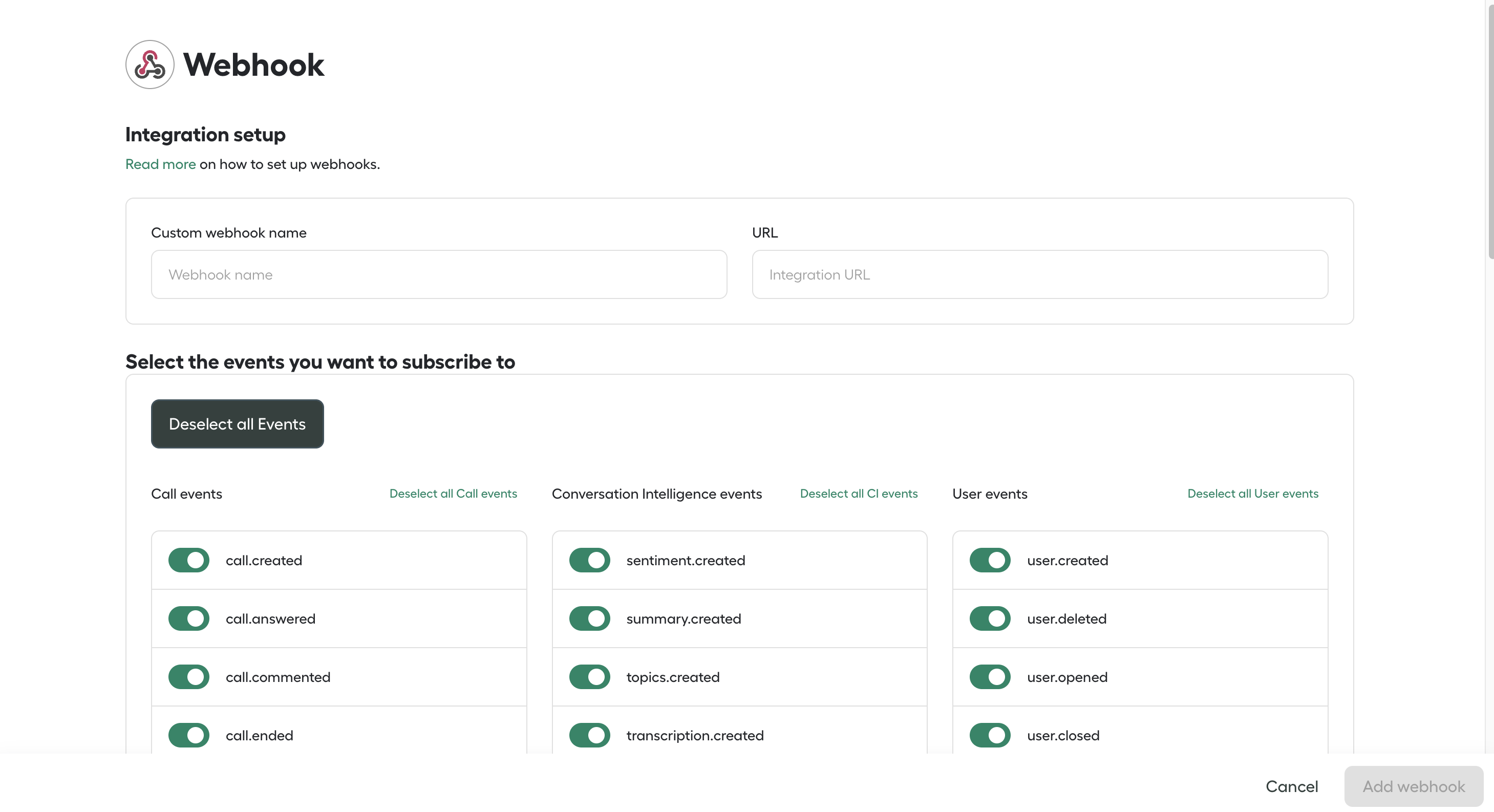
Webhook usage
Make sure your server can receive
POST requests, reads JSON format and always answers a 200 HTTP Code!
During development, you can create SSH tunnels to your local environment. At Aircall, we use and recommend ngrok which is free and open-source.
Web server
Once the endpoints are registered, a simple web server is needed in order to receive events.
Then, Aircall will send a POST request to the Webhook's URL each time an event occurs with a JSON payload body.
The Web server must be publicly available, Aircall does not provide a list of static IP addresses to whitelist.
Please note an event will be delivered at least once, if generated, but events might not be delivered in a specific sequence/order
Automatic deactivation
If webhook delivery fails, Aircall will retry the event up to 50 times. If the issue persists after all retries, the webhook will be automatically disabled and no further events will be sent. A notification will also appear on the Aircall Dashboard indicating that the webhook has been disabled.
Once disabled, Aircall will continue retrying the failed events for up to 12 hours. If a successful response is received for any of the failed events during this period, the webhook will be automatically re-enabled.
Admin users can receive email notifications when a webhook is disabled or re-enabled by turning on email notifications in User Settings within the Aircall Dashboard.
A request is considered failed if the server responds with an HTTP status code outside the 2xx range, or if the request times out. To prevent your webhook from being deactivated, ensure your server always returns a 200 HTTP status code.
Aircall's HTTP requests sent to external web servers are set up to timeout after 5 seconds.
Filtering by Numbers
If the integration is built using the OAuth authentication method, Admins will be able to filter from which Numbers they want to receive Call events from on their Aircall Dashboard.
If the integration is using the Basic Auth method, Call webhook events will be sent for all Numbers of a Company.
Payload
Webhook events are sent with a JSON payload attached.
This payload mixes the JSON formatting of an Aircall's object (User, Number, Call, Contact) and some metadata like an absolute timestamp or the name of the event.
-
Webhook attributes
-
resourceStringName of the resource for this event.Can be
number,user,contactorcall. -
eventStringEvent's name for this payload.See the complete list here.
-
timestampIntegerUNIX timestamp for when the payload was built, in UTC.
-
tokenStringToken associated to the Webhook. Use it to identify from which Aircall account a Webhook event is sent from.
-
dataObjectModelization of the
resourceat thetimestampvalue.
Payload{
  "resource": "number",
  "event": "number.closed",
  "timestamp": 1585001020,
  "token": "45XXYYZZa08",
  "data": {
    "id": 456,
    "direct_link": "https://api.aircall.io/v1/numbers/123",
    "name": "My first Aircall Number",
    "digits": "+33 1 76 36 06 95",
    "country": "FR",
    "time_zone": "Europe/Paris",
    "open": false,
    "users": [
      {
        "id": 456,
        "direct_link": "https://api.aircall.io/v1/users/456",
        "name": "Madelaine Dupont",
        "email": "madelaine.dupont@aircall.io",
        "available": false,
        "language": "en-US"
      }
    ]
  }
}
User events V1
The following events refers to the User object.
Users can be invited by Aircall Admin users, from the Aircall Dashboard, or via the Public API (see here).
This version of User events V1 will be deprecated soon. Please migrate to User events V2.
user.created
Sent when new users are invited in an Aircall company.
Payload{
  "event": "user.created",
  "resource": "user",
  "timestamp": 1585601319,
  "token": "45XXYYZZa08",
  "data": {
    // the User v1 object
  }
}
user.deleted
Sent when users are deleted from an Aircall company by Admin users.
Payload{
  "event": "user.deleted",
  "resource": "user",
  "timestamp": 1589609314,
  "token": "45XXYYZZa08",
  "data": {
    // the User v1 object
  }
}
user.connected
Sent when users open Aircall Workspace.
Payload{
  "event": "user.connected",
  "resource": "user",
  "timestamp": 158555000,
  "token": "45XXYYZZa08",
  "data": {
    // the User v1 object
  }
}
user.disconnected
Sent when users close Aircall Workspace.
Payload{
  "event": "user.disconnected",
  "resource": "user",
  "timestamp": 1585603000,
  "token": "45XXYYZZa08",
  "data": {
    // the User v1 object
  }
}
user.opened
Sent when users become available according to their working hours.
Payload{
  "event": "user.opened",
  "resource": "user",
  "timestamp": 158556187,
  "token": "45XXYYZZa08",
  "data": {
    // the User v1 object
  }
}
user.closed
Sent when users become unavailable according to their working hours.
For receiving substatus or unavailability reason selected by a user in Aircall Workspace in
user.closed event, please reach out to Aircall support team at support.aircall.io to enable it for your company. Also, please note that this will result in two user.closed events being sent to you i.e. 1st one with just availability_status and 2nd one with substatus as selected by the user in Aircall Workspace. So please ensure to handle the two events at your end and not to treat them as duplicate events.
Payload{
  "event": "user.closed",
  "resource": "user",
  "timestamp": 158554819,
  "token": "45XXYYZZa08",
  "data": {
    // the User v1 object
  }
}
user.wut_start
Sent when a user starts their wrap-up time (WUT) work according to their settings.
If wrap up time is set as zero and have mandatory call tagging enabled,
user.wut_start event will be sent if user tags the call at the end of the call. However if call was tagged during the call(having mandatory call tagging enabled), the event would not be sent.
Payload{
  "event": "user.wut_start",
  "resource": "user",
  "timestamp": 158554819,
  "token": "45XXYYZZa08",
  "data": {
    // the User v1 object
  }
}
user.wut_end
Sent when a user finishes their wrap-up time (WUT) work according to their settings.
If wrap up time is set as zero and have mandatory call tagging enabled,
user.wut_end event will be sent if user tags the call at the end of the call. However if call was tagged during the call(having mandatory call tagging enabled), the event would not be sent.
Payload{
  "event": "user.wut_end",
  "resource": "user",
  "timestamp": 158554819,
  "token": "45XXYYZZa08",
  "data": {
    // the User v1 object
  }
}
User events V2
user.created.v2
Sent when new users are invited in an Aircall company.
Payload{
  "event": "user.created.v2",
  "resource": "user",
  "timestamp": 1585601319,
  "token": "45XXYYZZa08",
  "data": {
    // the User v2 object
  }
}
user.deleted.v2
Sent when users are deleted from an Aircall company by Admin users.
Payload{
  "event": "user.deleted.v2",
  "resource": "user",
  "timestamp": 1589609314,
  "token": "45XXYYZZa08",
  "data": {
    // the User v2 object
  }
}
user.connected.v2
Sent when users open Aircall Workspace.
Payload{
  "event": "user.connected.v2",
  "resource": "user",
  "timestamp": 158555000,
  "token": "45XXYYZZa08",
  "data": {
    // the User v2 object
  }
}
user.disconnected.v2
Sent when users close Aircall Workspace.
Payload{
  "event": "user.disconnected.v2",
  "resource": "user",
  "timestamp": 1585603000,
  "token": "45XXYYZZa08",
  "data": {
    // the User v2 object
  }
}
user.opened.v2
Sent when users become available according to their working hours.
Payload{ "event": "user.opened.v2", "resource": "user", "timestamp": 158556187, "token": "45XXYYZZa08", "data": { // the User v2 object } }
user.closed.v2
Sent when users become unavailable according to their working hours.
For receiving substatus or unavailability reason selected by a user in Aircall Workspace in
user.closed.v2 event, please reach out to Aircall support team at support.aircall.io to enable it for your company. Also, please note that this will result in two user.closed.v2 events being sent to you i.e. 1st one with just availability_status and 2nd one with substatus as selected by the user in Aircall Workspace. So please ensure to handle the two events at your end and not to treat them as duplicate events.
Payload{ "event": "user.closed.v2", "resource": "user", "timestamp": 158554819, "token": "45XXYYZZa08", "data": { // the User v2 object } }
user.wut_start.v2
Sent when user start their wrap up time (WUT) work according to their setting.
If wrap up time is set as zero and have mandatory call tagging enabled,
user.wut_start event will be sent if user tags the call at the end of the call. However if call was tagged during the call(having mandatory call tagging enabled), the event would not be sent.
Cold transferring a call to a teammate transfers the existing call leg and does not have any wrap-up time associated with it, so this event will not be generated for such calls. However, if a call is cold transferred to an internal Aircall number or an external line, this event will be generated as wrap-up time is required in these cases.
Payload{ "event": "user.wut_start.v2", "resource": "user", "timestamp": 158554819, "token": "45XXYYZZa08", "data": { // the User v2 object } }
user.wut_end.v2
Sent when user finishes their wrap up time (WUT) work according to their setting.
If wrap up time is set as zero and have mandatory call tagging enabled,
user.wut_end event will be sent if user tags the call at the end of the call. However if call was tagged during the call(having mandatory call tagging enabled), the event would not be sent.
Cold transferring a call to a teammate transfers the existing call leg and does not have any wrap-up time associated with it, so this event will not be generated for such calls. However, if a call is cold transferred to an internal Aircall number or an external line, this event will be generated as wrap-up time is required in these cases.
Payload{ "event": "user.wut_end.v2", "resource": "user", "timestamp": 158554819, "token": "45XXYYZZa08", "data": { // the User v2 object } }
Call events
The following events refers to the Call object.
If your app is using the OAuth authentication method, Admins will be able to filter from which Numbers they want to receive Call events from on their Aircall Dashboard.
If your app is using the Basic Auth method, Call webhook events will be sent for all Numbers of a Company. You can implement this logic on your server!
Inbound calls
Here is a diagram showing when call events are being triggered during inbound calls:
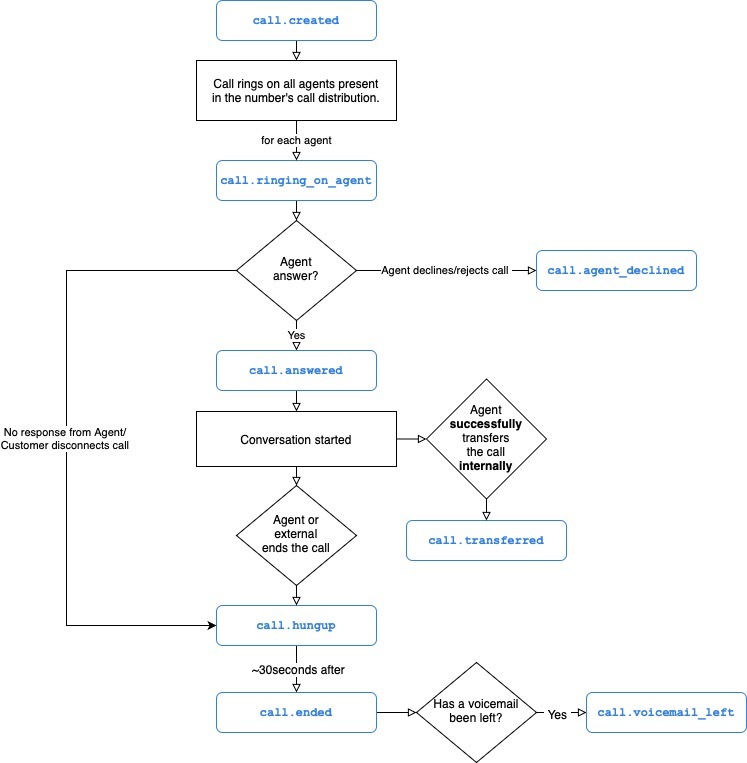
Outbound calls
Here is a diagram showing when call events are being triggered during outbound calls:
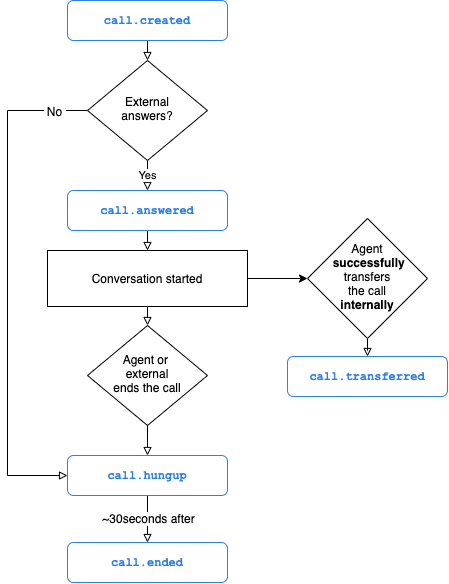
Please note the following attributes have different naming conventions in Call APIs and Webhook events :
i. sid and call_uuid - Both refers to same value but in call APIs attribute is called sid and in case of call events its called call_uuid.
ii. participants and conference_participants - Both refers to same value but in call APIs attribute is called conference_participants and in case of call events its called participants.
Payload{ "resource": "call", "event": "call.created", "timestamp": 1732622896, "token": "cebcaac65XXXXXXXXXx", "data": { "id": 123, "direct_link": "https://api.aircall.io/v1/calls/123", "direction": "outbound", "call_uuid": "CAed058bba60a84d62c77cee898a852b05", "status": "initial", "missed_call_reason": null, "started_at": 1732622895, "answered_at": null, "ended_at": null, "duration": 0, "cost": "0", "hangup_cause": null, "voicemail": null, "voicemail_short_url": null, "recording": null, "recording_short_url": null, "asset": null, "raw_digits": "+1 800-123-4567", "participants":[ { "phone_number" : "+1 800-123-4567" "type" : "external" }, { "phone_number" : "+3512345678" "type" : "external" }, { "id" : 123, "name": "John Doe", "type" : "user" } ], "user": { //the User Object }, "contact": { //the Contact Object }, "number": { //the Number Object } } }
call.created
Sent when a call is started.
- For inbound calls, this event is sent when a call hits an Aircall number.
- For outbound calls, this event is sent when Agents start a call from their Phone.
Please note in an IVR flow, the customer should link an Integration to either Parent or Child number in IVR Widget to receive only one call.created event. If Child number is linked to Integration then please reach out to Aircall Support team on support.aircall.io to inform and get IVR Call redirection enabled for Child number.
Linking both Parent and Child will result in duplicate call.created event generated for each number and should be handled by the customer at their end.
Payload{ "event": "call.created", "resource": "call", "timestamp": 1585001000, "token": "45XXYYZZa08", "data": { // the Call object } }
call.ringing_on_agent
Sent when calls start ringing on Agents' Phone or on a Team. In case a call rings on a team, Team name along with other details will be included in the Teams attribute.
Payload{ "event": "call.ringing_on_agent", "resource": "call", "timestamp": 1585001010, "token": "45XXYYZZa08", "data": { // the Call object } }
call.agent_declined
Sent when Agents decline inbound calls.
Payload{ "event": "call.agent_declined", "resource": "call", "timestamp": 1585001020, "token": "45XXYYZZa08", "data": { // the Call object } }
call.answered
For inbound calls, this event is sent only when one Agent picks the call up.
For outbound calls, this event is sent only when the external person picks the call up.
The call
direction is in the data object present in the payload.
Payload{ "event": "call.answered", "resource": "call", "timestamp": 1585001020, "token": "45XXYYZZa08", "data": { // the Call object } }
call.transferred
Calls can be transferred either by Agents from their Aircall Workspace, or via the Public API (see here).
- When calls are transferred to another Agent, this event is sent when the other agent answers the call.
- When calls are transferred to a Team, this event is sent when one agent answers the call.
- When calls are transferred to an external number via the Aircall Workspace, this event is not sent.
- When calls are transferred to an external number via the Public API, this event is sent without the transferred_to field in the payload.
If the external party does not answer the call,
call.transferred event will not be sent and call will return back to the original agent.
If a call is transferred to an internal number by dialling it in Aircall Workspace, then it will be considered as an external transfer and not as internal transfer. In this scenario,
call.external_transferred event will be sent instead of call.transferred event.
More details on Transferring calls in our Knowledge Base.
Payload{ "event": "call.transferred", "resource": "call", "timestamp": 1585001030, "token": "45XXYYZZa08", "data": { // the Call object } }
call.external_transferred
Calls can be transferred to an external number via Ring To widget in the Call Routing flow or by Agents from their Aircall Workspace.
- When calls are transferred to an external number via the Aircall Workspace, this event is sent when the external agent answers the call.
- When calls are transferred to an external number via the Aircall Workspace, this event is sent without the
transferred_tofield in the payload, instead it will have a new fieldexternal_transferred_towhich will be a string indicating the external number. - When calls are transferred to an external number via Ring To widget in the Call Routing flow, this event will include a new field
external_caller_numberwhich will be a string indicating the caller's number.
In case of call transferred via Aircall Workspace, If the external party does not answer the call,
call.external_transferred event will not be sent and call will return back to the original agent.
Payload{ "event": "call.external_transferred", "resource": "call", "timestamp": 1585001030, "token": "45XXYYZZa08", "data": { // the Call object "external_transferred_to": "919205152487", //New field "external_caller_number" : "+3253281310" //New field } }
call.unsuccessful_transfer
Calls can be transferred either by Agents from their Aircall Workspace, or via the Public API (see here).
- For calls that are unsuccessfully transferred to another Agent, this event is sent when the other agent doesn't answer the call.
- For calls that are unsuccessfully transferred to a Team, this event is sent when no agent answers the call.
- For calls that are unsuccessfully transferred to an external number via the Aircall Workspace, this event is not sent.
- For calls that are unsuccessfully transferred to an external number via the Public API, this event is sent when the external line is busy and without the transferred_to field in the payload.
More details on Transferring calls in our Knowledge Base.
Payload{ "event": "call.unsuccessful_transfer", "resource": "call", "timestamp": 1585001030, "token": "45XXYYZZa08", "data": { // the Call object } }
call.hungup
Sent immediately after calls are hung up.
Some fields present in the payload body might be null as Aircall needs ~30sec to gather extra data like the duration and recording files.
This event must only be used to know when a call is hung up whereas
call.ended and call.voicemail_left can be used to retrieve extra data such as the recording file, call duration etc.
Payload{ "event": "call.hungup", "resource": "call", "timestamp": 1585001040, "token": "45XXYYZZa08", "data": { // the Call object } }
call.ended
Sent ~30sec after calls are actually hung up as Aircall server needs time to gather and process extra data like duration and recording files.
This event must only be used to retrieve all calls information whereas
call.hungup can be used to know in real time when a call is ended.
If the call or voicemail recording link is missing in call.ended event then the event call.comm_assets_generated can be referred/subscribed to, to receive the recording links when they are available.
Payload{ "event": "call.ended", "resource": "call", "timestamp": 1585002050, "token": "45XXYYZZa08", "data": { // the Call object } }
call.voicemail_left
Sent ~30sec after calls end if a voicemail is present. Voicemail file will be included in the data object under the voicemail and asset fields.
Payload{ "event": "call.voicemail_left", "resource": "call", "timestamp": 1585002050, "token": "45XXYYZZa08", "data": { // the Call object } }
call.commented
Calls can be commented, either by Agents from their Aircall Workspace, or via the Public API (see here).
This event is sent when this action is performed and a new comment is created on a Call.
If the call is ongoing and the action is done by the agent in the in-call view, this event will be triggered at the end of the call.
Payload{ "event": "call.commented", "resource": "call", "timestamp": 1585601319, "token": "45XXYYZZa08", "data": { // the Call object } }
call.tagged
Calls can be tagged either by Agents from their Aircall Workspace, or via the Public API (see here).
This event is sent when this action is performed.
If the call is ongoing and the action is done by the agent in the in-call view, this event will be triggered at the end of the call.
Payload{ "event": "call.tagged", "resource": "call", "timestamp": 1585601319, "token": "45XXYYZZa08", "data": { // the Call object } }
call.untagged
Tags can be removed from calls by Agents from their Aircall Workspace.
This event is sent when this action is performed and does not apply on ongoing calls.
Payload{ "event": "call.untagged", "resource": "call", "timestamp": 1585601319, "token": "45XXYYZZa08", "data": { // the Call object } }
call.assigned
Calls can be assigned to an Agent by another Agent, from Aircall Workspace.
This event is sent when this action is performed.
Payload{ "event": "call.assigned", "resource": "call", "timestamp": 1585601319, "token": "45XXYYZZa08", "data": { // the Call object } }
call.archived
Calls can be archived (=mark as done) either by Agents from their Aircall Workspace, or via the Public API (see here).
This event is sent when this action is performed.
Payload{ "event": "call.archived", "resource": "call", "timestamp": 1585601319, "token": "45XXYYZZa08", "data": { // the Call object } }
call.hold
Sent when a call is put on hold.
Payload{ "event": "call.hold", "resource": "call", "timestamp": 1585001000, "token": "45XXYYZZa08", "data": { // the Call object } }
call.unhold
Sent when a call is removed from on hold.
Payload{ "event": "call.unhold", "resource": "call", "timestamp": 1585001000, "token": "45XXYYZZa08", "data": { // the Call object } }
call.ivr_option_selected
Sent when a caller makes a selection in an IVR step within a Smartflow. This includes both:
- Keypad inputs in a traditional IVR (menu selection), and
- Any caller input captured via the Input IVR widget (e.g., numeric input for account ID).
Use this event to track which routing path a caller chose during these IVR interactions.
Note: If the "Display caller’s input" setting is disabled in the Input IVR widget, the actual input value will not be included in the event payload.
Payload{ "event": "call.ivr_option_selected", "resource": "call", "timestamp": 1585001040, "token": "45XXYYZZa08", "data": { // the Call object } }
call.comm_assets_generated
This event is sent when communication assets for a call i.e. call recording or voicemail is generated. Only one event per call is sent. This event can be referenced if call recording or voicemail link is not available in call.ended event.
This event will be sent only when a call is recorded or a voicemail is left.
Payload{ "event": "call.comm_assets_generated", "resource": "call", "timestamp": 1585001040, "token": "45XXYYZZa08", "data": { // the Call object } }
Number events
The following events refers to the Number object.
Numbers can be bought and deleted by Aircall Admin users.
number.created
Sent when new numbers are created on Aircall accounts.
Payload{ "event": "number.created", "resource": "number", "timestamp": 1585601319, "token": "45XXYYZZa08", "data": { // the Number object } }
number.deleted
Sent when numbers are deleted from Aircall accounts by Admin users.
Payload{ "event": "number.deleted", "resource": "number", "timestamp": 1589609314, "token": "45XXYYZZa08", "data": { // the Number object } }
number.opened
Note: This event has been deprecated and is no longer supported for numbers using Smartflows. Time-based routing should now be managed using the Time Rule and Date Rule widgets within Smartflows.
Payload{ "event": "number.opened", "resource": "number", "timestamp": 158556187, "token": "45XXYYZZa08", "data": { // the Number object } }
number.closed
Note: This event has been deprecated and is no longer supported for numbers using Smartflows. Time-based routing should now be managed using the Time Rule and Date Rule widgets within Smartflows.
Payload{ "event": "number.closed", "resource": "number", "timestamp": 158554819, "token": "45XXYYZZa08", "data": { // the Number object } }
Message events
The following events refers to the Message object. This covers messaging events for SMS, MMS, and WhatsApp.
Messages can be sent to or received from Aircall numbers.
Inbound message
Here is a diagram showing when message events are being triggered during inbound message:
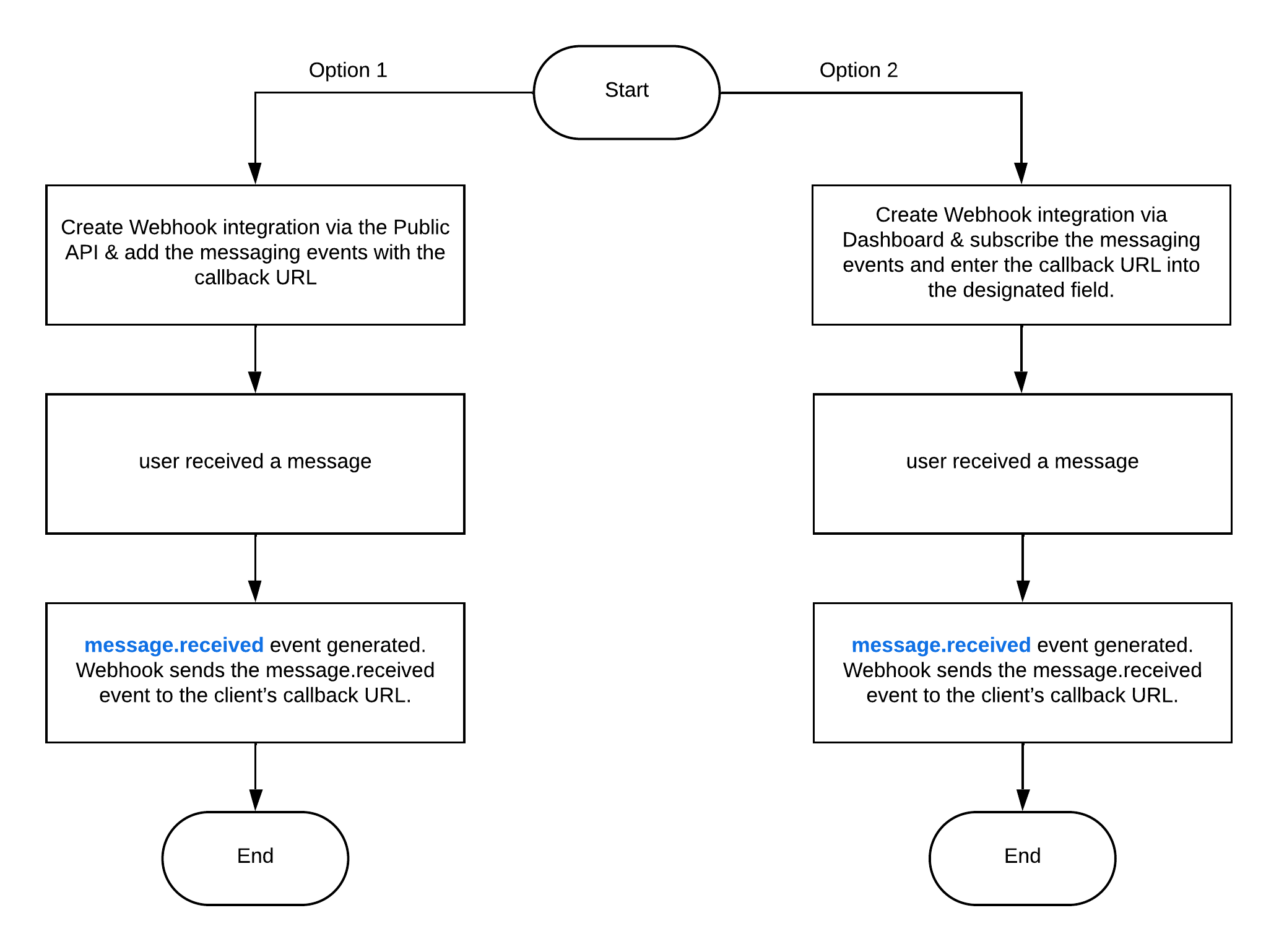
Outbound message
Here is a diagram showing when message events are being triggered during outbound message:
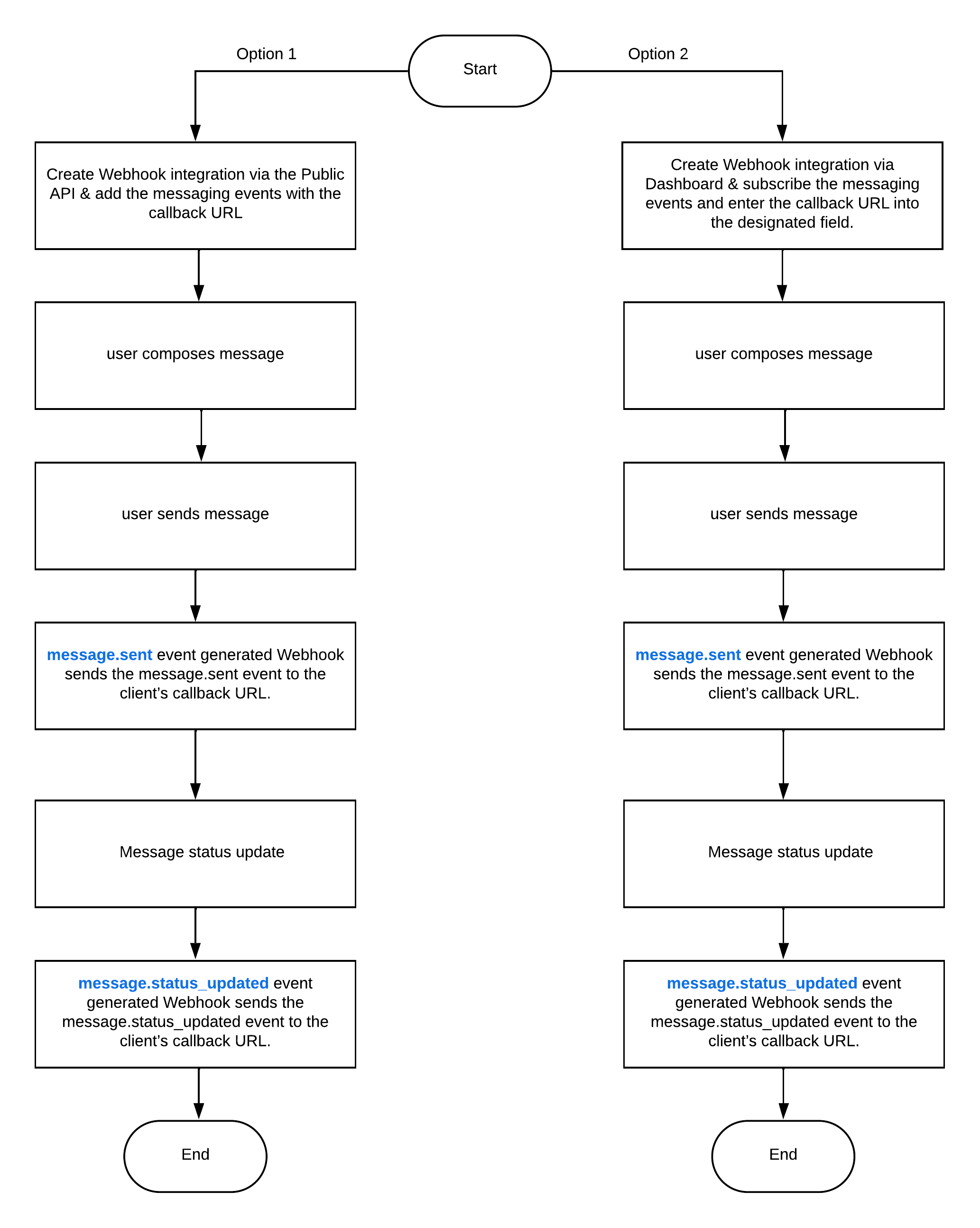
message.sent
Sent when a new message is sent from Aircall accounts.
Payload{ "event": "message.sent", "resource": "message", "timestamp": 1585601319, "token": "45XXYYZZa08", "data": { // the Message object // the Number object // the Contact object } }
message.received
Sent when a new message is received to Aircall accounts.
Payload{ "event": "message.received", "resource": "message", "timestamp": 1589609314, "token": "45XXYYZZa08", "data": { // the Message object // the Number object // the Contact object } }
message.status_updated
Sent when the message from Aircall accounts has an updated status.
Payload{ "event": "message.status_updated", "resource": "message", "timestamp": 158556187, "token": "45XXYYZZa08", "data": { // the Message object // the Number object // the Contact object } }
WhatsApp username message
The whatsapp_username_message.* events describe WhatsApp conversations identified by a Business-Scoped User ID (BSUID).
A BSUID identifies a WhatsApp user within a Meta business portfolio. It is not a phone number, username, or UUID.
You receive these events when:
- You have created a webhook.
- Your webhook subscribes to the relevant
whatsapp_username_message.*events. - Aircall identifies the conversation by a BSUID because no phone number is available.
This typically applies to new contacts with a WhatsApp username and no prior phone-based exchange with your business.
Existing contacts can normally provide both a phone number and a BSUID, even with a WhatsApp username.
If a phone number is available, Aircall uses it and the conversation sends message.* events.
A subscription to username events does not change that routing.
See Meta's phone-number rules and Twilio's WhatsApp identity documentation.
-
Message
-
idStringIdentifier of the message.Required.
-
external_user_idStringBSUID of the external WhatsApp user.Required.
-
external_user_nameStringWhatsApp username.Optional.
-
external_user_display_nameStringWhatsApp profile name, distinct from the username.Optional.
-
external_numberStringExternal phone number, only when a separate phone number is available.Optional. Absent for BSUID-only identities.
-
bodyStringText of the message.Optional. Sent and received events only. Can be absent for media-only or template messages.
-
created_atStringCreation time of the message in ISO 8601 format.Optional. Sent and received events only.
-
statusStringMessage status as a lowercase string.Required for received and status events. Absent from sent events.
-
sub_statusStringReason for the status, when available.Optional. Status events only.
-
typeStringType of the message, for example
text,image, ortemplate.Optional. Sent and received events only. -
parent_idStringIdentifier of the message that this message replies to.Optional. Sent and received events only.
-
originStringOrigin of the message, for example
native.Optional. -
delivery_methodString or nullDelivery method, when available.Optional. Can be
null. -
metadataObjectJSON object with information specific to the message type.Optional. Not a JSON string.
-
template_contentObjectJSON object with the template content of a sent message.Optional. Not a JSON string.
-
media_detailsArray of ObjectsAttached media files, each with
file_name,file_type, andpresigned_url.Optional.file_typeis a full MIME type, such asimage/jpeg. -
whatsapp_service_window_closing_timeStringClosing time of the WhatsApp customer service window, in ISO 8601 format.Optional. Received events only.
-
whatsapp_free_entry_point_opportunity_closing_timeStringClosing time of the opportunity to open a free-entry-point window, in ISO 8601 format.Optional. Received events only.
-
whatsapp_free_entry_point_closing_timeStringClosing time of the free-entry-point window in ISO 8601 format.Optional. Status events only.
-
whatsapp_message_categoryStringWhatsApp template category:
marketing,utility, orauthentication.Optional. Status events only. -
whatsapp_message_typeStringWhatsApp billing type:
service,regular,free_entry_point, orfree_customer_service.Optional. Status events only.serviceidentifies a free-form message without a template. -
recipient_countryStringTwo-letter country code for the recipient, for example
GB.Optional. Status events only. -
numberObjectNumber object for the Aircall number.Optional.
-
userObjectUser object for the Aircall agent.Optional. Sent and status events only.
-
contactObjectContact object matched by a separate external phone number.Optional. No phone-based lookup occurs for a BSUID-only identity.
Upstream serialization can omit default values.
These events do not include channel, media counts, or media sizes, and do not provide a BSUID-to-phone lookup.
The examples omit optional Number, User, and Contact objects.
whatsapp_username_message.sent
Sent when Aircall sends a WhatsApp message in a conversation identified by a BSUID.
The payload uses the WhatsApp username message fields and can include Number and User objects.
This event includes created_at in ISO 8601 format, when available, but does not include status.
Payload{ "resource": "message", "event": "whatsapp_username_message.sent", "timestamp": 1791531621, "token": "example-webhook-token", "data": { "id": "00000000-0000-4000-8000-000000000001", "external_user_id": "GB.ExampleUser123", "external_user_display_name": "Example Customer", "origin": "native", "body": "Hello, how can we help?", "created_at": "2026-10-09T07:40:20.661Z", "type": "text", "delivery_method": null // the Number object // the Contact object } }
whatsapp_username_message.received
Sent when an Aircall number receives a WhatsApp message in a conversation identified by a BSUID.
The payload uses the WhatsApp username message fields and can include the Number object.
The status is received. This event includes created_at in ISO 8601 format, when available.
Payload{ "resource": "message", "event": "whatsapp_username_message.received", "timestamp": 1791531637, "token": "example-webhook-token", "data": { "id": "00000000-0000-4000-8000-000000000002", "external_user_id": "GB.ExampleUser123", "external_user_display_name": "Example Customer", "origin": "native", "body": "I have a question about my order.", "created_at": "2026-10-09T07:40:37.351Z", "status": "received", "type": "text", "metadata": { "type": "text" }, "delivery_method": null, "whatsapp_service_window_closing_time": "2026-10-10T07:40:27.341Z" // the Number object // the Contact object } }
whatsapp_username_message.status_updated
Sent when a WhatsApp message in a conversation identified by a BSUID has an updated delivery status.
The payload uses the WhatsApp username message fields and can include Number and User objects.
The required status is a lowercase string, such as delivered, read, or undelivered.
Twilio's failed and undelivered statuses both become undelivered, with an optional sub_status string that describes the reason.
Aircall skips updates without a status. It skips sent updates to avoid duplicate send notifications.
This payload does not include created_at or updated_at.
Payload{ "resource": "message", "event": "whatsapp_username_message.status_updated", "timestamp": 1791531628, "token": "example-webhook-token", "data": { "id": "00000000-0000-4000-8000-000000000001", "external_user_id": "GB.ExampleUser123", "external_user_display_name": "Example Customer", "origin": "native", "status": "delivered", "delivery_method": null, "whatsapp_message_type": "service", "recipient_country": "GB" // the Number object // the Contact object } }
group_message.sent
Sent when a new group message is sent from an Aircall number to a group conversation.
Payload{ "resource": "message", "event": "group_message.sent", "timestamp": 1772530502, "token": "45XXYYZZa08", "data": { "id": "a3f7c821-4e92-4b1d-8c6f-0d5e2a9b3f74", "group_conversation_id": "b8d2e047-7f3a-4c85-9e1d-6a4b0c7f2e38", "participants": [ "12025550147", "13105550293", "16465550812" ], "body": "test", "status": "sent", "created_at": "2026-03-03T09:35:00.520Z", "number": { // the Number object - the Aircall number that sent the message } } }
group_message.received
Sent when a new group message is received on an Aircall number from a group conversation.
Payload{ "resource": "message", "event": "group_message.received", "timestamp": 1772530510, "token": "45XXYYZZa08", "data": { "id": "c1b4d763-2a85-4f09-b7e3-9c8d1f5a6e20", "group_conversation_id": "e9f3a512-6c74-48b2-a0d5-3b7e9c1f8d46", "external_number": "+1 312 555 0174", // The external number that sent the message "participants": [ "13125550174", "12125550389", "14155550621" ], "body": "test", "status": "received", "created_at": "2026-03-03T09:35:03.475Z", "number": { // the Number object - The Aircall number that received the message } } }
group_message.status_updated
Sent when the delivery status of a group message has been updated. One event is triggered per external participant in the group conversation.
Payload{ "resource": "message", "event": "group_message.status_updated", "timestamp": 1772530514, "token": "45XXYYZZa08", "data": { "id": "a3f7c821-4e92-4b1d-8c6f-0d5e2a9b3f74", "group_conversation_id": "b8d2e047-7f3a-4c85-9e1d-6a4b0c7f2e38", "external_number": "+1 646 555 0293", "status": "delivered", "number": { // the Number object - the Aircall number that sent the message } } }
Contact events
The following events refers to the Contact object.
Contacts can be created, updated and deleted via Aircall Workspace and via the Public API (see here).
Please note that in the payload of Contact Webhook Events, the
created_at and updated_at attributes will contain timestamps in UTC format (i.e., YYYY-MM-DDTHH:mm:ssZ)
contact.created
Sent when new contacts are created on an Aircall account.
Payload{ "event": "contact.created", "resource": "contact", "timestamp": 1585601319, "token": "45XXYYZZa08", "data": { // the Contact object } }
contact.updated
Sent when contacts are updated on an Aircall account.
Payload{ "event": "contact.updated", "resource": "contact", "timestamp": 158561587, "token": "45XXYYZZa08", "data": { // the Contact object } }
contact.deleted
Sent when contacts are deleted on an Aircall account.
Payload{ "event": "contact.deleted", "resource": "contact", "timestamp": 158562010, "token": "45XXYYZZa08", "data": { // the Contact object } }
Integration events
The following events refer to the Integration object.
Integrations can be created and deleted by Aircall Admin users.
integration.deleted
Sent when an integration is deleted. This event is only sent for webhooks created by applications that use Aircall OAuth credentials.
This event is useful for technology partners, to make sure uninstall flows are synced between Aircall and their application. When the integration is deleted in Aircall, we recommend deleting it on your side as well.
Payload{ "event": "integration.deleted", "resource": "integration", "timestamp": 158554819, "token": "45XXYYZZa08", "data": { "integration_id": 42, "company_id": 1 } }
Conversation Intelligence events
The following events refers to the Conversation Intelligence object.
Conversation Intelligence Events are AI-generated events related to AI entities such as Call Summary, Key Topics, Call Transcription, Sentiment Analysis, Next Actions, Playbook results etc.
sentiment.created
Sent after Sentiment Analysis is generated for a Call and indicates customer’s sentiment/mood on the call.
This event is only generated when a company has signed up for Aircall AI package
Payload{ "event": "sentiment.created", "resource": "conversation_intelligence", "timestamp": 1585001000, "token": "45XXYYZZa08", "data": { // the Conversation Intelligence object } }
summary.created
Sent after call summary is generated for a call.
This event is only generated when a company has signed up for Aircall AI package
Payload{ "event": "summary.created", "resource": "conversation_intelligence", "timestamp": 1585001000, "token": "45XXYYZZa08", "data": { // the Conversation Intelligence object } }
topics.created
Sent after Key topics for a Call are generated.
This event is only generated when a company has signed up for Aircall AI package
Payload{ "event": "topics.created", "resource": "conversation_intelligence", "timestamp": 1585001000, "token": "45XXYYZZa08", "data": { // the Conversation Intelligence object } }
transcription.created
Sent after Transcription is generated for a Call.
Transcription won't be available via transcription.created event. It will only notify availability of Transcription for a call. Please use Retrieve a Transcription API to fetch the Transcription for a specific Call.
This event is only generated when a company has signed up for Aircall AI package
Payload{ "event": "transcription.created", "resource": "conversation_intelligence", "timestamp": 1585001000, "token": "45XXYYZZa08", "data": { // the Conversation Intelligence object } }
action_item.created
Sent after Transcription is generated for a Call. Several action items can be generated for the same call.
This event is only generated when a company has signed up for Aircall AI package
Payload{ "event": "action_item.created", "resource": "conversation_intelligence", "timestamp": 1585001000, "token": "45XXYYZZa08", "data": { // the Conversation Intelligence object } }
playbook_result.created
Sent after playbook is generated for a Call.
This event is only generated when a user has purchased a license for AI Assist Pro
Payload{ "event": "playbook_result.created", "resource": "conversation_intelligence", "timestamp": 1585001000, "token": "45XXYYZZa08", "data": { // the Conversation Intelligence object } }
playbook_result.updated
Sent after playbook result is updated for a Call.
This event is only generated when a user has purchased a license for AI Assist Pro
Payload{ "event": "playbook_result.updated", "resource": "conversation_intelligence", "timestamp": 1585001000, "token": "45XXYYZZa08", "data": { // the Conversation Intelligence object } }
realtime_transcription.utterances_received
Sent when utterances are received in real-time during active calls whenever speech is transcribed. This enables live call monitoring, real-time analytics, and immediate assistance features.
For complete call transcription tracking, combine this event with call.created and call.ended events.
This event is only generated when a company has signed up for AI Assist Pro and has real-time transcription enabled
Payload{ "resource": "conversation_intelligence", "event": "realtime_transcription.utterances_received", "timestamp": 1693483200000, "token": "webhook-token", "data": { // the Conversation Intelligence object } }
custom_summary.result_created
Sent after custom summary is generated for a Call.
This event is only generated when a user has purchased a license for AI Assist Pro
Payload{ "event": "custom_summary.result_created", "resource": "conversation_intelligence", "timestamp": 1585001000, "token": "45XXYYZZa08", "data": { // the Conversation Intelligence object } }
custom_summary.result_updated
Sent after custom summary is updated for a Call.
This event is only generated when a user has purchased a license for AI Assist Pro
Payload{ "event": "custom_summary.result_updated", "resource": "conversation_intelligence", "timestamp": 1585001000, "token": "45XXYYZZa08", "data": { // the Conversation Intelligence object } }
call_evaluation.created
Sent after a call evaluation is created.
This event is only generated when a user has purchased a license for AI Assist or AI Assist Pro
The
data field contains a subset of the Call Evaluations Object. To retrieve the full evaluation details including scorecard, categories, and questions, use the Retrieve call evaluations endpoint.
Payload{ "event": "call_evaluation.created", "resource": "conversation_intelligence", "timestamp": 1585001000, "token": "45XXYYZZa08", "data": { "call_id": 123, "created_at": "2025-11-18T10:00:00Z", "updated_at": "2025-11-18T10:00:00Z", "created_by": 101, "updated_by": null, "scorecard_name": "some name", "ai_generated": true, "reviewee_id": 123, "reviewer_id": null } }
call_evaluation.updated
Sent after a call evaluation is updated.
This event is only generated when a user has purchased a license for AI Assist or AI Assist Pro
The
data field contains a subset of the Call Evaluations Object. To retrieve the full evaluation details including scorecard, categories, and questions, use the Retrieve call evaluations endpoint.
Payload{ "event": "call_evaluation.updated", "resource": "conversation_intelligence", "timestamp": 1585001000, "token": "45XXYYZZa08", "data": { "call_id": 123, "created_at": "2025-11-18T10:00:00Z", "updated_at": "2025-11-18T10:00:00Z", "created_by": 101, "updated_by": 102, "scorecard_name": "some name", "ai_generated": true, "reviewee_id": 123, "reviewer_id": 343 } }
AI Voice Agent events
The following events refer to AI Voice Agent interactions and call handling.
AI Voice Agent Events are generated when calls are processed through Aircall's AI Voice Agent system, providing detailed information about voice agent interactions to help integrations better log and handle call information when AI Voice Agents are involved in the call flow.
Payload{ "resource": "ai_voice_agent", "event": "ai_voice_agent.started", "timestamp": 1585001000, "token": "45XXYYZZa08", "data": { "id": 123456789, "call_id": 123456789, "call_uuid": "CAxxxxxxxxxxxxxxxxxxxxxxxxxxxxxxxxx", "company_id": 1, "ai_voice_agent_id": "01XXXXXXXXXXXXXXXXXXXXXXXx", "ai_voice_agent_session_id": "xxxxxxxx-xxxx-xxxx-xxxx-xxxxxxxxxxxx", "ai_voice_agent_name": "AI Voice Agent", "number_id": 123456, "external_caller_number": "+1234567890", "aircall_number": "+0987654321", "created_at": 1585001000, "started_at": 1585001000, "initial_direction": "outbound" } }
ai_voice_agent.started
This event will be sent as soon as a call handled by AI Voice Agent has initiated/started.
This event is generated only if your Smartflow number has set up AI Voice Agent.
Payload{ "resource": "ai_voice_agent", "event": "ai_voice_agent.started", "timestamp": 1585001000, "token": "45XXYYZZa08", "data": { // the AI Voice Agent object } }
ai_voice_agent.ended
This event will be sent when a call handled by AI Voice Agent has ended.
This event is generated only if your Smartflow number has set up AI Voice Agent.
Payload{ "resource": "ai_voice_agent", "event": "ai_voice_agent.ended", "timestamp": 1585001000, "token": "45XXYYZZa08", "data": { // the AI Voice Agent object "ended_at": 1585001030, "call_end_reason": "escalated", "initial_direction": "outbound" } }
ai_voice_agent.escalated
This event will be sent when a call handled by AI Voice Agent has been escalated or transferred to a human agent.
This event is generated only if your Smartflow number has set up AI Voice Agent.
Payload{ "resource": "ai_voice_agent", "event": "ai_voice_agent.escalated", "timestamp": 1585001000, "token": "45XXYYZZa08", "data": { // the AI Voice Agent object "escalation_reason": "Caller requested to speak with support", "escalation_target": { "type": "branch", "destination": "Number Porting & Purchase" }, "initial_direction": "inbound" } }
ai_voice_agent.summary
This event will be sent on completion of a call handled by AI Voice Agent only if the agent successfully collected answers to intake questions configured on the agent (e.g., 'What is your full name?', 'What is your email address?').
This event is generated only if your Smartflow number has set up AI Voice Agent.
Payload{ "resource": "ai_voice_agent", "event": "ai_voice_agent.summary", "timestamp": 1585001000, "token": "45XXYYZZa08", "data": { // the AI Voice Agent object "extracted_data": { "question": "what is your name" "answer": "John Doe" }, "outbound_idempotency_key": "b3d7c1a2-4f5e-6a7b-8c9d-0e1f2a3b4c5d", "call_outcome": "HUMAN_ANSWERED", "initial_direction": "outbound" } }
Analytics events
The following events refer to asynchronous Analytics report exports. Subscribe to them to be notified when an export job started via Create an Analytics Report Export finishes, instead of polling the Retrieve an Analytics Report Export endpoint.
-
Attributes
-
idString (UUID)Unique identifier for the export job.Matches the
exportIDreturned by Create an Analytics Report Export. -
created_atString (ISO 8601)Timestamp when the export job was created, in UTC.
-
input_paramsString (JSON)Stringified JSON snapshot of the request parameters applied to this export.Provided for debugging —
JSON.parseto inspect. Treat the inner structure as opaque; the field set may evolve. -
formatStringFile format of the generated export.Only present on
analytics.report_created. Currently alwaysCSV. -
export_nameStringName of the export (caller-supplied via
exportOptions.exportName, or auto-generated).Only present onanalytics.report_created. -
is_zip_compressedBoolean
truewhen the generated file is delivered as a ZIP archive (typically for larger exports).Only present onanalytics.report_created. -
download_urlString (URI)Presigned URL to download the generated file.Only present on
analytics.report_created. Expires atdownload_url_expires_at. -
download_url_expires_atString (ISO 8601)Timestamp at which
download_urlstops working, in UTC.Only present onanalytics.report_created. Re-call Retrieve an Analytics Report Export with the sameidto mint a fresh URL while the export remains available. -
error_codeStringMachine-readable failure code, e.g.
EXPORT_QUERY_FAILED.Only present onanalytics.report_failed. -
error_messageStringHuman-readable failure reason. Includes the export
idas a reference for support tickets.Only present onanalytics.report_failed.
Payload{ "resource": "analytics", "event": "analytics.report_created", "timestamp": 1779730051, "token": "c779a2c9606c440f8adfb449654c7d8e", "data": { "id": "48c50ec9-751b-4f54-8790-c6881fe8de25", "created_at": "2026-05-25T17:27:30.610Z", "input_params": "{\"filter\":{...},\"options\":{...},\"dateRange\":{...},\"exportOptions\":{...}}", "format": "CSV", "export_name": "user-activity-availability-breakdown", "is_zip_compressed": false, "download_url": "https://aircall-analytics-exports.s3.amazonaws.com/exports/48c50ec9-751b-4f54-8790-c6881fe8de25/user-activity-availability-breakdown.csv?X-Amz-Signature=...", "download_url_expires_at": "2026-05-25T18:27:30.608Z" } }
analytics.report_created
This event is sent when an Analytics report export job finishes successfully. The payload includes a presigned download_url for the generated file — subscribe to this event to skip the GET polling loop.
download_url is presigned and time-limited (validity window indicated by download_url_expires_at). If the URL has expired by the time you process the event, call Retrieve an Analytics Report Export with the same id to mint a fresh URL while the export remains available.
Payload{ "resource": "analytics", "event": "analytics.report_created", "timestamp": 1779730051, "token": "c779a2c9606c440f8adfb449654c7d8e", "data": { "id": "48c50ec9-751b-4f54-8790-c6881fe8de25", "created_at": "2026-05-25T17:27:30.610Z", "input_params": "{\"filter\":{...},\"options\":{...},\"dateRange\":{...},\"exportOptions\":{...}}", "format": "CSV", "export_name": "user-activity-availability-breakdown", "is_zip_compressed": false, "download_url": "https://aircall-analytics-exports.s3.amazonaws.com/exports/48c50ec9-751b-4f54-8790-c6881fe8de25/user-activity-availability-breakdown.csv?X-Amz-Signature=...", "download_url_expires_at": "2026-05-25T18:27:30.608Z" } }
analytics.report_failed
This event is sent when an Analytics report export job fails. The payload includes error_code (a stable machine-readable identifier such as EXPORT_QUERY_FAILED) and error_message (a human-readable description that includes the export id for support reference).
Failures are usually deterministic — read error_message before retrying, as a retry with the same payload will often produce the same outcome.
Payload{ "resource": "analytics", "event": "analytics.report_failed", "timestamp": 1779729574, "token": "c779a2c9606c440f8adfb449654c7d8e", "data": { "id": "38c8bb97-775d-484c-b0ac-0ed6cbb0658d", "created_at": "2026-05-25T17:19:30.334Z", "input_params": "{\"filter\":{...},\"options\":{...},\"dateRange\":{...},\"exportOptions\":{...}}", "error_code": "EXPORT_QUERY_FAILED", "error_message": "Failed to retrieve data for your export. Reference: 38c8bb97-775d-484c-b0ac-0ed6cbb0658d" } }
Outbound Campaign events
The following events refer to Campaigns - Aircall's outbound dialler feature. Subscribe to them to react to a campaign's lifecycle changes and call outcomes being recorded, instead of polling Retrieve a Campaign or List Campaign call outcomes.
These events fire the same way whether the change was made from the Aircall app or the public API.
-
Attributes
-
idString (UUID)Attempt id.Only present on outbound_campaign.outcome_recorded.
-
company_idIntegerCompany the campaign belongs to.Present on every event.
-
campaign_idString (UUID)Campaign the event happened on.Present on every event.
-
call_idIntegerThe call this outcome was recorded against.Only present on outbound_campaign.outcome_recorded.
-
number_idIntegerThe Aircall number the call went through.Only present on outbound_campaign.outcome_recorded.
-
attempt_idString (UUID)Id of the dial attempt the outcome was recorded for.Only present on outbound_campaign.outcome_recorded.
-
outcome_idStringThe recorded outcome.Only present on outbound_campaign.outcome_recorded. A UUID for a company-defined Campaign Outcome, or a fixed code (e.g.
do_not_call) for a predefined one - never both. -
outcome_labelStringHuman-readable label for
outcome_idat the time it was recorded.Only present on outbound_campaign.outcome_recorded. Renaming the outcome later does not retroactively change past events. -
attempt_numberIntegerWhich attempt this was for the contact, starting at 1.Only present on outbound_campaign.outcome_recorded.
-
max_attemptsIntegerThe campaign's configured retry ceiling at the time of the attempt.Only present on outbound_campaign.outcome_recorded.
-
call_uuidStringThe call's UUID, for cross-referencing with the Call object and its webhook events.Only present on outbound_campaign.outcome_recorded.
-
agent_idIntegerThe agent who handled the call.Only present on outbound_campaign.outcome_recorded.
-
agent_session_idStringThe agent's campaign session at the time of the call.Only present on outbound_campaign.outcome_recorded.
-
statusStringThe campaign's new status:
running,paused,endedorarchived.Only present on outbound_campaign.status_changed. -
previous_statusStringThe campaign's status immediately before this change.Only present on outbound_campaign.status_changed.
-
actor_user_idIntegerThe user who made the change.Only present on outbound_campaign.status_changed. Absent for a system-driven transition (e.g. automatic completion when the queue empties) or a change made by a company-scoped API token with no acting user.
Payload{ "resource": "outbound_campaign", "event": "outbound_campaign.outcome_recorded", "timestamp": 1772355600, "token": "45XXYYZZa08", "data": { // shape depends on the event - see each event below } }
outbound_campaign.outcome_recorded
This event is sent when a call attempt within a campaign gets a disposition recorded - automatically for a predefined outcome, or via Record a Campaign call outcome for one applied after the fact. It is never sent for a call still in progress.
Payload{ "resource": "outbound_campaign", "event": "outbound_campaign.outcome_recorded", "timestamp": 1772355600, "token": "45XXYYZZa08", "data": { "id": "b84d1411-e145-56eb-c1g4-80bb740494bg", "company_id": 12345, "call_id": 12345, "number_id": 12345, "campaign_id": "a93e2300-d034-45da-b0f3-79aa639383af", "attempt_id": "b84d1411-e145-56eb-c1g4-80bb740494bg", "outcome_id": "c75e2522-f256-67fc-d2h5-91cc851505ch", "outcome_label": "Interested", "attempt_number": 2, "max_attempts": 5, "call_uuid": "CA88888888888888888888888888888888", "agent_id": 67890, "agent_session_id": "session-99" } }
outbound_campaign.status_changed
This event is sent whenever a campaign moves to a new lifecycle status: launched (running), paused, resumed (back to running), ended (automatically, once its dial queue empties), or archived.
previous_status is always included so you can tell a resume (paused → running) from a launch (draft → running) without keeping your own state.
Payload{ "resource": "outbound_campaign", "event": "outbound_campaign.status_changed", "timestamp": 1772355600, "token": "45XXYYZZa08", "data": { "company_id": 12345, "campaign_id": "a93e2300-d034-45da-b0f3-79aa639383af", "status": "running", "previous_status": "draft", "actor_user_id": 67890 } }
AI Messaging Agent events
The following events refer to escalation handoffs between Aircall's AI Messaging Agent and a human teammate on a messaging conversation.
AI Messaging Agent Events are generated when a conversation's escalation status changes, providing information about escalation handoffs to help integrations track when a conversation needs a human teammate's attention and when that escalation has been resolved.
These events are generated only if your line has AI Messaging Agent configured.
-
Attributes
-
idStringStable identifier for this escalation lifecycle event.Present on every event.
-
external_numberStringThe customer's phone number on this conversation, in international format.Present on every event.
-
occurred_atString (ISO 8601)When the escalation or de-escalation actually happened.Present on every event. Distinct from the top-level
timestamp, which is when Aircall sent the webhook. -
numberThe Aircall number the conversation is on.Present on every event, when the number can be resolved.
Payload{ "resource": "ai_messaging_agent", "event": "ai_messaging_agent.escalated", "timestamp": 1758600000, "token": "45XXYYZZa08", "data": { // shape depends on the event - see each event below } }
ai_messaging_agent.escalated
This event is sent when Aircall's AI Messaging Agent hands a conversation off to a human teammate.
Payload{ "resource": "ai_messaging_agent", "event": "ai_messaging_agent.escalated", "timestamp": 1758600000, "token": "45XXYYZZa08", "data": { "id": "01a0c324-4bd1-73af-a052-cff7899257ca", "external_number": "+33612345678", "occurred_at": "2026-09-23T09:12:44.000Z", "number": { "id": 48366, "direct_link": "https://api.aircall.io/v1/numbers/48366", "name": "Support Line", "digits": "+1 424-253-0150", "e164_digits": "+14242530150", "country": "US", "time_zone": "America/Chicago", "open": true, "availability_status": "open", "is_ivr": false, "live_recording_activated": true } } }
ai_messaging_agent.de_escalated
This event is sent when a pending escalation on a conversation is resolved.
Payload{ "resource": "ai_messaging_agent", "event": "ai_messaging_agent.de_escalated", "timestamp": 1758601500, "token": "45XXYYZZa08", "data": { "id": "0a940458-ed31-42a7-bcb6-45c61f9062c1", "external_number": "+33612345678", "occurred_at": "2026-09-23T09:37:12.000Z", "number": { "id": 48366, "direct_link": "https://api.aircall.io/v1/numbers/48366", "name": "Support Line", "digits": "+1 424-253-0150", "e164_digits": "+14242530150", "country": "US", "time_zone": "America/Chicago", "open": true, "availability_status": "open", "is_ivr": false, "live_recording_activated": true } } }
Mobile
In this section, you will find documentation for integrating with the Aircall mobile applications on Android and iOS.
URL Schemes
The aircall:// URL scheme enables external applications to launch the Aircall mobile app. By using a formatted URL, any client application can hand off an action to Aircall by pre-filling the relevant information.
Open app (iOS)
Available since Aircall for iOS v9.9.0.
The aircall:// URL scheme enables external applications to launch the Aircall iOS app directly. When triggered, it brings the Aircall app to the foreground, allowing users to quickly switch to Aircall from any third-party application without navigating through the home screen.
This is useful for CRM or helpdesk integrations that need to bring the Aircall app into focus before or after performing other actions.
Scheme Syntax
Parameters
This URL scheme does not accept any parameters. It simply opens the Aircall app.
Example
Opens the Aircall app:
aircall://
Behavior
- If the Aircall app is installed and the user is logged in, the app will be brought to the foreground.
- If the user is not authenticated, the app will open on the login screen.
- If the Aircall app is not installed, iOS will not be able to open the URL and
UIApplication.shared.openwill returnfalsein its completion handler.
Integration Example
// Swift
if let url = URL(string: "aircall://") {
UIApplication.shared.open(url, options: [:]) { success in
if !success {
// Aircall app is not installed
}
}
}
You can check if the Aircall app is installed before attempting to open the URL by calling
UIApplication.shared.canOpenURL(url). Note that this requires adding aircall to the LSApplicationQueriesSchemes array in your app's Info.plist.
aircall://Call (Android & iOS)
Available since Aircall for Android v8.2.0 and iOS v9.9.0.
The aircall://call URL scheme allows external applications to trigger outbound calls from within the Aircall mobile app. By using a formatted URL, any client application can hand off a call to Aircall by pre-filling the dialpad.
Scheme Syntax
Parameters
| Parameter | Required | Format | Description |
|---|---|---|---|
to |
Yes | E.164 | The destination phone number to call (e.g., +14155552671). |
from |
No | E.164 | The Aircall line to place the call from. Defaults to the user's current line. |
Phone numbers must be in E.164 format, which includes a leading
+ followed by the country code and subscriber number (e.g., +33612345678). See Dealing with phone numbers for more details.
Examples
Basic call (default line):
Initiates a call to a US number using the user's default Aircall line:
aircall://call?to=+14155552671
Call with a specific line:
Initiates a call to a French number, placing it from a specific Aircall line:
aircall://call?to=+33612345678&from=+33140000001
Behavior
- If the
fromparameter is provided, Aircall will attempt to place the call from that line. If the line does not belong to the authenticated user, the call falls back to the default line. - If the
fromparameter is omitted, Aircall uses the user's currently selected default line. - The app will prefill the Dialpad with the provided information.
- If the Aircall app is not installed, the operating system will not be able to handle the URL and it will have no effect.
The user must be logged into the Aircall app and have an active session for the URL scheme to work. If the user is not authenticated, the app will prompt them to log in first.
Integration Examples
Android (Kotlin):
// Kotlin
val uri = Uri.parse("aircall://call?to=+33655445566&from=+33112233445")
val intent = Intent(Intent.ACTION_VIEW, uri)
startActivity(intent)
Android (Java):
// Java
Uri uri = Uri.parse("aircall://call?to=+33655445566&from=+33112233445");
Intent intent = new Intent(Intent.ACTION_VIEW, uri);
startActivity(intent);
iOS (Swift):
// Swift
if let url = URL(string: "aircall://call?to=+33655445566&from=+33112233445") {
UIApplication.shared.open(url, options: [:]) { success in
if !success {
// Aircall app is not installed
}
}
}
On iOS, you can check if the Aircall app is installed before attempting to open the URL by calling
UIApplication.shared.canOpenURL(url). Note that this requires adding aircall to the LSApplicationQueriesSchemes array in your app's Info.plist.
aircall://call?to=&from=
Changelog
This changelog is here to present fields and endpoints that have been added overtime.
-
Versions
-
1.97.02026-10-13Add whatsapp_username_message.sent, whatsapp_username_message.received, and whatsapp_username_message.status_updated webhook events for WhatsApp conversations identified by a BSUID.
-
1.96.02026-10-07Add
run_mode(one_time/continuous) to the Campaign object and Create a Campaign. AcontinuousCampaign never auto-completes and can be launched with no contacts. -
1.95.02026-09-30Add ai_messaging_agent.escalated and ai_messaging_agent.de_escalated Webhook events for AI Messaging Agent escalation handoffs.
-
1.94.02026-09-17Add the new Outbound Campaigns section, covering the full Campaign lifecycle (create, update, delete, launch, pause, resume, archive and duplicate), user and team assignment, the Campaign Outcome catalogue and call-outcome recording, Campaign contact management and contact import, Campaign queue reordering and rescheduling, the Campaign Eligible Number reference, the AIVA campaigns guide for AI Voice Agent Campaigns (
agent_type,aiva_agent_id,calling_hoursandcaller_id_numbers), and outbound_campaign.outcome_recorded and outbound_campaign.status_changed Webhook events. -
1.93.02026-09-02Add new Trackers sub-section with List all Trackers and Retrieve a Tracker endpoints to Conversation Intelligence section.
-
1.92.02026-06-29AI Voice Agent escalation tracking: add
escalation_targetandinitial_directionattributes to the ai_voice_agent.escalated event,initial_directionto the ai_voice_agent.summary event, and a newai_voice_agentsarray on the Call object (retrievable via the newfetch_aiva_convquery param on Retrieve a Call, List all Calls and Search Calls). -
1.91.02026-07-07Reorganise the Messages API reference into two sections: Message for agent-conversation messaging, and High Volume Messages for number configuration and skip-inbox sending.
-
1.90.02026-07-06Add Retrieve Predicted CSAT endpoint to Conversation Intelligence section.
-
1.89.02026-06-26Add messaging usage limits documentation (per-line SMS volume limits and WhatsApp tier behaviour) to the Message section.
-
1.88.12026-06-17The
priorityfield of the Number object now typically returns0(no priority) instead ofnullwhen no priority is configured. All values documented forpriority(null,0,1) remain valid. AffectsGET /v1/numbers,GET /v1/numbers/{id},GET /v1/users/{user_id}, andGET /v2/users/{user_id}/numbers. -
1.88.02026-06-09Add
initial_directionattribute to ai_voice_agent.ended event. -
1.87.02026-05-29Add
initial_directionattribute to ai_voice_agent.started event andoutbound_idempotency_keyandcall_outcomeattributes to ai_voice_agent.summary event. -
1.86.02026-05-26Add analytics.report_created and analytics.report_failed Webhook events for asynchronous Analytics report exports.
-
1.85.02026-05-25Add new Analytics section with Create an Analytics Report Export and Retrieve an Analytics Report Export endpoints.
-
1.84.02026-05-20Deprecate CTI - Aircall Everywhere SDK V1.
-
1.83.02026-05-20Add
automatic_callback_call_idattribute to Call object, available via call.created, call.answered, call.archived, call.assigned, call.hungup and call.ended Webhook events only. -
1.82.02026-05-15Add Send WhatsApp Message in Agent Conversation, Send WhatsApp Message Skipping Aircall Inbox, List WhatsApp Templates, and Get WhatsApp Line Status endpoints to Message section.
-
1.81.02026-05-14Add new API Trigger an Outbound Call endpoint to AI Voice Agent section.
-
1.80.02026-05-11Update API Rate limit from 60 to 120 requests per minute.
-
1.79.02026-05-05
-
1.78.02026-04-06
-
1.77.02026-03-27Add Mobile section with URL Schemes documentation for initiating calls via the
aircall://URL scheme (Android v8.2.0+, iOS v9.9.0+). -
1.76.02026-03-12
-
1.75.02026-03-04Add group_message.sent, group_message.received and group_message.status_updated Webhook events for group message conversations.
-
1.74.02026-02-25Deprecation of User V1 APIs List all Users, Retrieve a User, Create a User and Update a User as well as User V1 events
-
1.73.02026-02-20Update transcription API to support retrieval of realtime transcriptions and deprecate realtime API
-
2.0.02026-01-20
-
1.72.02025-12-17Add new API Retrieve call evaluations endpoint and call_evaluation.created and call_evaluation.updated Webhook events to Conversation Intelligence section.
-
1.71.02025-11-13Add new API Retrieve a custom summary result endpoint to Conversation Intelligence section.
-
1.70.02025-11-07Add custom_summary.result_created and custom_summary.result_updated Webhook events for custom summary results.
-
1.69.02025-10-31Removed deprecated A2P api documentation
-
1.68.02025-10-30Add ai_voice_agent.summary Webhook event for answers to intake questions configured on voice agent.
-
1.67.02025-10-08Add realtime_transcription.utterances_received Webhook event for real-time transcription updates during active calls.
-
1.66.02025-10-08Add new API Retrieve realtime transcription endpoint to Conversation Intelligence section.
-
1.65.02025-09-10Updated IVR events doc to consider new InputIVR widget events. Updated the send message to agent conversation endpoint with agentId as optional parameter.
-
1.64.02025-08-28Add AI Voice Agent Webhook events: ai_voice_agent.started, ai_voice_agent.ended, and ai_voice_agent.escalated
-
1.63.32025-08-05Update from 3 to 6 months search and list calls
-
1.63.22025-07-24Add playbook_result.updated Webhook event
-
1.63.12025-07-23Add new 'ai_voice_agent' as a new participant type in Retrieve a transcription and Add transcription.created Webhook event
-
1.63.02025-07-23
-
1.62.12025-07-04Added an entry for announcements section
-
1.62.02025-06-24Updated Numbers documentation according to Smartflows compatibility. Deprecated some legacy numbers fields
-
1.61.12025-06-19
-
1.61.02025-06-04Added
whatsappchannel to message webhook events : message.sent, message.received and message.status_updated. -
1.60.32025-05-15Add
substatusparameter in the Update a User -
1.60.22025-05-07
-
1.60.12025-04-29Add new version V2 of CTI - Aircall Everywhere SDK.
-
1.60.02025-04-16Add External Transfer via Ring To widget in the Call Routing flow in call.external_transferred event and
external_caller_numberattribute to Call Object and call.external_transferred event -
1.59.02025-02-27Add uniqueness validation on Tag Name attribute in Create a Tag and Update a Tag APIs
-
1.58.02025-02-18Add call.external_transferred Webhook event
-
1.57.02025-01-27Remove limit on number of users per team in call transfers
-
1.56.02024-12-18Added warnings to clarify that Smartflows music and messages cannot currently be updated via the Public API.
-
1.55.02024-12-10Clarify error 400 when multiple transfer destinies are set in call transfers
-
1.54.02024-12-10
-
1.53.02024-11-25Add Send message within agent conversation endpoint to Message section.
-
1.52.02024-11-21Forbid multiple transfer destinies in call transfers
-
1.51.02024-11-21
-
1.50.02024-10-24Add summary.created and topics.created Webhook event
-
1.49.02024-10-07Add sid in call response for Call object. Allow to retrieve IVR options on Retrieve a Call, List all calls, Search calls
-
1.48.02024-09-13Add Retrieve a transcription, Retrieve sentiments, Retrieve a summary, Retrieve topics endpoints to Conversation Intelligence section.
-
1.47.02024-09-06
-
1.46.02024-08-26Add transcription.created Webhook event
-
1.45.02024-08-14Add sentiment.created Webhook event
-
1.44.02024-08-07Update Call Id Data Type to Int64 in Call.
-
1.43.02024-08-05Add Create Number configuration, Fetch Number configuration, Delete Number configuration and Send Message endpoints to Message section.
-
1.42.02024-07-29Deprecate
costattribute in Call. -
1.41.02024-07-26Add
recording_short_urlandvoicemail_short_urlattributes in Call object for Call retrieve, list and search endpoints when usingfetch_short_urls=truequery parameter. -
1.40.02024-07-10Add
substatusattribute to User object for Webhook events. -
1.39.02024-06-18Add Query Params
events_actionto Update Webook endpoint. -
1.38.02024-06-03
-
1.37.02024-05-24
-
1.36.02024-05-15Add
[GET] /v1/numbers/:id/registration_statusto Number endpoints. -
1.35.02024-04-29Deprecate
idparameter in the Webhook endpoint. -
1.34.02024-04-04Deprecate
isAdminparameter in the Create a User endpoint. -
1.33.02024-03-25
-
1.32.02024-03-04
-
1.31.02023-11-02Update of Webhook Automatic deactivation Process.
-
1.30.02023-09-28Change call history window time from 6 months to 3 months.
-
1.29.02023-09-19Add
wrap_up_timeinput parameter for User's Create and Update methods. -
1.28.12023-07-13Add Information regarding using Number API with Smartflow enabled Numbers.
-
1.28.02023-05-17Introduce a new property
webhook_idfor Webhook endpoints. -
1.27.02022-09-30
-
1.26.02021-09-22
-
1.25.02021-09-27When a call is transferred to an external number via the Public API, transfer Webhook events are now fired.
-
1.24.02021-09-20
-
1.23.02021-09-15
-
1.22.02021-07-30Add
priorityparameter on Number. This property is used during routing to dequeue the agent's tasks. Can benull,0(no priority) or1(top priority). Defaultnull -
1.21.02021-08-17Update the endpoint
[POST] /v1/contacts,phone_numbersparameter is mandatory to create a contact. -
1.20.02021-06-14Add
transferred_byparameter on Call -
1.19.02021-04-28Add
call.unsuccessful_transferevent Webhook -
1.18.02021-03-31
-
1.17.02021-02-18Add
integration.deletedWebhook event. -
1.16.02021-02-17Add Participants to
[GET] v1/calls/:idendpoint. The participant is a representation of a member in a conference call. -
1.15.02021-01-12Add
dispatching_strategyparameter on Call transfer. -
1.14.02020-11-26Add User to
[GET] v1/integrations/meendpoint. The user is the one that installed the integration. -
1.13.02020-11-26Add
languageattribute on User object. -
1.12.22020-11-20When an inbound call is anonymous, the raw_digits value is
anonymous. -
1.12.22020-11-10Scope the webhook access: it is now only possible to list, update and delete webhooks linked to the request credentials.
-
1.12.12020-11-04Update the endpoint
[DELETE] v1/calls/:id/recording, it takes between 10 and 15 minutes to delete a call'srecordingfrom our servers. -
1.12.02020-10-02Add
time_zoneparameter on User object. -
1.11.32020-09-16
-
1.11.22020-06-22Add a
usertype to the Insight Card model. -
1.11.12020-04-15When call is ringing, transfering to a team is now limited to teams with 25 users or less.Transfering to a user or after call as been answered is unchanged.
-
1.11.02020-04-14New documentation design for this API References! 🎉
-
1.10.12019-11-21Deprecate the
[POST] /v1/calls/:id/metadataand[POST] /v1/calls/:id/linkendpoints, available on the Call object. -
1.10.02019-04-08
-
1.9.12019-02-08Add
numberparameter for external call transfers via Public API. -
1.9.02019-01-10Add
[DELETE] /v1/teams/:idendpoint on Team object. -
1.8.92018-11-26
-
1.8.82018-11-07Add
costparameter on Call object. -
1.8.72018-07-24Add
call.voicemail_leftWebhook event. -
1.8.62018-07-09Add
[DELETE] /v1/users/:idendpoint on User object. -
1.8.52018-06-27Add
live_recording_activatedto Number. -
1.8.42018-06-27Add
is_sharedattribute to Contact object. -
1.8.32018-06-26New
[POST] /v1/users/:id/dialendpoint for User object. -
1.8.22018-06-15
-
1.8.12018-05-31Add
call.agent_declinedWebhook event. -
1.8.02018-05-30Add
call.ringing_on_agentWebhook event. -
1.7.92018-05-25New
[POST] /v1/users/:id/callsendpoint for User object. -
1.7.82018-05-16Add
assetattribute to the Call object. -
1.7.72018-04-25New
[POST] /v1/calls/:id/pause_recordingand[POST] /v1/calls/:id/resume_recordingendpoints for Call object. -
1.7.62018-04-03New
[POST] /v1/calls/:id/tagsendpoint for Tags. -
1.7.52018-04-02Add Tag actions via Public API.
-
1.7.42018-03-20Allow
user_idandphone_numberquery params on[GET] /v1/calls/searchsearch endpoint. Addcall.transferredWebhook event. -
1.7.32018-01-11
-
1.7.22017-12-16
-
1.7.12017-12-15New
[POST] /v1/calls/:id/commentsroute to add a comment to a call. -
1.7.02017-12-05Add Team creation via Public API.
-
1.6.02017-11-22Add User creation via Public API.
-
1.5.02017-10-02Add Webhooks management via Public API.
-
1.4.42017-09-18Add possibility to update User's & Number's name.
-
1.4.32017-09-15Add
call.hungupevent to Webhooks object. -
1.4.22017-09-06Add
is_ivrparameter on Number object. -
1.4.12017-07-21Add
order_byparameter on Contact list. -
1.4.02017-03-07
-
1.3.02017-01-16Add
user.connectedanduser.disconnectedevents for Webhooks. -
1.2.02016-11-08Add transfers endpoint.
-
1.1.72016-10-23Add search by tags on Call list.
-
1.1.62016-05-23Add
informationfield on Contact object. -
1.1.52016-05-02Add tags in Call object.
-
1.1.32015-10-08Add
call.answeredevent for Webhooks. -
1.1.22015-10-01Add two timestamps in Call object.
-
1.1.12015-09-28Add recording URL in Call object.
-
1.1.02015-08-03API public release.
-
1.0.92015-07-31API beta release.
-
1.0.42015-07-30Add comments to Call object.
-
1.0.32015-07-29Add assignment to Call object.
-
1.0.22015-07-28Introducing direct API links.
-
1.0.12015-07-27Update Contact object.
-
1.0.02015-06-02Public release.
-
0.9.02015-05-25Beta release.
-
0.1.02015-05-18Alpha release.
-
0.0.12015-05-10🎉 Initial release.
Extras
In this section, we will describe a few non-essential things to know when working with Aircall Public API, like Timezones, Phone numbers formats and emojis.
CTI - Aircall Everywhere SDK
Looking to build a more advanced integration with Aircall? Aircall Everywhere is a JavaScript SDK that lets you embed and control the Workspace app in your website.
The Workspace app will be loaded in a HTML iframe and will send events to your main page when incoming calls are ringing, when calls are answered, when agents log in... You can also send instructions to the Workspace app such as dial a number or exit the keyboard! The full list of events is available on GitHub.
A demo website is available here and the full documentation of it is available on GitHub!
import AircallWorkspace from 'aircall-everywhere';
const aircallWorkspace = new AircallWorkspace({
onLogin: settings => {
console.log('phone loaded');
doStuff();
},
onLogout: () => {},
domToLoadWorkspace: '#workspace',
integrationToLoad: 'zendesk',
size: 'big'
});Dealing with phone numbers
Aircall uses international phone number formatting in its Public API.
But dealing with phone number formatting can be complex and time consuming. We recommend using libphonenumber, built by Google, complete and up-to-date!
It extracts useful information from any phone number, like the number's type (mobile, toll-free, landline...), the country, the international/national/e164 format...
SIP trunking
Aircall uses several providers under the hood to buy and configure phone numbers all around the World.
As each provider is specific, Aircall does not offer SIP trunking capabilities or any advanced voice feature via its Public API yet!
The best way to get access to the audio data is to get the recording mp3 file URL at the end of a Call.
Timezones
Aircall dates and times are rendered in UTC.
Timezones listed in Aircall's products follow the tz database format.
Emojis
We love emojis, but they don't fit well everywhere in our products (yet!). You can display emojis in Insight Cards, to make caller insights displayed in Aircall Workspace more compelling 💅 . For the rest, the Public API will return an error if you try to update any string with an emoji 😱